Question

Formula to check difference between rows

  • March 16, 2026
  • 4 replies
  • 45 views

Forum|alt.badge.img+1
  • New Participant

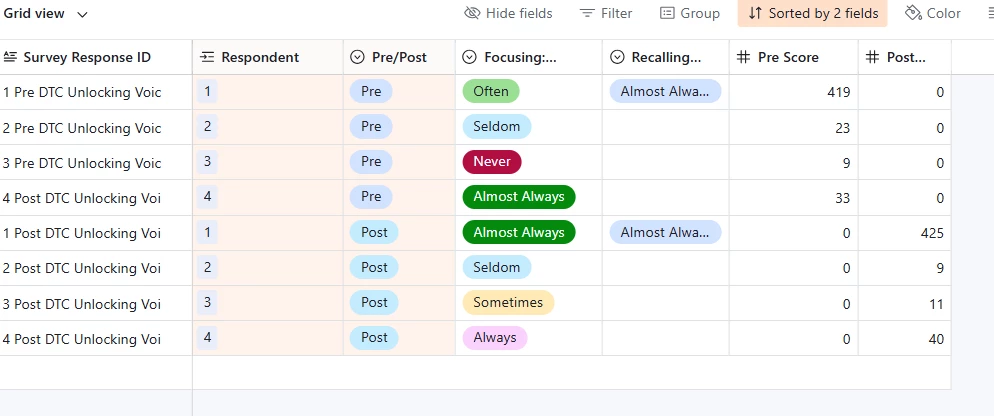
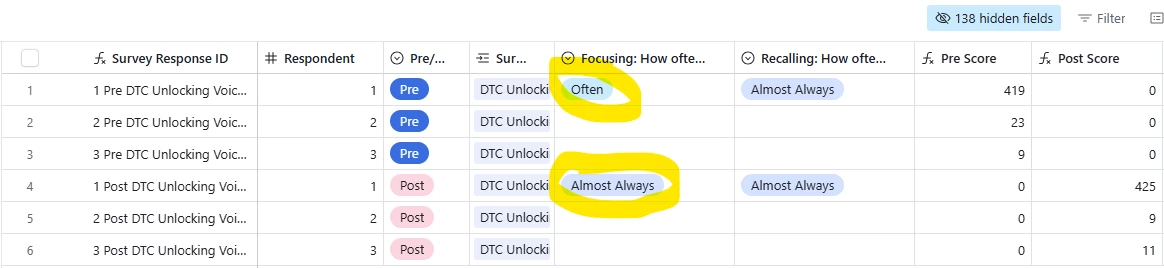
Is there a way for airtable to check if the single select option in my first row is different from the single select in the fourth row?

The top three rows are respondent data from Pre-Surveys and the bottom three are respondent data from Post-Surveys.

I want to calculate the percentage of participants who have been positively impacted by a programme.

4 replies

bredah
Forum|alt.badge.img+9
  • Inspiring
  • March 16, 2026

this might be more of a data structure question than a formula one. in airtable, formulas can only evaluate fields within the same record, so there isn’t really a native way to say “compare row 1 to row 4” like you might in a spreadsheet.

typically when people want to compare pre vs post survey responses, the data is structured so both responses are connected to the same participant record. that way, the pre and post values can either live in the same record, or be linked and rolled up into the same record. once both values are accessible in one place, a formula can easily compare them and calculate the change or impact.

for example, a common structure might look something like:

  • Respondents table → one record per respondent (whether they’re anonymous or named responses)
  • Survey Submissions table → one record per survey submission

each submission would link to the respondent and include a field indicating whether it’s a Pre or Post survey (single select, formula, automation, etc.). then you could roll up the relevant scores to the Respondents table and compare the participant’s pre vs post results there.

based on your screenshot, it looks like the pre and post responses might currently live in separate rows, which makes that type of comparison difficult in airtable without restructuring slightly.

if you’re able to share a quick screenshot or a bit more detail about how the other tables or survey data are structured, i’d be happy to help think through a more specific approach!


anmolgupta
Forum|alt.badge.img+3
  • Participating Frequently
  • March 16, 2026

This is where Airtable is not like a spreadsheet. Airtable is not a spreadsheet at all btw but some people often call it “excel on steroids” but its actually a visual relational database management system (RDBMS)

In a database, unlike spreadsheet, you can link rows like how’d you do in a spreadsheet. However, you can achieve what you want to achieve using “Linked Record” field.

-Create a column linking to the same table.

-Link your first record to 4th record. 

-Look up for the single select field

-Create another column with ‘formula’ type and write your comparison logic there


DisraeliGears01
Forum|alt.badge.img+21

Definitely want to echo the prior responses here, Airtable may look like a spreadsheet bit it’s actually database software. As a simplified shorthand, I like to say Airtable looks at data horizontally instead of vertically. I think ​@anmolgupta’s suggestion of an internally linked table is probably the simplest solution (though multiple tables might make sense in the longer term.)

For long term functionality, you’re definitely going to want to restructure, but if you just need a quick kludge for the moment, it might be useful to create a view where you group the records by Respondent number, and change the survey single select colors to be higher contrast. Then it would be fairly quick to scan down the view and add up how many respondents have differing responses (you could also filter out where Focusing=Empty to get rid of blank ones). 


Alexey_Gusev
Forum|alt.badge.img+25

Hi,
In Airtable, such ‘vertical’ counts and different types of totals, usually performed via linked ‘Summary’ table. Sometimes it’s a table containing just one record, linked to all records of initial table.
In this case, one of possible ways is to change Respondents column to a linked field, then when you choose where to link, select ‘new table’. Btw, you can stay with the single table, making your table ‘self-linked’, but I would suggest to avoid it unless you are really need it.
In database, each table represents a group of some entities. Similar type of entities should be in the same table. So you will have a table of Responces and a table of Respondents.
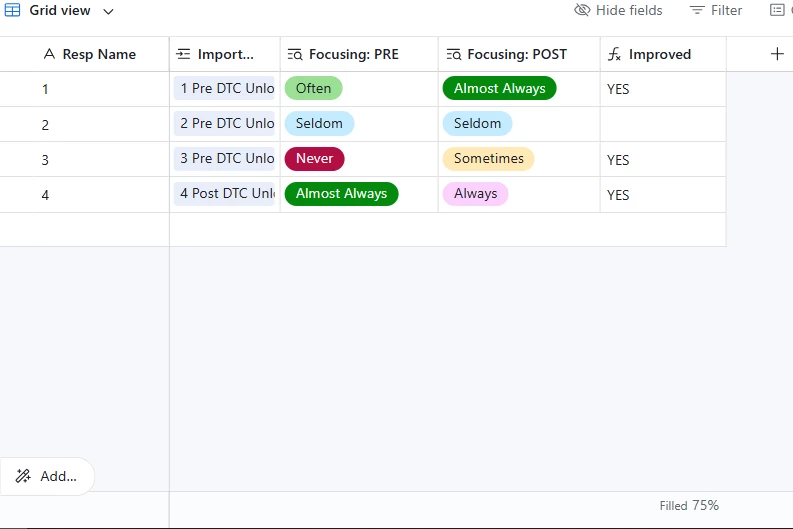
So, you will see the linked Respondents table, with 4 records (i added one for this example), each for one of respondents. Then you can add two columns - lookups with built-in filter, one for ‘Pre’, other for ‘Post’. The you can do all your operations with formula.
For example, how it may looks like: