Hide "Create a View" and "Use a suggested view"

  • September 30, 2020
  • 4 replies
  • 26 views

Forum|alt.badge.img+2

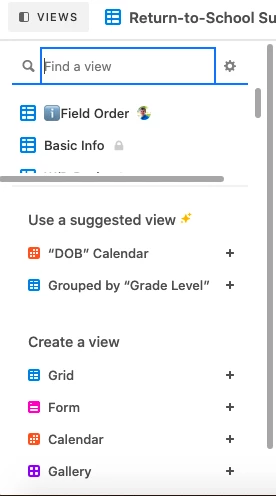
These two features are great but take up a lot of valuable space in the views sidebar. When you have more than a few views, the less you need to scroll, the better. Perhaps a small Plus (+) icon button at the bottom to open up the create a view option/menu and a small Sparkle icon button at the bottom to open suggested views…better yet, those suggested views appear on the create a view menu.

4 replies

Karl_L
Forum|alt.badge.img+12
  • Known Participant
  • October 1, 2020

I hate the “suggested” part.


Forum|alt.badge.img+20
  • Inspiring
  • October 1, 2020

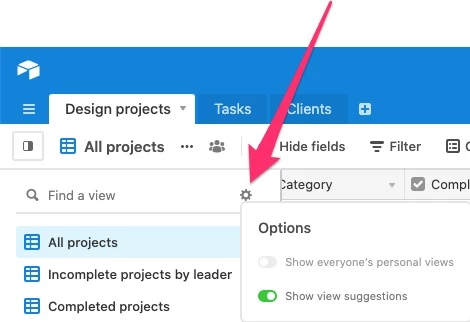
Hi there! You can actually hide these by clicking the gear icon next to the view search, and toggling off the view suggestions. Hope that helps :slightly_smiling_face:


Forum|alt.badge.img+2
  • Author
  • Participating Frequently
  • October 1, 2020

Hi there! You can actually hide these by clicking the gear icon next to the view search, and toggling off the view suggestions. Hope that helps :slightly_smiling_face:


That’s helpful! Thanks! Now to just slim down those new view buttons! :slightly_smiling_face:


Adam_Minich
Forum|alt.badge.img+18
  • Employee
  • May 21, 2021

Adam from Airtable here.

The “Show view suggestions” section no longer exists in our UI. The image that @Jason included above is no longer relevant as the “Suggested views” section has been removed as a feature. If anyone is still seeing the previous version of the UI, then please let me know.