Solved

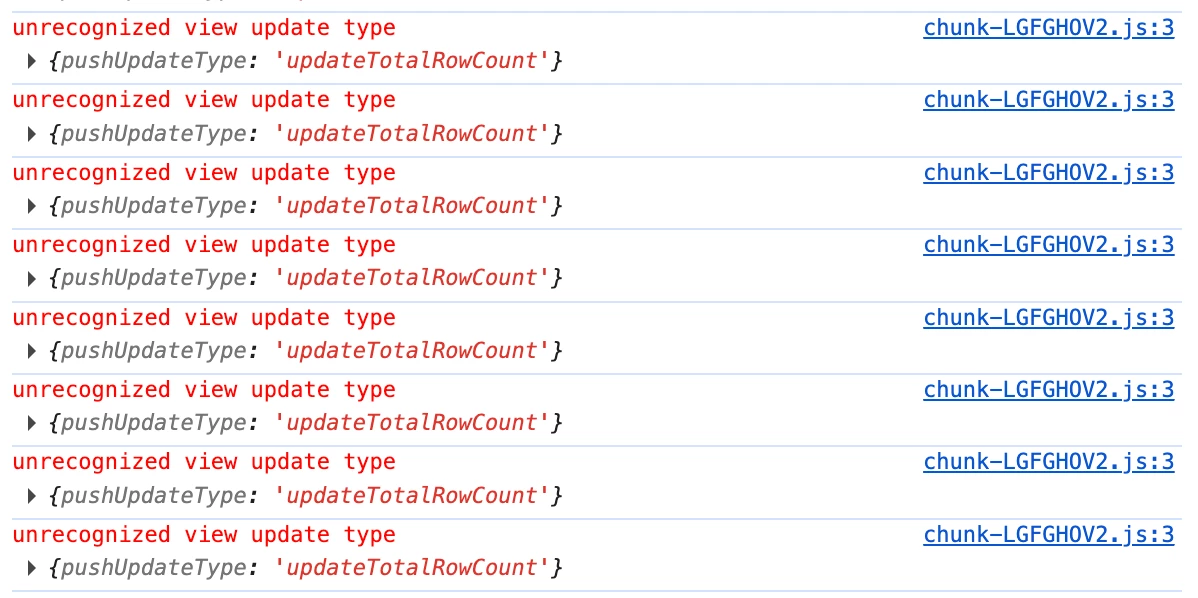
Airtable block "unrecognized view update type" error

  • February 18, 2026
  • 2 replies
  • 57 views

Forum|alt.badge.img+14

I’ve recently noticed an error appearing in the developer console when running a custom block. This appears to be happening both in development and when released to the base.

I am running the latest versions of both the block CLI (3.0.1) and the SDK (1.19.0). As far as I can tell, these messages are displayed when writing data back to the base, for example:

table.createRecordsAsync() || table.updateRecordsAsync()

Any insights into why this is happening, and how I can go about fixing the error? While writes to the base are seemingly unaffected, these messages are cluttering the console log, and if not relevant, should not be emitted to begin with.


Best answer by Muhammad Ali

Hi Matthew! 👋

You are definitely not alone here. This "unrecognized view update type" error is typically an internal SDK-to-API telemetry log rather than a failure in your custom code. It usually occurs when the Airtable backend sends a metadata update (like a change in a View configuration or a Field description) that the current version of the SDK doesn't have a specific "handler" for yet.

Since your createRecordsAsync and updateRecordsAsync calls are still functioning, this confirms the "write" path is safe, but the "listener" path in the SDK is getting confused by a new packet type.

Why this is happening right now:

Airtable has been rolling out several updates to View Metadata (linked to the new Interface features and Timeline/Gantt improvements). If your Extension is "watching" a table or view, it receives a broadcast every time a change happens. If that change is a "type" the SDK (v1.19.0) hasn't been programmed to name yet, it throws that console error.

Recommended Troubleshooting Steps:

  1. Isolate the Trigger: Does this happen only when your code writes to the base, or does it happen if you manually move a record in a different window while the Extension is open? If it happens during manual moves, it’s 100% a metadata broadcast issue and not your updateRecordsAsync logic.

  2. Check for "Watchers": Are you using useRecords, useSettings, or a watch on a specific view? If you are watching a view that has Complex Filters or Color Coding based on a specific field, try switching the watch to a "Basic Grid View" to see if the console noise stops.

  3. SDK vs. CLI Versioning: While you are on 1.19.0, check your package.json for any conflicting peer dependencies. Sometimes a sub-dependency (like airtable-sdk-private or similar) can get pinned to an older version during a npm install. Try a fresh rm -rf node_modules && npm install.

The "Silent" Fix (If it's just clutter):

If the writes are working and the base is stable, this is likely a bug that Airtable's engineering team will resolve in a silent SDK patch (1.19.1+). To keep your console clean for actual debugging in the meantime, you can temporarily filter your console:

  • In Chrome DevTools, in the Filter box, type: -unrecognized

  • This will hide those specific strings so you can see your actual app logs.

A quick question: Are you using any of the newer field types (like the AI field or the Button field) in the table your Extension is interacting with? Those are the most common culprits for "new" update types.


2 replies

Muhammad Ali
Forum|alt.badge.img+2
  • Inspiring
  • Answer
  • February 28, 2026

Hi Matthew! 👋

You are definitely not alone here. This "unrecognized view update type" error is typically an internal SDK-to-API telemetry log rather than a failure in your custom code. It usually occurs when the Airtable backend sends a metadata update (like a change in a View configuration or a Field description) that the current version of the SDK doesn't have a specific "handler" for yet.

Since your createRecordsAsync and updateRecordsAsync calls are still functioning, this confirms the "write" path is safe, but the "listener" path in the SDK is getting confused by a new packet type.

Why this is happening right now:

Airtable has been rolling out several updates to View Metadata (linked to the new Interface features and Timeline/Gantt improvements). If your Extension is "watching" a table or view, it receives a broadcast every time a change happens. If that change is a "type" the SDK (v1.19.0) hasn't been programmed to name yet, it throws that console error.

Recommended Troubleshooting Steps:

  1. Isolate the Trigger: Does this happen only when your code writes to the base, or does it happen if you manually move a record in a different window while the Extension is open? If it happens during manual moves, it’s 100% a metadata broadcast issue and not your updateRecordsAsync logic.

  2. Check for "Watchers": Are you using useRecords, useSettings, or a watch on a specific view? If you are watching a view that has Complex Filters or Color Coding based on a specific field, try switching the watch to a "Basic Grid View" to see if the console noise stops.

  3. SDK vs. CLI Versioning: While you are on 1.19.0, check your package.json for any conflicting peer dependencies. Sometimes a sub-dependency (like airtable-sdk-private or similar) can get pinned to an older version during a npm install. Try a fresh rm -rf node_modules && npm install.

The "Silent" Fix (If it's just clutter):

If the writes are working and the base is stable, this is likely a bug that Airtable's engineering team will resolve in a silent SDK patch (1.19.1+). To keep your console clean for actual debugging in the meantime, you can temporarily filter your console:

  • In Chrome DevTools, in the Filter box, type: -unrecognized

  • This will hide those specific strings so you can see your actual app logs.

A quick question: Are you using any of the newer field types (like the AI field or the Button field) in the table your Extension is interacting with? Those are the most common culprits for "new" update types.


Forum|alt.badge.img+14

Thank you Ali! I can confirm this message is being broadcast for any “updateTotalRowCount” action, even within the Airtable UI itself. So given it doesn’t seem to be directly related to the SDK itself, having the filter of `-unrecognized` that you described will be helpful!

Question for you: I’m curious what AI prompt(s) you used to help get this answer! When I tried myself I got nothing helpful (it suggested I update to the latest version of the SDK which I was already on, and didn’t suggest isolating the trigger to check when the message is emitted, which I think was the ultimate “solution” here).
