Question

Base View all place my base is syncing too

  • March 27, 2026
  • 4 replies
  • 48 views

Forum|alt.badge.img

Hello - I saw a post about viewing all place my base is syncing too  - but there was no answer and the thread is closed now.

Situation: We have multiple bases that are connected via synced columns. Data moves through the operations workflow. We would like to be able to visualize the system and any dependencies. 

I’m trying to generate or create something similar to the Base Schema extension but across multiple bases. Anyone know a way to do this? 

Thanks

4 replies

TheTimeSavingCo
Forum|alt.badge.img+32

I think you’re going to have to track it manually I’m afraid

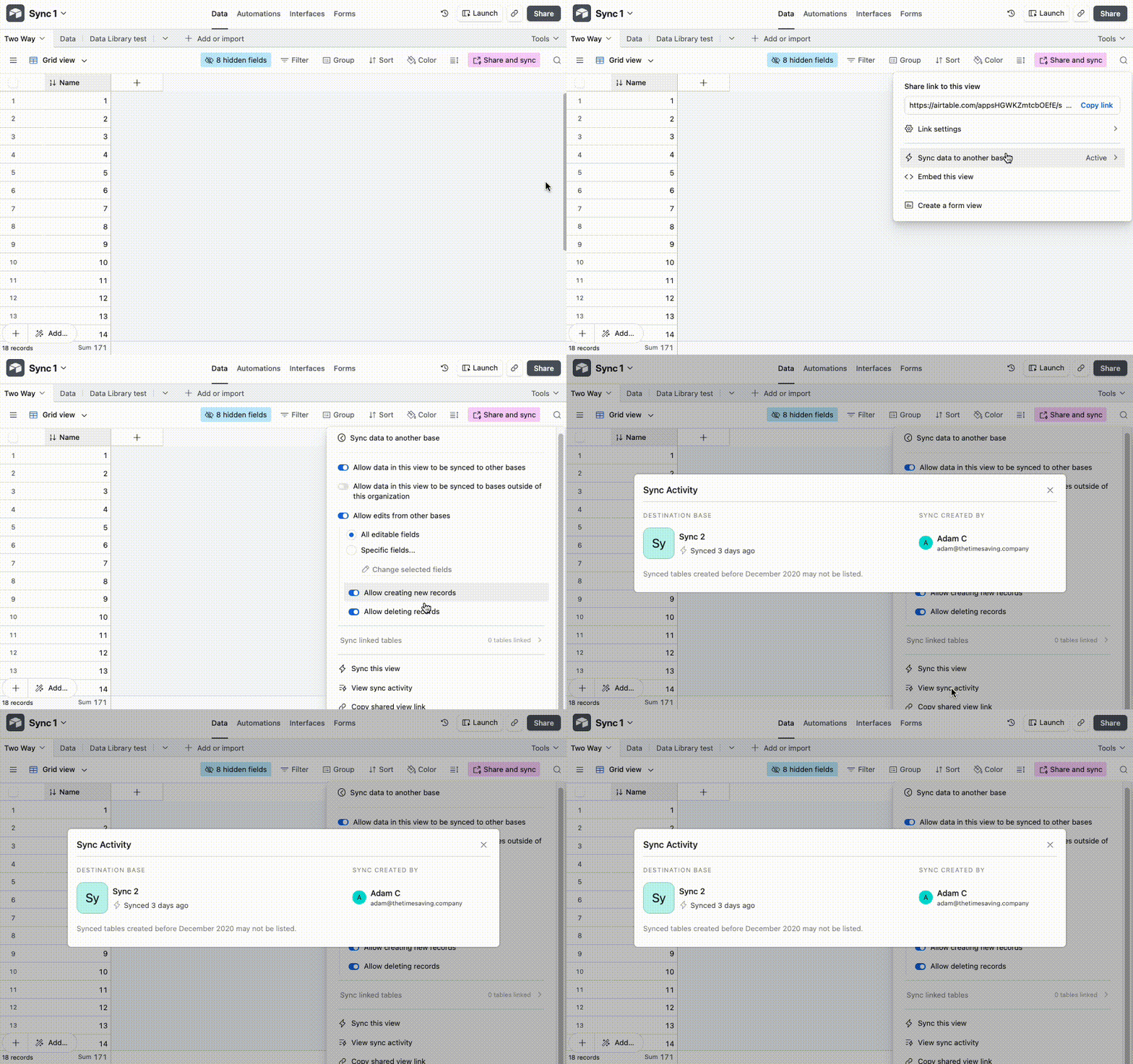
You probably already know this, but we can see where each view is being synced to by going to ‘Share and sync’, ‘Sync data to another base’ and then ‘View sync activity’ if that helps!


Philip_Ade
Forum|alt.badge.img+3
  • Participating Frequently
  • March 29, 2026

Airtable doesn’t support cross-base schema visualization the Base Schema extension only works per base.

What you can do instead

1. Create a dependency registry (best option)
Track:

  • source base/table
  • destination base/table
  • sync type + direction

This gives you a clear system map you can visualize externally (Miro, Whimsical, etc.).

2. Use Metadata API (semi-automated)
You can pull schema + synced tables and map relationships programmatically.
Limitation: won’t capture full logic (automations, integrations).

3. Use naming conventions
Consistent prefixes like:

  • SRC →
  • SYNC →
  • DEST →

…make dependencies much easier to trace.

Bottom line

No native solution yet best approach is a central dependency map + light automation.


coderkid
Forum|alt.badge.img+6
  • Inspiring
  • March 30, 2026

Here is a code I wrote to extract table information from multiple databases and save it in Mermaid notation for rendering as a diagram. It needs more work, but I think it's a good starting point for you. Let me know if you need more clarification.
 

import fs from "fs/promises";

const API_KEY = "XXXXXX";

const BASE_IDS = [
"base1",
"base2",
"base3"
];

async function fetchSchema(baseId) {
const res = await fetch(`https://api.airtable.com/v0/meta/bases/${baseId}/tables`, {
headers: {
Authorization: `Bearer ${API_KEY}`
}
});
if (!res.ok) {
throw new Error(`Failed for ${baseId}`);
}
return res.json();
}

function generateMermaid(baseId, data) {
let output = `%% Base: ${baseId}\n`;
output += `erDiagram\n`;
const tableMap = Object.fromEntries(
data.tables.map(table => [table.id, table.name])
);
const relationships = [];
for (const table of data.tables) {
output += ` ${table.name} {\n`;
for (const field of table.fields) {
output += ` ${field} ${field.name}\n`;
if (field.type === "multipleRecordLinks") {
const linkedTableName = tableMap[field.options?.linkedTableId];
if (linkedTableName) {
relationships.push([
table.name,
linkedTableName,
field.name
]);
}
}
}
output += ` }\n\n`;
}
for (const [from, to, field] of relationships) {
output += ` ${from} }o--o{ ${to} : "${field}"\n`;
}
return(output);
}

async function run() {
let output = "";
for (const baseId of BASE_IDS) {
try {
const data = await fetchSchema(baseId);
output += generateMermaid(baseId, data);
output += "\n\n"; // spacing between bases
} catch (err) {
console.error(`Error with ${baseId}:`, err.message);
}
}
await fs.writeFile("all-bases-schema.mmd", output);
}

run();


Forum|alt.badge.img
  • Author
  • New Participant
  • March 31, 2026

Airtable doesn’t support cross-base schema visualization the Base Schema extension only works per base.

What you can do instead

1. Create a dependency registry (best option)
Track:

  • source base/table
  • destination base/table
  • sync type + direction

This gives you a clear system map you can visualize externally (Miro, Whimsical, etc.).

@Philip_Ade thanks so much for your advice - could you please explain just one or two sentences further about what sync type + direction means ? I’m creating a simple registry and am not sure what options I’d put for this one or whether it’s a notes column. Thanks!