Question

filterByFormula SEARCH with escaped double quotes silently fails on linked record fields

  • April 2, 2026
  • 5 replies
  • 38 views

Forum|alt.badge.img

I've found that SEARCH() in filterByFormula handles escaped double quotes differently depending on the field type. Backslash-escaped quotes work correctly on text fields but silently return no results on linked record fields.

Setup:

- Table "Registrations" has a linked record field {Rider} pointing to table "Riders"
- One of the records in the Riders table has the primary field value: Aubrey "Aub" Holland
- A Registrations record links to that Rider
- Table "Registrations" also has a plain text field {Direct name} where one of the values is Joe "Biggie" Smalls

When searching the Registration table I get different results with a very similar search depending on which field I search:
 

What Works (text field):
  SEARCH("Joe \"Biggie\" Smalls", {Direct name}) != ""
Returns the matching record correctly.


What Fails (linked record field):
  SEARCH("Aubrey \"Aub\" Holland", {Rider}) != ""
Returns zero results — no error, just an empty response. The formula is accepted as valid but doesn't match. This does work fine if I search for a rider by name where that name does not include quotes.


Environment: Using the POST /v0/{baseId}/{tableId}/listRecords endpoint with filterByFormula in the JSON body.


A not-great workaround I’ve found: Split the search value on the double-quote characters and AND together separate SEARCH conditions for each fragment:
  AND(SEARCH("Aubrey ", {Rider}) != "", SEARCH("Aub", {Rider}) != "", SEARCH(" Holland", {Rider}) != "")
  This matches correctly.


Is there a supported way to include double quotes in a SEARCH on a linked record field?

5 replies

ScottWorld
Forum|alt.badge.img+35
  • Genius
  • April 2, 2026

That’s interesting that you’re able to get any results at all with those linked record searches, because I didn’t know that you could search linked record fields by using strings of text that are human-readable!

I am probably not up-to-date on this, because I rarely use the filterbyformula API call. (I only use Make’s search module to search my records.)

I was originally thinking that you would need to search linked record fields by using the internal Airtable Record ID of the linked record that you’re searching for.

However, the workaround to do what you want to do would likely still be the same.

You can create a formula field or a lookup field or a rollup field that references your linked record field, and those should be searchable with human-readable text — and hopefully with your escaping of the quotation  

You can also search the linked table itself by using human-readable text there, but that might be a less convenient option.

Hope this helps!

- ScottWorld, Expert Airtable Consultant


Forum|alt.badge.img
  • Author
  • New Participant
  • April 2, 2026

@ScottWorld Thanks! Just to clarify — SEARCH on linked record fields does seem to work with human-readable text in general. For example SEARCH("Bob Smith", {Rider}) != "" works correctly when Bob Smith is the primary field of a linked record. The issue I'm reporting is specifically that escaped double quotes don't match on linked record fields, while they do match on text fields. So SEARCH("Joe \"Biggie\" Smalls", {Text Field}) works but SEARCH("Aubrey \"Aub\" Holland", {Linked Record Field}) doesn't, even though the linked record's display value contains that exact text.


ScottWorld
Forum|alt.badge.img+35
  • Genius
  • April 2, 2026

That’s great information to know!

I would try it with a formula field, which should work.

Your formula field would just be: {linked record field} & “” (make sure to use straight quotes), which would turn the linked record field into a normal string of text.  

And you may want to report the linked record issue to support@airtable.com so they can be aware of it!

- ScottWorld, Expert Airtable Consultant 


coderkid
Forum|alt.badge.img+4
  • Participating Frequently
  • April 3, 2026

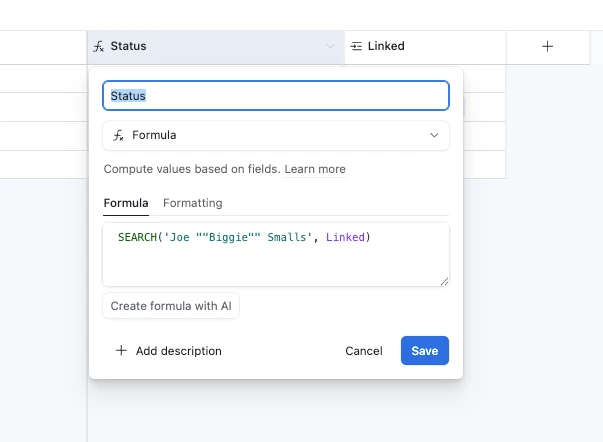
@aubreyholland  Try this… It will work… 


TheTimeSavingCo
Forum|alt.badge.img+31

With reference to ​@coderkid ‘s fix, you can update your API call to add in the escaping double quote automatically and so it’d end up looking something like this:

?filterByFormula=SEARCH(SUBSTITUTE('Aubrey \"Aub\" Holland', '\"', '\"\"'),{Rider})