
Question

Is it possible to duplicate an existing column and have it display data from a prior date?

  • March 25, 2026
  • 3 replies
  • 18 views

James_McElroy
Forum|alt.badge.img+6

A common use case I encounter in Airtable is comparing the state of my data today to a prior state.

Here’s an example:

  • I have a table of people and the business units (BUs) they bill their time to
  • Due to reorgs, this info changes frequently
  • I’m trying to get a quick view that lets me compare currently billing to prior state

For example:
 

Person BU as of today BU as of date xx/xx/xx
1 BU 1 BU 2
2 BU 1 BU 1
3 BU 3 BU 4
4 BU 4 BU 1


Perhaps this is an example of a poorly designed database (we didn’t anticipate so many org changes), and I know I can retrieve a snapshot and do a manual compare.

IT would amazing if I could take the field “BU as of today”, duplicate it, and set it to show the data that was in that field on a prior date. (Basically a mini-snapshot).

3 replies

TheTimeSavingCo
Forum|alt.badge.img+31

Hm, I don’t think that’s possible I’m afraid, and your workaround of doing the snapshot and manual compare makes sense to me

---

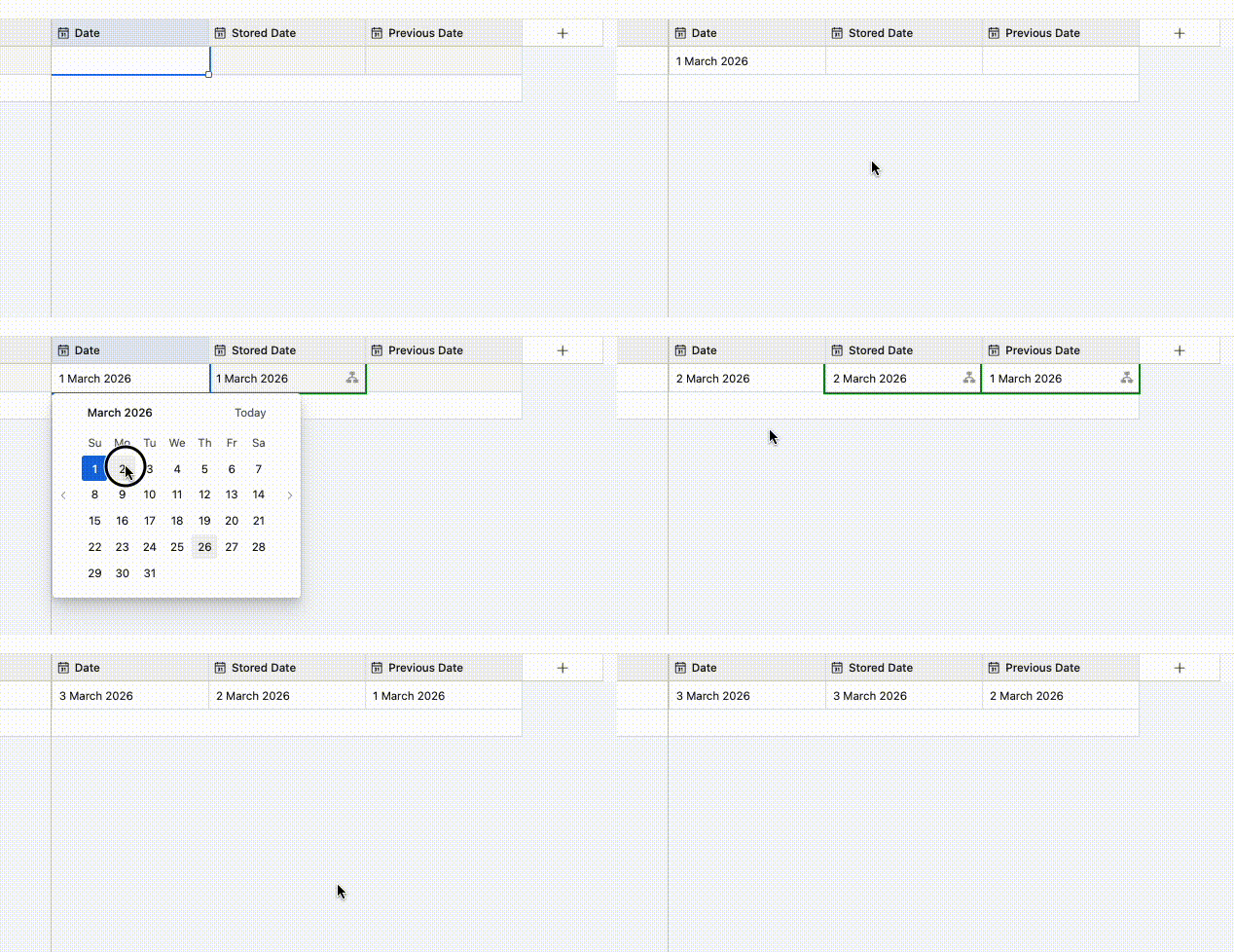
You’ve probably already thought of this, but for future data, perhaps we could have two new fields:

  1. Stored Date
    1. This just a helper field for the automation
  2. Previous Date

And an automation that triggers whenever the date field gets updated and its action would be to:

  1. Update the ‘Stored Date’ field with the new update
  2. Update the ‘Previous Date’ field with the ‘Stored Date’ value

This would let us compare the ‘Date’ field against the ‘Previous Date’ field for future stuff and I’ve set it up here for you to check out


coderkid
Forum|alt.badge.img+1
  • Participating Frequently
  • March 26, 2026

Airtable does not remember past values inside a field in a way you can reuse in formulas or views.

But, you can do it with a “History” table and 2 automations...

https://www.awesomescreenshot.com/video/50817099?key=d7155d05647ee3c63a45aa0d8a499dd3


anmolgupta
Forum|alt.badge.img+3
  • Participating Frequently
  • March 26, 2026

A cleaner long-term approach: maintain a BU History table

Rather than trying to snapshot a field, I'd suggest restructuring slightly to make historical queries a natural part of your data model.

Table structure

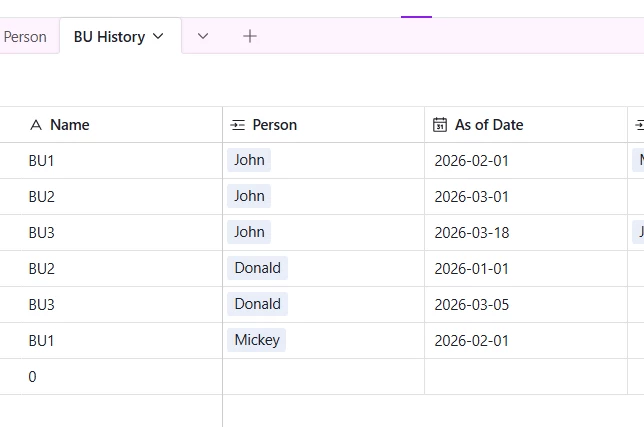
BU History table with three fields:

  • BU (text or single select)
  • Person (linked record to your People table)
  • As of Date (date field)

Person table gets two additional fields:

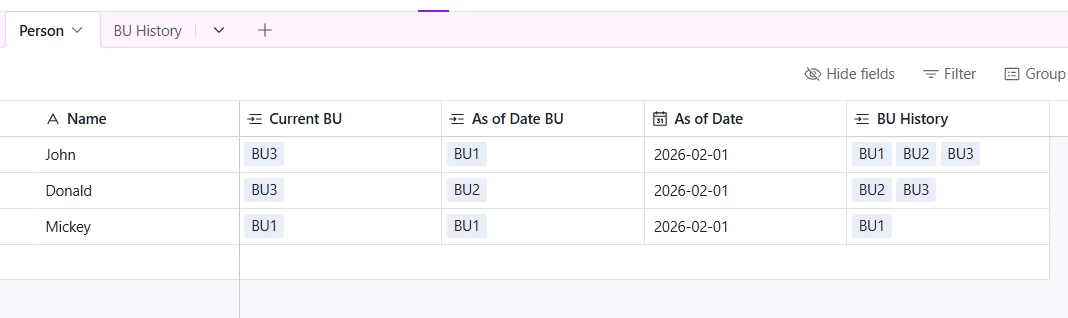
  • Current BU (linked record to BU History — populated by the first automation)
  • As of Date BU (linked record to BU History — populated by the second automation)
  • Compare Date (date field — the date you want to compare against)

How it works

Automation 1 — Keep Current BU up to date

Trigger: when a new record is created in BU History

Action: find the linked Person record and overwrite Current BU with the BU from the record just added.

Important condition: this only works correctly if BU History records are added in chronological order. If a record is ever added retrospectively (i.e. with an As of Date earlier than an existing entry for the same person), this automation will incorrectly overwrite Current BU with an older value. Additional date comparison logic would be needed to handle that case.

Automation 2 — Point in time BU lookup

Trigger: when Compare Date is set or updated on a Person record

Action: search BU History for all records linked to that Person → find the record whose As of Date is the closest date that is less than or equal to Compare Date (using Run script step) → write that record's BU value into As of Date BU.

This gives you the side by side view you're after: Current BU and As of Date BU on the same Person record, directly comparable.

Why this scales better

You end up with a full audit trail of every BU change per person, queryable at any point in time and not just today vs. one prior snapshot. As your org changes keep happening, you just keep adding to BU History and the model holds up without any restructuring.


Tables will look something like following: