How to sort Date and Time in Text?

  • March 28, 2022
  • 3 replies
  • 24 views

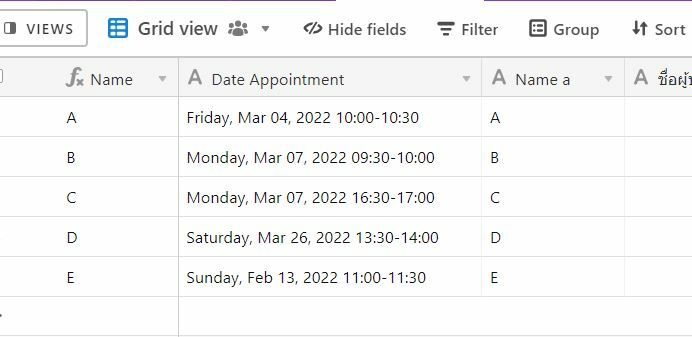
I synced my data with Jotform and the Date appointment is come in Text so I can’t find the way to sort it by Date. not sure there are anyway to help me with this.
Thank you.

3 replies

Ben_Young1
Forum|alt.badge.img+22
  • Brainy
  • March 28, 2022

Hey @Pornwalai_Ransom!
Welcome in!

So, the simplest way to do this would be to leverage a formula field.
Now, we can get the date pretty easily by using this formula format:

DATETIME_FORMAT(
    DATETIME_PARSE(
        {Date Appointment},
        'dddd, MMM DD, YYYY'
    ),
    'dddd, MMM DD, YYYY'
)

(There might be redundancy in my formula, but it works nonetheless.)


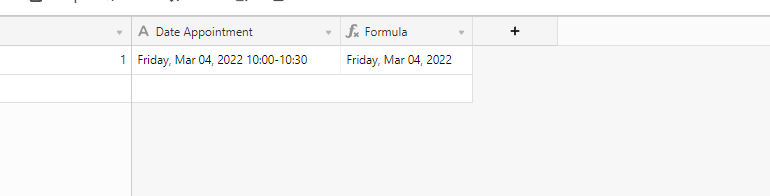
Using that formula will return something like this:

Now, if you’d like to get the times out of there as well, then you’re going to have to create a new solution that utilizes two fields.
One field for a starting time and date, and another for the appointment’s end time and date.

If you’d like to extract those times with a formula, let me know and I can take a look again at this use case.

Please note that if you intend to copy and paste the formula I provided above, you’ll want to make sure that your field names match or are corrected. It will return a formula error if you overlook this.


ScottWorld
Forum|alt.badge.img+35
  • Genius
  • March 28, 2022

@Pornwalai_Ransom You may also just want to address this on the JotForm side by using an actual date/time field in JotForm.


kuovonne
Forum|alt.badge.img+29
  • Brainy
  • April 7, 2022

Hey @Pornwalai_Ransom!
Welcome in!

So, the simplest way to do this would be to leverage a formula field.
Now, we can get the date pretty easily by using this formula format:

DATETIME_FORMAT(
    DATETIME_PARSE(
        {Date Appointment},
        'dddd, MMM DD, YYYY'
    ),
    'dddd, MMM DD, YYYY'
)

(There might be redundancy in my formula, but it works nonetheless.)


Using that formula will return something like this:

Now, if you’d like to get the times out of there as well, then you’re going to have to create a new solution that utilizes two fields.
One field for a starting time and date, and another for the appointment’s end time and date.

If you’d like to extract those times with a formula, let me know and I can take a look again at this use case.

Please note that if you intend to copy and paste the formula I provided above, you’ll want to make sure that your field names match or are corrected. It will return a formula error if you overlook this.


To turn the text into a date object, just use the DATETIME_PARSE() function. Don’t use DATETIME_FORMAT() as well. That turns the date object back into a text string. You need a date object for proper sorting.