Airtable Formula

  • March 13, 2022
  • 5 replies
  • 41 views

Forum|alt.badge.img+20

Hi Airtable!

I am trying to figure out how to create a formula for a string.

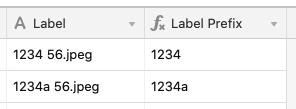
I would like to remove everything after the first set of numbers, with no spaces:
1234 56.jpeg
1234a 56.jpeg

to:
1234
1234a

Can someone help me?

Formulas are not my strong suit.

Mary

5 replies

Ben_Young1
Forum|alt.badge.img+22
  • Brainy
  • March 13, 2022

Hey @M_k!

Try this formula format:


REGEX_EXTRACT(
    SUBSTITUTE(
        {Label},
        " ",
        ""
    ),
    "[A-Za-z0-9]*"
)

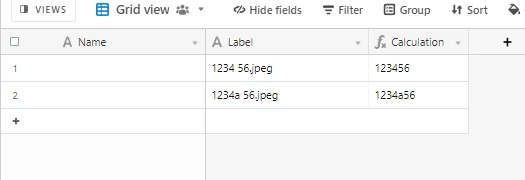
It will produce something like this:

Let me know if you have any issues, questions, or just want a wider explanation!


Justin_Barrett
Forum|alt.badge.img+21

@Ben.Young The requirement was to remove all characters after the space. Yours removes the space and the extension, but keeps the characters after the space.

@M_k This will do what you want:

IF(Label, REGEX_EXTRACT(Label, "[^ ]*"))


Forum|alt.badge.img+20
  • Author
  • Inspiring
  • March 13, 2022

@Ben.Young The requirement was to remove all characters after the space. Yours removes the space and the extension, but keeps the characters after the space.

@M_k This will do what you want:

IF(Label, REGEX_EXTRACT(Label, "[^ ]*"))


Thank you so much, @Justin_Barrett and @Ben.Young!!

It’s the formula output from Justin’s, that will work for my use case. TY

Mary


ScottWorld
Forum|alt.badge.img+35
  • Genius
  • March 13, 2022

@M_k You can also do this without using REGEX at all:

LEFT(text,FIND(" ",text)-1)


Ben_Young1
Forum|alt.badge.img+22
  • Brainy
  • March 13, 2022

@Ben.Young The requirement was to remove all characters after the space. Yours removes the space and the extension, but keeps the characters after the space.

@M_k This will do what you want:

IF(Label, REGEX_EXTRACT(Label, "[^ ]*"))


Oops - I guess killing time on the forums late at night might not be the best idea for me lmao.