Cross-Referencing Tables

  • March 10, 2021
  • 4 replies
  • 201 views

Hi guys,

I’m trying to cross-reference two tables within one base and add some automation. It seems like this should be relatively straightforward but can’t figure out a way to do, maybe overthinking it!

Anyway, one table (“Completed Reviews”) is dynamically generated when a person submits a Review form. When the form is submitted, an automation creates a new record in this table, and a Reference ID is generated (i.e., Ref Id) based on a formula that parses and sequences certain text.

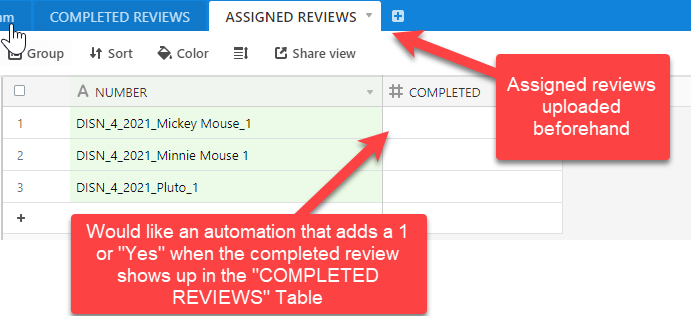
In another table (“Assigned Reviews”) I’ve uploaded (from a csv) a single field that matches the Ref ID structure listed in the “Completed Reviews” table and have added a blank column (called “Completed”). What I’m trying to do is add a “1” or a “Yes” or some other signifier to the “Completed” column when a Ref ID is created in “Completed Reviews” that matches the one listed in “Assigned Reviews” Ref Id field.
Any help would be greatly appreciated!

Thank you!

This topic has been closed for replies.

4 replies

Grunty
Forum|alt.badge.img+15
  • Inspiring
  • March 10, 2021

The method I propose is not so straightforward, but it’s the one I could devise (not tested):

  1. Make ‘Ref ID’ the key field of ‘Completed Reviews’ (as it should be)
  2. Create a linked field in ‘Assigned Reviews’ to ‘Completed Reviews’
  3. Make field ‘Completed’ a formula: IF (Number = linked-field, “Yes”, “”)

This way no special automation is needed - database’s own automation does the job.

Side note: Advise Minnie that her assigned review is being inaccurately informed: an underscore is missing. I suspect her review will never be marked completed.


Databaser
Forum|alt.badge.img+25
  • Brainy
  • March 10, 2021

Maybe a simple automation can do the trick?

“when record created” trigger > “find records” action > “update record” action


  • Author
  • New Participant
  • March 11, 2021

I tried both proposed solutions but not having luck.

Re: Grunty’s formula approach, when I link the field in “Assigned Reviews” it wipes out all the uploaded data except for what is already a match to “Completed Reviews”…therefore, I don’t think this works on an ongoing basis?

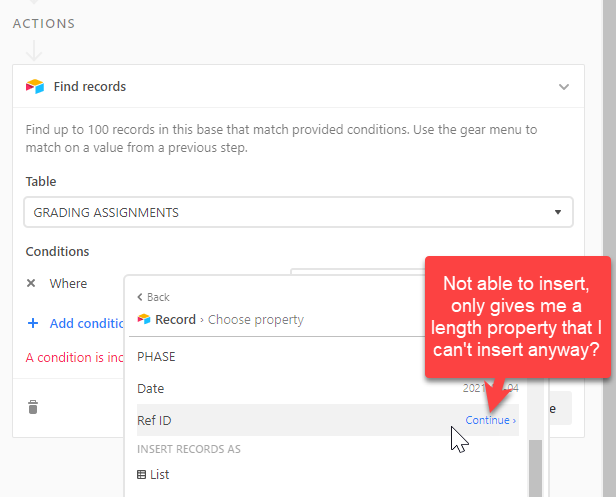
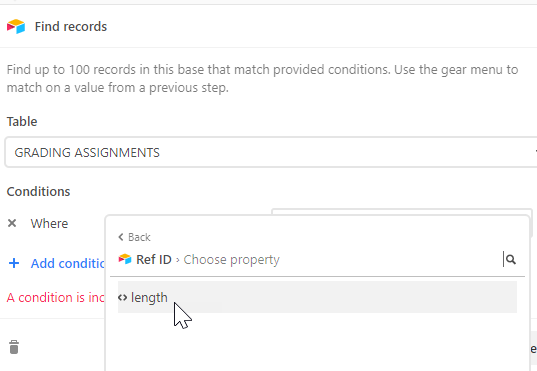
Re: Databaser, for some reason, when I tried to insert the “Find Record” for the Ref ID field, I’m not able to do this properly. Am wondering if this is because it is a formula?

At any rate, I ended up just making it work via a Zapier integration with Google Sheets. Appreciate the help, though!


Databaser
Forum|alt.badge.img+25
  • Brainy
  • March 11, 2021

I tried both proposed solutions but not having luck.

Re: Grunty’s formula approach, when I link the field in “Assigned Reviews” it wipes out all the uploaded data except for what is already a match to “Completed Reviews”…therefore, I don’t think this works on an ongoing basis?

Re: Databaser, for some reason, when I tried to insert the “Find Record” for the Ref ID field, I’m not able to do this properly. Am wondering if this is because it is a formula?

At any rate, I ended up just making it work via a Zapier integration with Google Sheets. Appreciate the help, though!


Yep, that will be the problem…