Need Content Title to Update Based on a Single Select Status

  • September 14, 2022
  • 5 replies
  • 37 views

Hi! I’m trying to build an automation for a social media tracking table wherein when a user selects a status from a dropdown (ie Facebook, Twitter, Instagram, etc.) that Content Title will automatically have a suffix added (ie /FB, /TW, /IG, etc.). Any suggestions on how to build that? Thanks for the help!

5 replies

Mohamed_Swella1
Forum|alt.badge.img+17

Hi @Eric_Grundhauser ,

Welcome to Airtable Community !

What do you mean by Content Title?


TheTimeSavingCo
Forum|alt.badge.img+31

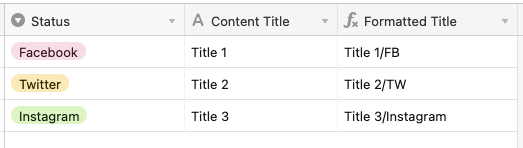
Hey @Eric_Grundhauser, not really sure if this is what you’re looking for, but I figure I’d take a stab at it. Just used a formula field to add the suffix to the content title

{Content Title}
&
SWITCH(
  Status,
  "Facebook", "/FB",
  "Twitter", "/TW",
  "Instagram", "/Instagram"
)

  • Author
  • New Participant
  • September 14, 2022

Hi @Eric_Grundhauser ,

Welcome to Airtable Community !

What do you mean by Content Title?


Oops, I meant the table’s primary field.


  • Author
  • New Participant
  • September 14, 2022

Hey @Eric_Grundhauser, not really sure if this is what you’re looking for, but I figure I’d take a stab at it. Just used a formula field to add the suffix to the content title

{Content Title}
&
SWITCH(
  Status,
  "Facebook", "/FB",
  "Twitter", "/TW",
  "Instagram", "/Instagram"
)

Oh this is in the right direction I think. Although I’m trying to have it update the primary field, which will already have text entered. Thanks for helping me work through this!


Mohamed_Swella1
Forum|alt.badge.img+17

Oh this is in the right direction I think. Although I’m trying to have it update the primary field, which will already have text entered. Thanks for helping me work through this!


Well you can do that with an automation then since there is already data there in the primary field.

You would need a formula field to help you though SWITCH( Status, "Facebook", "/FB", "Twitter", "/TW", "Instagram", "/Instagram" )

then use the output in this formula field to append the Primary field.