I created a database but not the way it is suppose to be, so now I created one with the same fields but it is relational now as i did not know how to build one. So, now I need to move all the data into the new one. Can someone tell me how, i saw something about syncing but I cant find a way to do it.
thanks
Rose
Best answer by TheTimeSavingCo
You’ll need to:
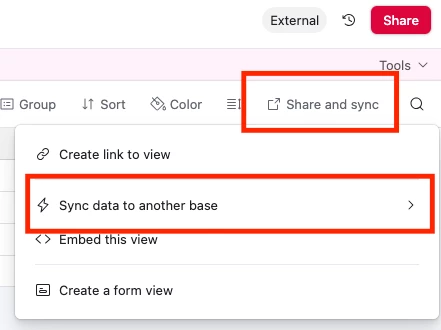
Create a shared view in your original base by clicking ‘Share and sync’, then ‘Sync data to another base’
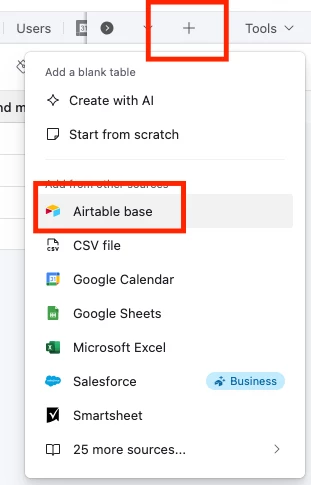
In your new base, create a new synced table by creating a new table and selecting Airtable base as the source
This’ll let you create a new table in your base with all the data, then you can copy paste it over
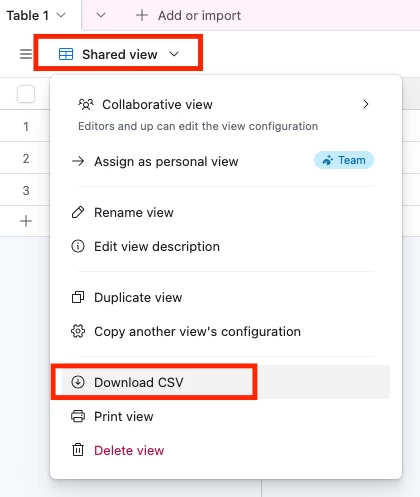
If you want to import it directly into your table, then you can try exporting the data as CSV by clicking on the view name and then ‘Download CSV’, then using the CSV Import extension in your main base to import it
If you want to import it directly into your table, then you can try exporting the data as CSV by clicking on the view name and then ‘Download CSV’, then using the CSV Import extension in your main base to import it
To move your data, you don't need to sync, you need to migrate it. The best way is to first export the data from your old database into a common file format like a CSV (Comma-Separated Values). Next, ensure the new relational database has the same field names and data types, then use its import function to load the CSV file, which will populate your new tables with all the old data.