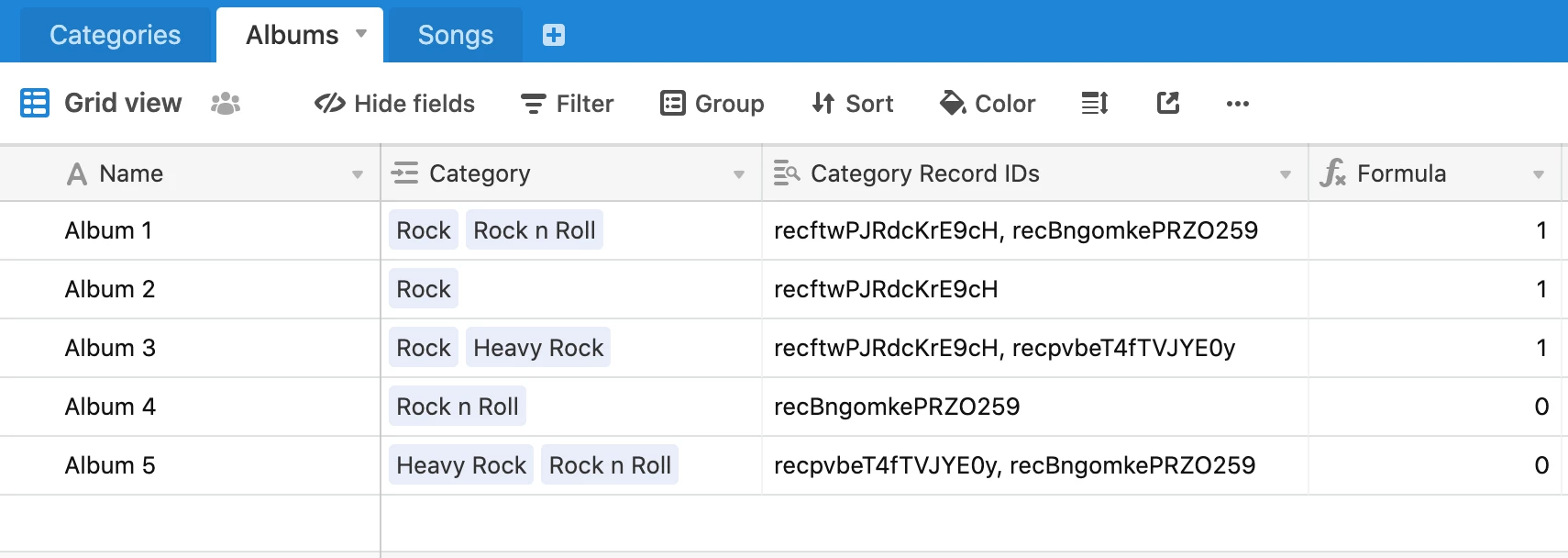
I’m trying to use the Airtable JS library to pull a list of records filtered by a Linked Record field, and although I can verify the data from a certain record by pulling by ID, I cannot filterByFormula for this particular record using a Linked Record field where multiple records are linked. I’ve also just went straight to postman to ensure it wasn’t the JS library but in fact the API itself.
I found an answer here on how to use filterByFormula with Linked Record fields, however the solution is not working although I’ve followed it to the T: https://community.airtable.com/t/filterbyformula-multiple-select/2075/8. It actually works with Linked Record fields that are 1:1 and not when 1:many.
Please see my description of the problem here:
filterByFormula option does not work when used for the following scenario (filtering on Linked Record field with multiple records):
- Tables: Albums, Songs, Categories
- Albums have a Linked Record field for Categories
- Songs have a Linked Record field for an Album and a Lookup field to show the Album Categories in the Songs table
When searching via the API for a Question with a category (everything is URL encoded properly), it pulls zero results when searching for category name or by category record_id
- Album query
{Categories} = 'category_record_id - Song query
{Album Categories} = 'category_record_id'
The same is true when using the != operator, as well as when these are used in AND/OR operations.
I also tried to use the Name of the Category instead of the record id, which didn’t pull any results.
My alternative for now is to use the FIND(“Category To Find”, {Album Categories}) > 0 when I want to include a Song from an album with that category, or FIND(“Category To Find”, {Album Categories}) = 0 when I want to exclude it. This works with AND/OR operations as well.
The issue with this though, is that it limits how we name Categories, because the names cannot collide with any starting substring. For example if I want to use the above logic for “Rock” but also have a category named “Rock n Roll” (contrived example).
Another alternative would be write my own filterByFormula function within my API since I can’t get any results using the filterByFormula here. Then I can just filter using the Airtable JS library and add my filter function on the records returned.
Posting this here to hopefully find out what I might be doing wrong, or at least help others if they run into the same issue.