StDev using only fields that are not empty

  • January 17, 2025
  • 3 replies
  • 67 views

Forum|alt.badge.img+3

I am new to airtable. I used this  Standard Deviation STDEV - Quick Reference - Airtable Community to calculated the standard deviation. However I have 5 fields in this table and sometimes only 3 or 4 values are entered. I would like to only consider the fields that have a value entered. for n I added a field called number of runs, which helped, but it still considers the fields that are empty and includes them as the value "0". How can we fix this? 

This topic has been closed for replies.

3 replies

Alexey_Gusev
Forum|alt.badge.img+25

Hi,

i simplified naming a bit
Instead of   POWER ( Value1 - Average , 2),
you should change each line to IF( Value1 ,  POWER ( Value1 - Average , 2)),
in the absence of value, difference will be a 0 and won't apply the whole result

- use COUNT( Value1, Value2, .... )   to get n and count average.
- you might also wrap the result formula in IF( NumOfRuns > 1 , ..._the_formula_..  ) to avoid risk of division by 0

You can use this formula to get your formula 😁 , just fix Field names 

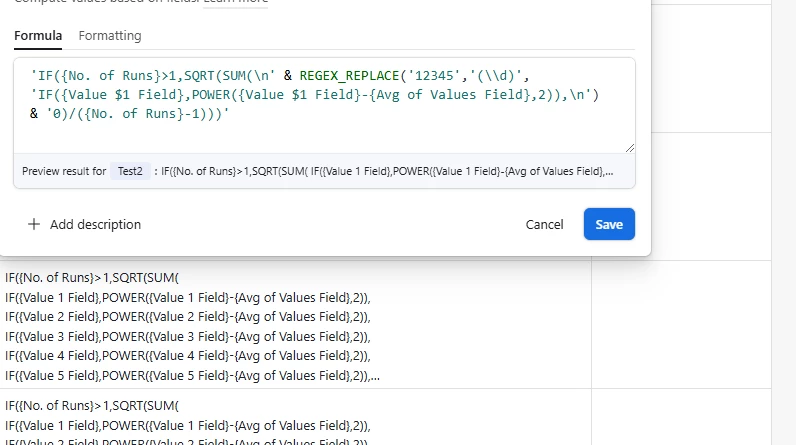
'IF(NumOfRuns>1,SQRT(SUM(\n' & REGEX_REPLACE('12345','(\\d)', 'IF(Value$1,POWER(Value$1-Average,2)),\n') & '0)/(NumOfRuns-1)))'

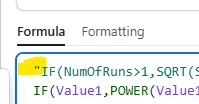
you might need to remove these double quotes, at the beginning and the end 


Forum|alt.badge.img+3
  • Author
  • New Participant
  • January 21, 2025

Hi,

i simplified naming a bit
Instead of   POWER ( Value1 - Average , 2),
you should change each line to IF( Value1 ,  POWER ( Value1 - Average , 2)),
in the absence of value, difference will be a 0 and won't apply the whole result

- use COUNT( Value1, Value2, .... )   to get n and count average.
- you might also wrap the result formula in IF( NumOfRuns > 1 , ..._the_formula_..  ) to avoid risk of division by 0

You can use this formula to get your formula 😁 , just fix Field names 

'IF(NumOfRuns>1,SQRT(SUM(\n' & REGEX_REPLACE('12345','(\\d)', 'IF(Value$1,POWER(Value$1-Average,2)),\n') & '0)/(NumOfRuns-1)))'

you might need to remove these double quotes, at the beginning and the end 


Thank you @Alexey_Gusev I am sorry. I still don't understand how that would work. I tried to create a formula the way you described it, but I do not understand some of the things I should replace, like n and d and 12345 and REGEX_REPLACE. Sorry I am not very familiar with CODE language. 

IF (No. of Runs>1, SQRT( SUM(\n'&REGEX_REPLACE('12345','(\\d)', IF (Value 1 Field, POWER({Value 1 Field} - {Avg of Values Field}, 2)) IF (Value 2 Field, POWER({Value 2 Field} - {Avg of Values Field}, 2)), IF (Value 3 Field, POWER({Value 3 Field} - {Avg of Values Field}, 2)), ... ),\n'&'0) / (n - 1) )


Alexey_Gusev
Forum|alt.badge.img+25
  • Brainy
  • January 21, 2025

Thank you @Alexey_Gusev I am sorry. I still don't understand how that would work. I tried to create a formula the way you described it, but I do not understand some of the things I should replace, like n and d and 12345 and REGEX_REPLACE. Sorry I am not very familiar with CODE language. 

IF (No. of Runs>1, SQRT( SUM(\n'&REGEX_REPLACE('12345','(\\d)', IF (Value 1 Field, POWER({Value 1 Field} - {Avg of Values Field}, 2)) IF (Value 2 Field, POWER({Value 2 Field} - {Avg of Values Field}, 2)), IF (Value 3 Field, POWER({Value 3 Field} - {Avg of Values Field}, 2)), ... ),\n'&'0) / (n - 1) )


Hi,
actually, in the basics, it's usual formula, like in Excel. Except that you are using field name, not A1/B2 - like stuff.  You did almost right, but you just didn't know that field name must be in curly brackets when it contains spaces.

It seems like I did it overcomplicated, sorry for that.


!!! you can omit this part of explanation

REGEX_REPLACE('12345','(\\d)'
, ' some stuff $1 ') is just a way to loop the same 5 times changing $1 as 1,2,3,4,5. 
/n  is to start a new line


So at start it looks like


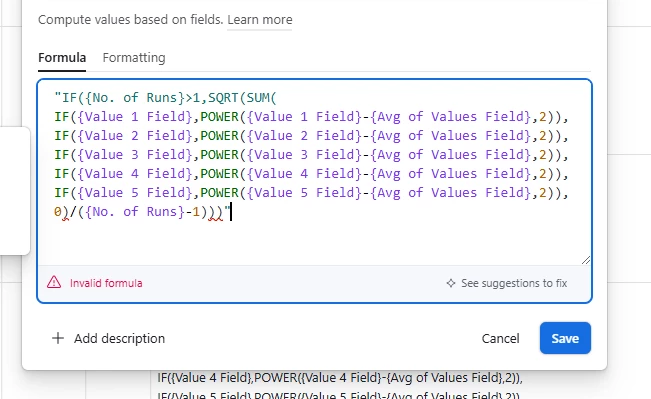
and then you can copy result


where you remove "  at start and the end 


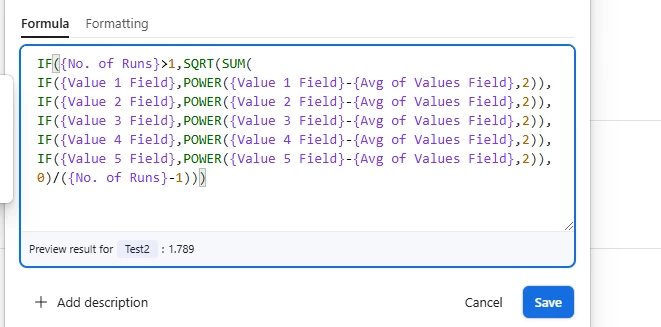
!!! and get to the final formula


version to copy-paste:


IF({No. of Runs}>1,SQRT(SUM( IF({Value 1 Field},POWER({Value 1 Field}-{Avg of Values Field},2)), IF({Value 2 Field},POWER({Value 2 Field}-{Avg of Values Field},2)), IF({Value 3 Field},POWER({Value 3 Field}-{Avg of Values Field},2)), IF({Value 4 Field},POWER({Value 4 Field}-{Avg of Values Field},2)), IF({Value 5 Field},POWER({Value 5 Field}-{Avg of Values Field},2)), 0)/({No. of Runs}-1)))