Extract Email Address (gmail)

  • November 19, 2019
  • 15 replies
  • 142 views

I’m trying to extract emails (name@gmail.com)from a notes field.

The format is uniform “name@gmail.com

But I can’t figure out a fomula to extract them

There is a “space” before the name and "space after the “.com”

15 replies

Forum|alt.badge.img+11

Will there be cases where there are multiple gmail addresses in a given notes field? Or will it be a single gmail address in a given notes field?


  • Author
  • Participating Frequently
  • November 22, 2019

Will there be cases where there are multiple gmail addresses in a given notes field? Or will it be a single gmail address in a given notes field?


a single email address in a field of text


Forum|alt.badge.img+19
  • Inspiring
  • November 22, 2019

Find @ and parse left to the space and right to the space.


  • Author
  • Participating Frequently
  • November 22, 2019

Find @ and parse left to the space and right to the space.


exactly! I’ve tried so many ways to write the formula but nothing works


Forum|alt.badge.img+19
  • Inspiring
  • November 23, 2019

exactly! I’ve tried so many ways to write the formula but nothing works


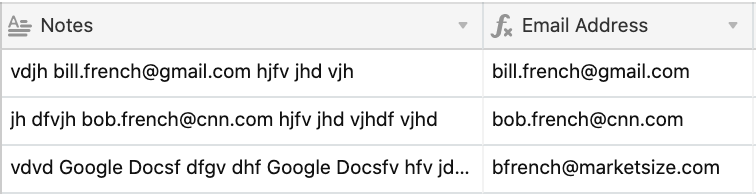
Like this?


  • Author
  • Participating Frequently
  • November 23, 2019

Like this?


Exactly like that. Bill. you even pulled the emails that were not “gmail” perfect


Forum|alt.badge.img+19
  • Inspiring
  • November 23, 2019

Exactly like that. Bill. you even pulled the emails that were not “gmail” perfect


Great - this is ugly because Airtable has so few tools to work with. It’s like starting a fire with wet hay and a couple of non-ferrous rocks in a 40mph crosswind.

But, it can be done despite the lack of simple string handling tools such as Split().

The formula to do this with Split is -

{Notes}.Split('@')[0].Split(' ')[1].Split(' ')[0]

Without Split() -

CONCATENATE(
    REPLACE(LEFT({Notes}, FIND("@", {Notes})),1,FIND("~",SUBSTITUTE(LEFT({Notes}, FIND("@", {Notes}))," ","~",LEN(LEFT({Notes}, FIND("@", {Notes}))) - LEN(SUBSTITUTE(LEFT({Notes}, FIND("@", {Notes}))," ","")))),""), 
    LEFT(RIGHT({Notes}, LEN({Notes}) - FIND("@", {Notes})), FIND(" ", RIGHT({Notes}, LEN({Notes}) - FIND("@", {Notes}))) - 1)
)

[sigh]

Don’t ask how I know how to do this. Just enjoy…


  • Author
  • Participating Frequently
  • November 23, 2019

Great - this is ugly because Airtable has so few tools to work with. It’s like starting a fire with wet hay and a couple of non-ferrous rocks in a 40mph crosswind.

But, it can be done despite the lack of simple string handling tools such as Split().

The formula to do this with Split is -

{Notes}.Split('@')[0].Split(' ')[1].Split(' ')[0]

Without Split() -

CONCATENATE(
    REPLACE(LEFT({Notes}, FIND("@", {Notes})),1,FIND("~",SUBSTITUTE(LEFT({Notes}, FIND("@", {Notes}))," ","~",LEN(LEFT({Notes}, FIND("@", {Notes}))) - LEN(SUBSTITUTE(LEFT({Notes}, FIND("@", {Notes}))," ","")))),""), 
    LEFT(RIGHT({Notes}, LEN({Notes}) - FIND("@", {Notes})), FIND(" ", RIGHT({Notes}, LEN({Notes}) - FIND("@", {Notes}))) - 1)
)

[sigh]

Don’t ask how I know how to do this. Just enjoy…


Thank you very much! I will enjoy and try to reverse engineer it to try to find out how you pull it off.


Forum|alt.badge.img+19
  • Inspiring
  • November 23, 2019

Thank you very much! I will enjoy and try to reverse engineer it to try to find out how you pull it off.


Do so at risk to your sanity. :winking_face:


  • Author
  • Participating Frequently
  • November 23, 2019

Do so at risk to your sanity. :winking_face:


Opps Sorry for this but it seems not to be pulling in the “gmail.com” of the email addresses… Am i missing something?


  • Author
  • Participating Frequently
  • November 23, 2019

Opps Sorry for this but it seems not to be pulling in the “gmail.com” of the email addresses… Am i missing something?


Or is it just easier to add that part in a different field?


Forum|alt.badge.img+19
  • Inspiring
  • November 23, 2019

Opps Sorry for this but it seems not to be pulling in the “gmail.com” of the email addresses… Am i missing something?


This is one of the Notes texts I tested with:

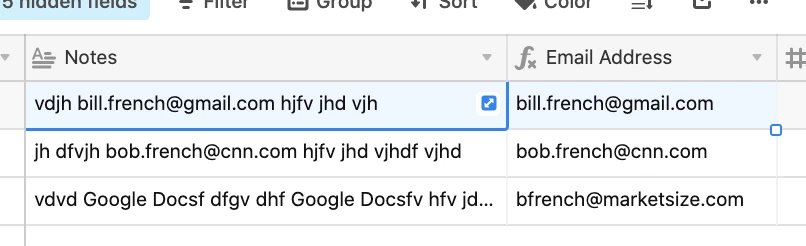
vdjh bill.french@gmail.com hjfv jhd vjh

This is the outcome from analyzing that row:

bill.french@gmail.com

It appears that it is performing the correct entity extraction at least in terms of this collection of tests.


Justin_Barrett
Forum|alt.badge.img+21

Here’s another way to tackle it:

TRIM(MID(SUBSTITUTE({Test string}, " ", REPT(" ", 30)), FIND("@", SUBSTITUTE({Test string}, " ", REPT(" ", 30))) - 30, 60))


Forum|alt.badge.img+19
  • Inspiring
  • November 25, 2019

Here’s another way to tackle it:

TRIM(MID(SUBSTITUTE({Test string}, " ", REPT(" ", 30)), FIND("@", SUBSTITUTE({Test string}, " ", REPT(" ", 30))) - 30, 60))


@Justin_Barrett,

That looks far simpler. What is the purpose of the 30 and 60 values in the formula?


Justin_Barrett
Forum|alt.badge.img+21

@Justin_Barrett,

That looks far simpler. What is the purpose of the 30 and 60 values in the formula?


I’m replacing each space with 30 spaces, grabbing a chunk of the resulting larger string that begins 30 characters before the @—which is guaranteed to be somewhere the mega-space block just before the email address—and is 60 characters long—which is mostly guaranteed to be in the mega-space block after the address—then trimming the extra spaces off the ends.