How not to concatenate a particular product from a list

  • June 15, 2021
  • 5 replies
  • 37 views

Forum|alt.badge.img+1

hello guys!.

I have an apparently simple situation to solve, but I’m still not used to the airtable formulas. basically I have a list of products and a product with the name “continue” which is an option that follows the flow of the system I am integrating with airtable.

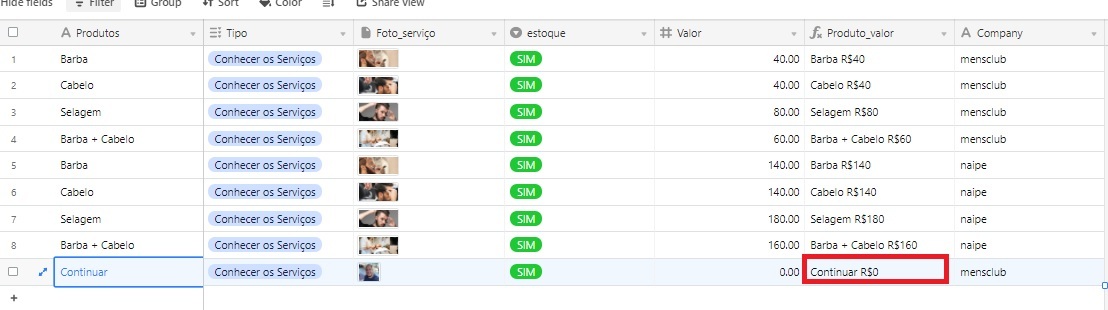
All products contact the Values ​​column. however I wanted the product “continue” not to concatenate. is it possible to insert this condition in the formula?

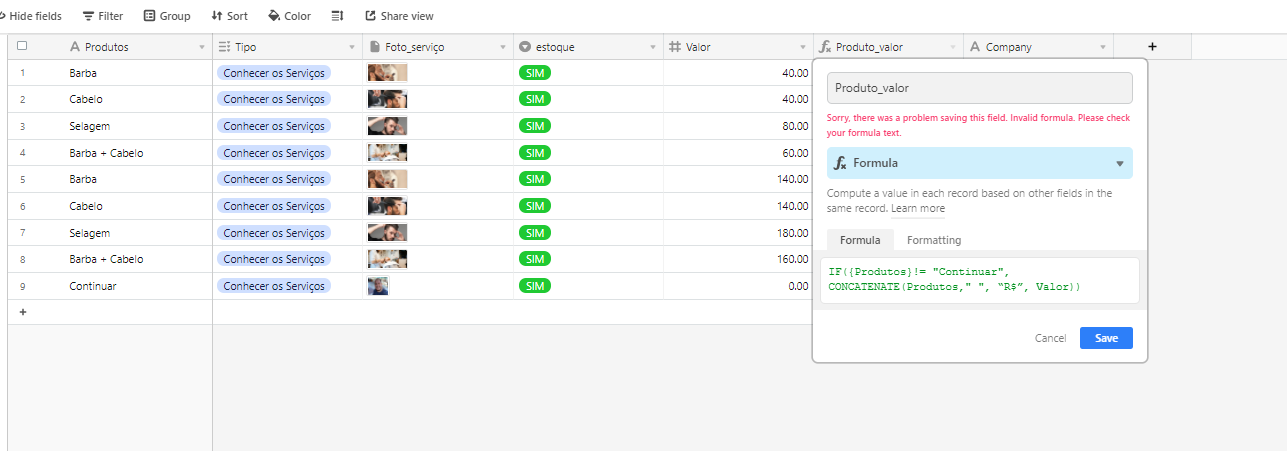
The formula I’m using is: CONCATENATE(Products," ", “R$”, Value)
5 replies

Kamille_Parks11
Forum|alt.badge.img+27
IF(
   {Produtos} != "Continuar",
   CONCATENATE(Products," ", "R$", Value)
)

Forum|alt.badge.img+1

It’s giving an error :thinking:


Kamille_Parks11
Forum|alt.badge.img+27

It’s giving an error :thinking:


Re-type the quotes around the R$. They’re “curly” quotes and formulas only accept straight quotes.


Forum|alt.badge.img+1

Re-type the quotes around the R$. They’re “curly” quotes and formulas only accept straight quotes.


now it worked, but I would like the name to continue in the cell, but instead the cell is blank. what would I have to modify in the formula?


Kamille_Parks11
Forum|alt.badge.img+27


now it worked, but I would like the name to continue in the cell, but instead the cell is blank. what would I have to modify in the formula?


Not sure what you mean by name continuing, but if you want something else to show when Produtos isn’t continuarr, you’d just add a third argument to the IF statement

IF(
   {Produtos} != "Continuar",
   CONCATENATE(Products," ", "R$", Value),
   "something else"
)