SWITCH (?) to choose random entry from field? Or something else?

  • October 12, 2020
  • 3 replies
  • 79 views

Use case:

At the end of my estimates (page designer), I want to put in an inspiring or humourous quote… but I don’t want to type it myself, just collect them in a field somewhere and have them appear with a formula.

What kind of formatting/formula would I need to have one long-not used quote selected from the list and popped on the paper?

Is there some kind of CHOOSE RANDOM FROM LIST function?

Thanks!

Insert inspiring quote here

3 replies

kuovonne
Forum|alt.badge.img+29
  • Brainy
  • October 12, 2020

There is no random function in Airtable formulas. You need to use a script in order to generate a random value.


JonathanBowen
Forum|alt.badge.img+18

There is no random function in Airtable formulas. You need to use a script in order to generate a random value.


As per @kuovonne, there is no random function, but this might be a suitable workaround:

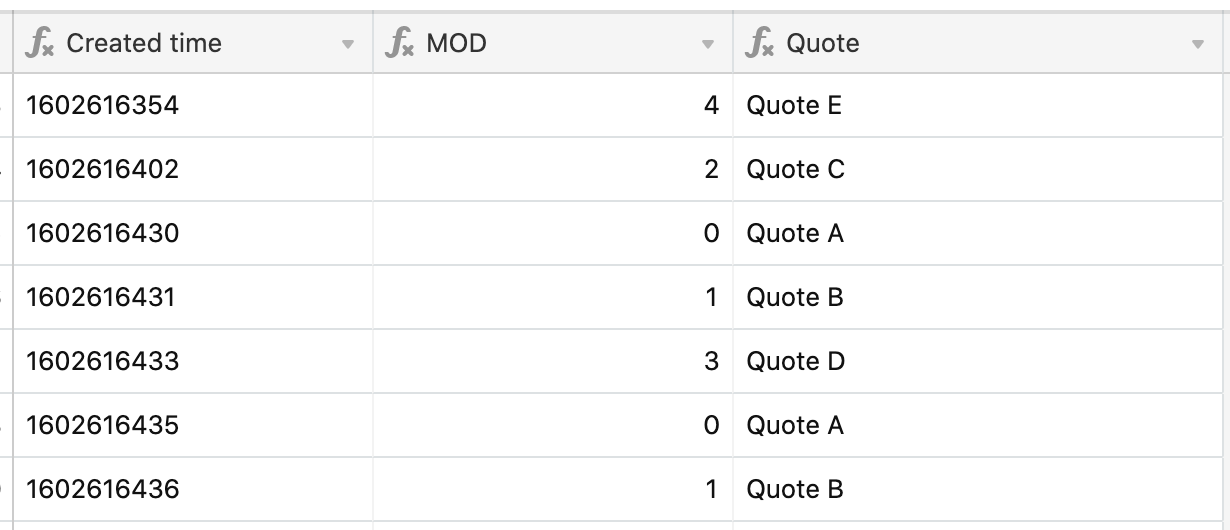
I’ve got 3 fields here:

  • Created time - using the formual DATETIME_FORMAT(CREATED_TIME(), 'X') which gives the unix time in seconds
  • MOD - using the formula MOD({Created time}, 5). This gives the remainder when the created time is divided by 5
  • The Quote field using the formula:
SWITCH(
  MOD, 
  0, 'Quote A', 
  1, 'Quote B', 
  2, 'Quote C', 
  3, 'Quote D', 
  4, 'Quote E', 
  'Quote F'
)

So, based on the result of the MOD field, this will display Quote A, Quote B etc.

Not random at all, but unless there’s a very strict timing pattern when you are creating records, I’m sure you will get a reasonable spread of quotes across a number of records. You can extend to 10, 20, 30 quotes by changing the divisor on the MOD field.


  • Author
  • Known Participant
  • October 13, 2020

As per @kuovonne, there is no random function, but this might be a suitable workaround:

I’ve got 3 fields here:

  • Created time - using the formual DATETIME_FORMAT(CREATED_TIME(), 'X') which gives the unix time in seconds
  • MOD - using the formula MOD({Created time}, 5). This gives the remainder when the created time is divided by 5
  • The Quote field using the formula:
SWITCH(
  MOD, 
  0, 'Quote A', 
  1, 'Quote B', 
  2, 'Quote C', 
  3, 'Quote D', 
  4, 'Quote E', 
  'Quote F'
)

So, based on the result of the MOD field, this will display Quote A, Quote B etc.

Not random at all, but unless there’s a very strict timing pattern when you are creating records, I’m sure you will get a reasonable spread of quotes across a number of records. You can extend to 10, 20, 30 quotes by changing the divisor on the MOD field.


Awesome, thanks! I’ll give it a go!