Complex nested formula help needed please

  • November 1, 2017
  • 5 replies
  • 37 views

Hello,

I have a nested formula that works a treat, however I need to add on to it and I’m wondering if someone would have the expertise to help me.

Currently I have this;
IF(Litres<38,Litres0.66,IF(AND(Litres>=38,Litres<277),25,Litres0.09))

I have a whole other column called {reg fee} which I need the above IF formula to only be run if {reg fee} is NULL, and then IF the {Reg fee} = 379, and Litres is <750, then add 379 + Litres *.66, or if {reg fee} = 379, and Litres is >750, then add 379 + Litres *.9 *.66

Hope someone can help me make sense of this! Any help greatly appreciated

5 replies

  • Participating Frequently
  • November 1, 2017

Hi

Maybe if you provide a screenshot of what you are trying to do it would be easier to help you. :slightly_smiling_face:


Forum|alt.badge.img+19
  • Inspiring
  • November 1, 2017

Small tip: you can use multiple fields (and hide them later) in combination with single / simpler formulas. Then use a final field to pick the outcome you need (or make sure only one field has an actual result and add all of them up).

This way you can also easily see what’s going on / wrong by looking at the separate fields / formulas. :winking_face:


  • Author
  • New Participant
  • November 1, 2017

Hi

Maybe if you provide a screenshot of what you are trying to do it would be easier to help you. :slightly_smiling_face:


Hi - thanks for replying

here is what I am trying to do;

if the column {reg fee} = 379, then i need the formula to look at the litres column and if the litres are less than 750 then X the litres by 0.09 and X 0.66. If the {reg fee} is over 750, then look at the litres column and X the litres by 0.66

To make it more complex, I then need to add the 379, but I think the easiest way to do this is via another formula in another cell.


Forum|alt.badge.img+19
  • Inspiring
  • November 5, 2017

For the record, this was what the OP was asking for…

IF(AND({REG FEE} = 379, LITRES > 750), (LITRES * .09) + 379, 0)

  • Participating Frequently
  • July 16, 2019

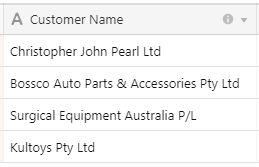
Can anyone help solve this nested ifs statement?

If({Customer Name}contains “Ltd”,“Pty”,“P/L”,1)))

How would you write a working formula to make this work?