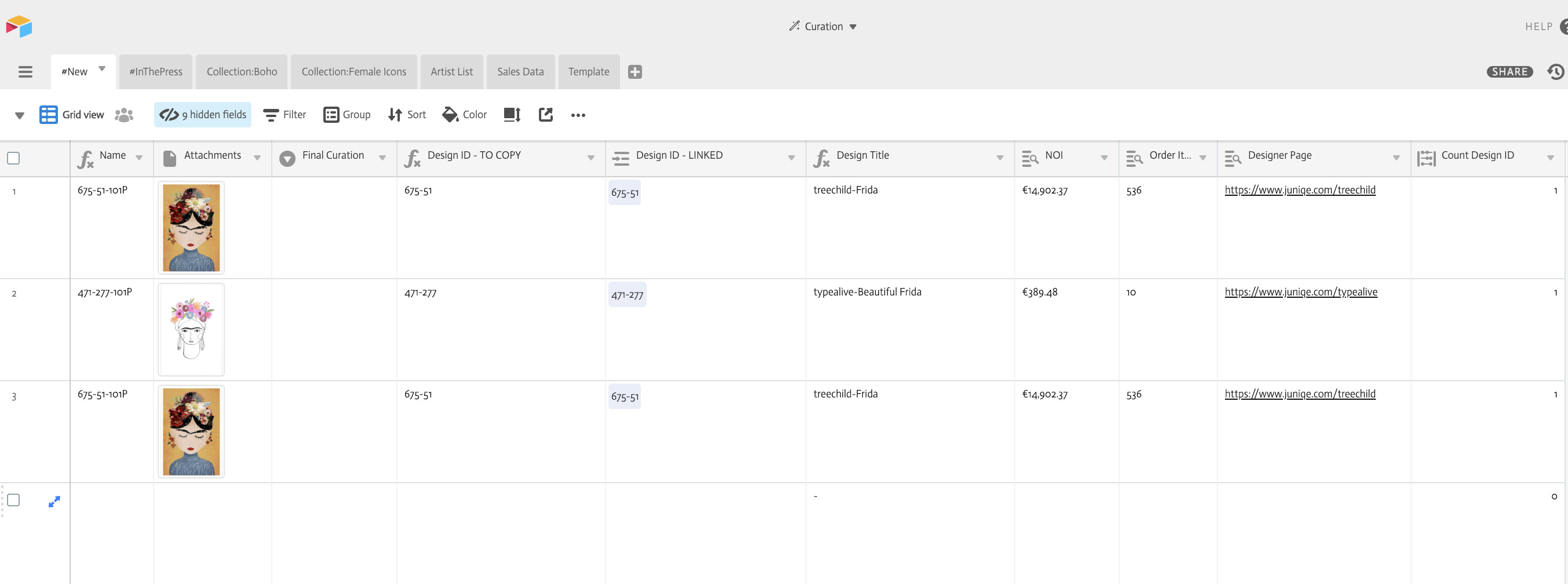
I am using airtable for a somewhat unlikely use case, namely as a tool to visually merchandise catalog pages on a webshop.
Basically, I am using a table called SHOP in the catalog view to drag-and-drop images directly from our webshop onto a record / attachment field and am using a formula to extract our product code from the attachment field, as the attachment name literally holds the unique product identifier.
Each product code is consisting of a prefix and a code, indicating supplier and product and I have both split as two separate fields by formula.
First, I would need to establish how many times the code prefix field and the code field are listed in a view, in google sheets a basic COUNTIF Formula, which I understand is not as basic in AirTable. The product code field is actually linked, but the prefix field at the moment, is not.
Additionally, I am pulling data from another table based calles SALES on the code, such as sales figures, engagement data, etc, which is being pulled via a lookup field onto the main table.
Currently, this requires me to manually duplicate the entire column that holds the product code and paste it into the linked field column to establish the relation to the sales data records in the SALES table. This does work but is a bit cumbersome, is there any way to dynamically link a formula-calculated field to a related record in another table?
Any help would be greatly appreciated!