Formula to check if a certain record exists

  • September 23, 2018
  • 10 replies
  • 196 views

Forum|alt.badge.img+2

Hi everyone,
I have a table that has a list of people. There’s a field called “parents”.
I want to create a view on that table that shows only people without children. To do that, I’d use a formula that checks if the person is present on the “parents” field of any record. If the result is false, it means the person is without children.
The problem is that I can’t figure out how formulas can use values from other records. I’m proficient in SQL and to do that I would use the clause "WHERE NOT EXISTS ".

Does anyone have an idea on how to do that?

10 replies

Forum|alt.badge.img+17
  • Inspiring
  • 1124 replies
  • September 24, 2018

I think you need an extra Table (maybe Parenthood), because you can’t get the number childs from the same table, I mean with a Lookup.


Forum|alt.badge.img+17
  • Inspiring
  • 1124 replies
  • September 24, 2018

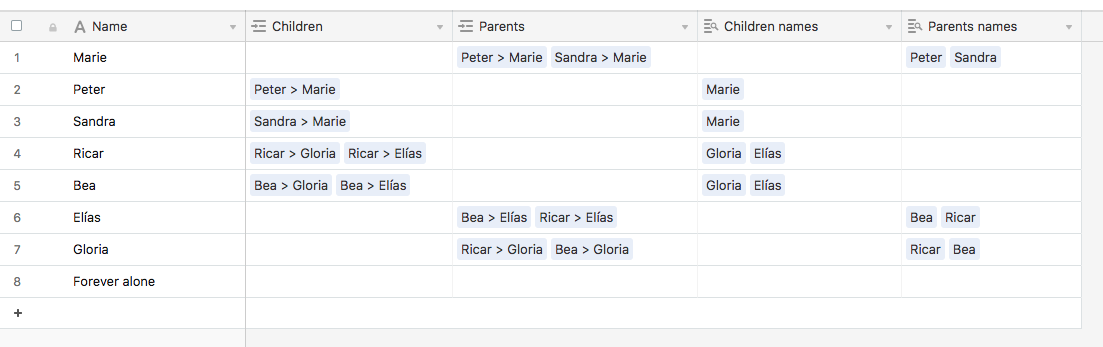
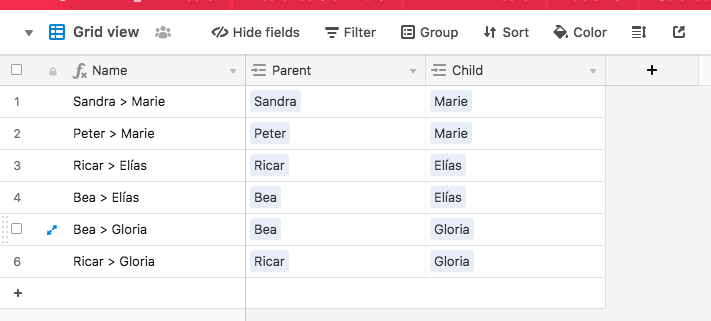
An example

People:

Relations:

And then you could create a View with the desired Filter:


Forum|alt.badge.img+2
  • Author
  • Known Participant
  • 10 replies
  • September 29, 2018

Thanks Elias for taking the time to explain this to me!
Actually this is a very clever trick, but I fear it stops working if I also want grandparents and grandchildren. We would need to add another level of indirection (another table).
That’s because Airtable lacks what in relational databases are called “self joins”, and so recursion is not possible.


Forum|alt.badge.img+17
  • Inspiring
  • 1124 replies
  • September 29, 2018

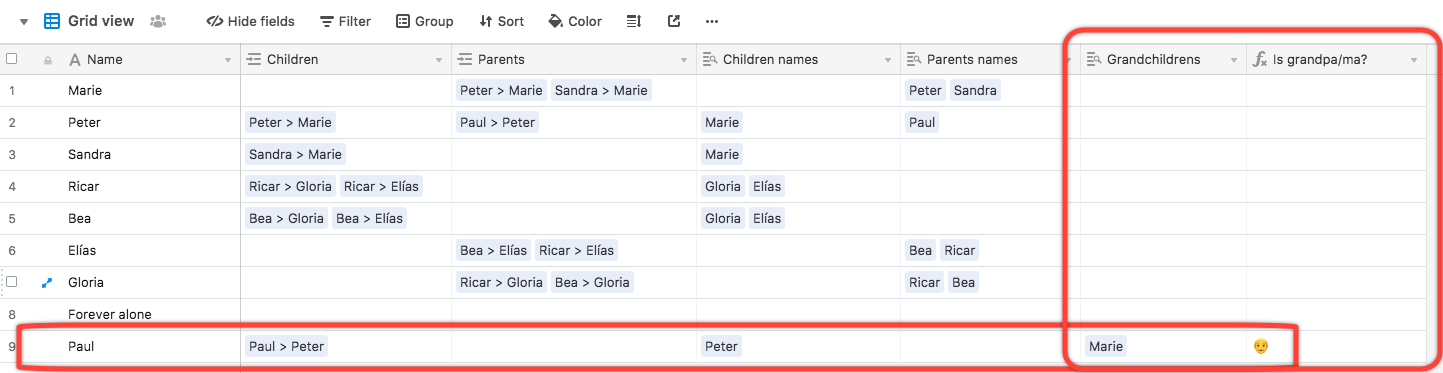
Easy! The relation is the same, you only need to add fields for the needed levels.


Forum|alt.badge.img+5
  • Inspiring
  • 1386 replies
  • September 30, 2018

Thanks Elias for taking the time to explain this to me!
Actually this is a very clever trick, but I fear it stops working if I also want grandparents and grandchildren. We would need to add another level of indirection (another table).
That’s because Airtable lacks what in relational databases are called “self joins”, and so recursion is not possible.


Airtable does support self-joins. However, it doesn’t support reciprocal self-joins, so you’d have to make explicit links both ways. Also, neither of the traditional linked-record field types (rollup, lookup) can be used on self-joins, so you’re limited to retrieving the names of the linked records — which in your case looks as if might be sufficient.


Forum|alt.badge.img+2
  • Author
  • Known Participant
  • 10 replies
  • October 8, 2018

@Elias_Gomez_Sainz I just noticed a thing while recreating your example.

Are these steps correct?
(1) adding Marie, Peter, Sandra in People table
(2) adding Sandra > Marie and Peter > Marie records in Relations table
(3) modifying parents field of Marie in People with a reference to records Sandra > Marie and Peter > Marie
(4) modifying children field of Peter and Sandra in People, adding a reference to Sandra > Marie and Peter > Marie

I feel there’s duplication of information while performing steps 3 and 4, because the relationship between these three people is already expressed in step 2.
This could lead to inconsistencies in information stored in the database if someone makes a mistake or forgets steps 3 and 4.

Am I forgetting something?


Forum|alt.badge.img+2
  • Author
  • Known Participant
  • 10 replies
  • October 24, 2018

Has anyone read this post?


Forum|alt.badge.img+18
  • Inspiring
  • 1691 replies
  • October 24, 2018

Has anyone read this post?


I did just now :winking_face:

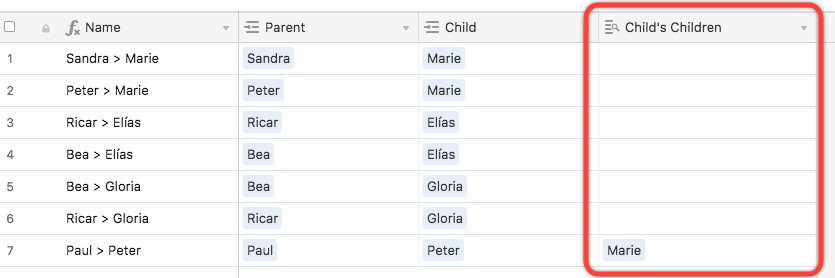
Airtable allows lookups on self-joins now:

This should eliminate the need to perform steps 3 and 4 above. Instead, perform a lookup One way or the other, either to see who the parents are (if you joined children to parents), or to see who the children are (if you joined parents to children).


Forum|alt.badge.img+2
  • Author
  • Known Participant
  • 10 replies
  • October 25, 2018

@Jeremy_Oglesby that’s great news! Airtable has made a significant step in the right direction with this feature!


Forum|alt.badge.img+2
  • Author
  • Known Participant
  • 10 replies
  • October 25, 2018

I’ve an interesting follow-up: Display a list of linked fields