Function Removes Commas from Multi-Select Fields

  • March 30, 2018
  • 10 replies
  • 107 views

William_Nutt
Forum|alt.badge.img+14

Hello! I’m attempting to concatenate two fields—both lookups from another table, one of which contains multi-select items separated by commas. When combining the fields via formula, the result strips out the comma separators from the multi-select field. However, if I use the formula only to display that multi-select field, the commas remain in place. How can I preserve that comma? Thanks!

10 replies

William_Nutt
Forum|alt.badge.img+14
  • Author
  • Known Participant
  • March 30, 2018

Resolved independently! The field is treated as an array; thus, I can apply array formulas.


Forum|alt.badge.img+1
  • New Participant
  • March 7, 2019

Hi William, I am having the same issue. Can you please elaborate on the fix. I tried ARRAYJOIN({Int Stakeholders/Staff Emails},{Paid Attendee Emails}) but I only get the comma in between the 3 fields.


  • Participating Frequently
  • May 24, 2019

Hi @William_Nutt. I am trying to turn a multi-select field into simple text. I am running into the problem that if the multi-select option choice has a comma in it, the text output returns within quotation marks. I need to avoid the quotation marks. Any chance you might have run into this problem and found a solution?.


Forum|alt.badge.img+17

Hi @William_Nutt. I am trying to turn a multi-select field into simple text. I am running into the problem that if the multi-select option choice has a comma in it, the text output returns within quotation marks. I need to avoid the quotation marks. Any chance you might have run into this problem and found a solution?.


You can use SUBSTITUTE.


  • Participating Frequently
  • May 25, 2019

You can use SUBSTITUTE.


Thank you @Elias_Gomez_Sainz. Unsure on how to use SUBSTITUTE but will do some research. Seems like I am having a dumb problem. Don’t know why the comma is making the text be in quotation marks.


Justin_Barrett
Forum|alt.badge.img+21

Thank you @Elias_Gomez_Sainz. Unsure on how to use SUBSTITUTE but will do some research. Seems like I am having a dumb problem. Don’t know why the comma is making the text be in quotation marks.


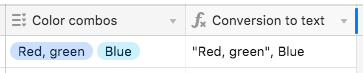
Maybe this example will clarify why Airtable puts quotes around items with commas:

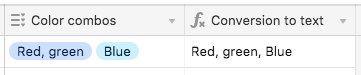
I could use SUBSTITUTE to remove them, as @Elias_Gomez_Sainz suggested:

SUBSTITUTE({Color combos}, '"', '')

But then it looks like I’ve got three items, not two:

For a moment I thought that it might be possible to force a different separator between each item before removing the quotes, so you could have something like this:

Red, green | Blue

I assumed that the items were stored in an array, and that ARRAYJOIN would allow changing of the separator. However, it has no affect whatsoever.

ARRAYJOIN({Color combos}, " | ")

Because I didn’t need to concatenate {Color combos} with a string when doing the earlier SUBSTITUTE test, it appears that Airtable automatically converts the array (if it even is an array) to a string before any formula gets hold of it.

What ultimately did the job was nested series of SUBSTITUTE functions:

SUBSTITUTE(
    SUBSTITUTE(
        SUBSTITUTE(
            {Color combos},
            '", ',
            ' | '
        ),
        ', "',
        ' | '
    ),
    '"',
    ''
)


  • Participating Frequently
  • May 25, 2019

Maybe this example will clarify why Airtable puts quotes around items with commas:

I could use SUBSTITUTE to remove them, as @Elias_Gomez_Sainz suggested:

SUBSTITUTE({Color combos}, '"', '')

But then it looks like I’ve got three items, not two:

For a moment I thought that it might be possible to force a different separator between each item before removing the quotes, so you could have something like this:

Red, green | Blue

I assumed that the items were stored in an array, and that ARRAYJOIN would allow changing of the separator. However, it has no affect whatsoever.

ARRAYJOIN({Color combos}, " | ")

Because I didn’t need to concatenate {Color combos} with a string when doing the earlier SUBSTITUTE test, it appears that Airtable automatically converts the array (if it even is an array) to a string before any formula gets hold of it.

What ultimately did the job was nested series of SUBSTITUTE functions:

SUBSTITUTE(
    SUBSTITUTE(
        SUBSTITUTE(
            {Color combos},
            '", ',
            ' | '
        ),
        ', "',
        ' | '
    ),
    '"',
    ''
)


Thank you so much @Justin_Barrett for this detailed explanation. So appreciate your time to answer.


  • Participating Frequently
  • May 25, 2019

Maybe this example will clarify why Airtable puts quotes around items with commas:

I could use SUBSTITUTE to remove them, as @Elias_Gomez_Sainz suggested:

SUBSTITUTE({Color combos}, '"', '')

But then it looks like I’ve got three items, not two:

For a moment I thought that it might be possible to force a different separator between each item before removing the quotes, so you could have something like this:

Red, green | Blue

I assumed that the items were stored in an array, and that ARRAYJOIN would allow changing of the separator. However, it has no affect whatsoever.

ARRAYJOIN({Color combos}, " | ")

Because I didn’t need to concatenate {Color combos} with a string when doing the earlier SUBSTITUTE test, it appears that Airtable automatically converts the array (if it even is an array) to a string before any formula gets hold of it.

What ultimately did the job was nested series of SUBSTITUTE functions:

SUBSTITUTE(
    SUBSTITUTE(
        SUBSTITUTE(
            {Color combos},
            '", ',
            ' | '
        ),
        ', "',
        ' | '
    ),
    '"',
    ''
)


Worked perfectly. Incredibly grateful!!! Thanks to all.


Forum|alt.badge.img+17

Maybe this example will clarify why Airtable puts quotes around items with commas:

I could use SUBSTITUTE to remove them, as @Elias_Gomez_Sainz suggested:

SUBSTITUTE({Color combos}, '"', '')

But then it looks like I’ve got three items, not two:

For a moment I thought that it might be possible to force a different separator between each item before removing the quotes, so you could have something like this:

Red, green | Blue

I assumed that the items were stored in an array, and that ARRAYJOIN would allow changing of the separator. However, it has no affect whatsoever.

ARRAYJOIN({Color combos}, " | ")

Because I didn’t need to concatenate {Color combos} with a string when doing the earlier SUBSTITUTE test, it appears that Airtable automatically converts the array (if it even is an array) to a string before any formula gets hold of it.

What ultimately did the job was nested series of SUBSTITUTE functions:

SUBSTITUTE(
    SUBSTITUTE(
        SUBSTITUTE(
            {Color combos},
            '", ',
            ' | '
        ),
        ', "',
        ' | '
    ),
    '"',
    ''
)


:thinking: so… SUBSTITUTE.


Justin_Barrett
Forum|alt.badge.img+21

:thinking: so… SUBSTITUTE.


To clarify, I wasn’t initially saying, “Don’t use SUBSTITUTE.” I was pointing out that using it solo to get rid of all quotes without consideration of the end result would lead to greater confusion, not greater clarity.