How do I hide a row?

  • February 20, 2020
  • 2 replies
  • 268 views

I have a column that says status. I want to hide any rows that have “completed” - is this possible?


2 replies

Forum|alt.badge.img+18

Hi @Emily_Eisenberg,

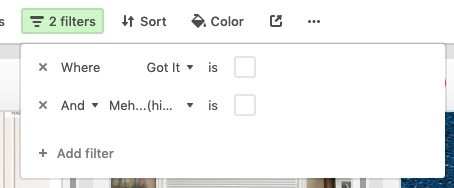
You can use the “Filter” menu at the top of a view to hide those records in that view:

If “Completed” is a checkbox, then set that filter to show only records Where “Completed” is unchecked.

If “Completed” is a single-select option, then set that filter to show only records Where “Status” is "completed".


  • Author
  • New Participant
  • February 20, 2020

Hi @Emily_Eisenberg,

You can use the “Filter” menu at the top of a view to hide those records in that view:

If “Completed” is a checkbox, then set that filter to show only records Where “Completed” is unchecked.

If “Completed” is a single-select option, then set that filter to show only records Where “Status” is "completed".


YES thank you so much you solved it!!!