How to use CSS selector on frame content?

  • October 23, 2019
  • 5 replies
  • 70 views

Forum|alt.badge.img+7

Hi,
I can successfully clip content on some pages but not others. The defining difference seems to be that content in a frame can’t be clipped. Is there a way around this or a different syntax that needs to be used (for example, if wanting to clip an element with a particular ID in a frame)?

Thanks.
5 replies

Hey Stephen, would you mind sharing an example of what you’re trying to do, so I can help here?


Forum|alt.badge.img+7
  • Author
  • Known Participant
  • October 24, 2019

Hey Stephen, would you mind sharing an example of what you’re trying to do, so I can help here?


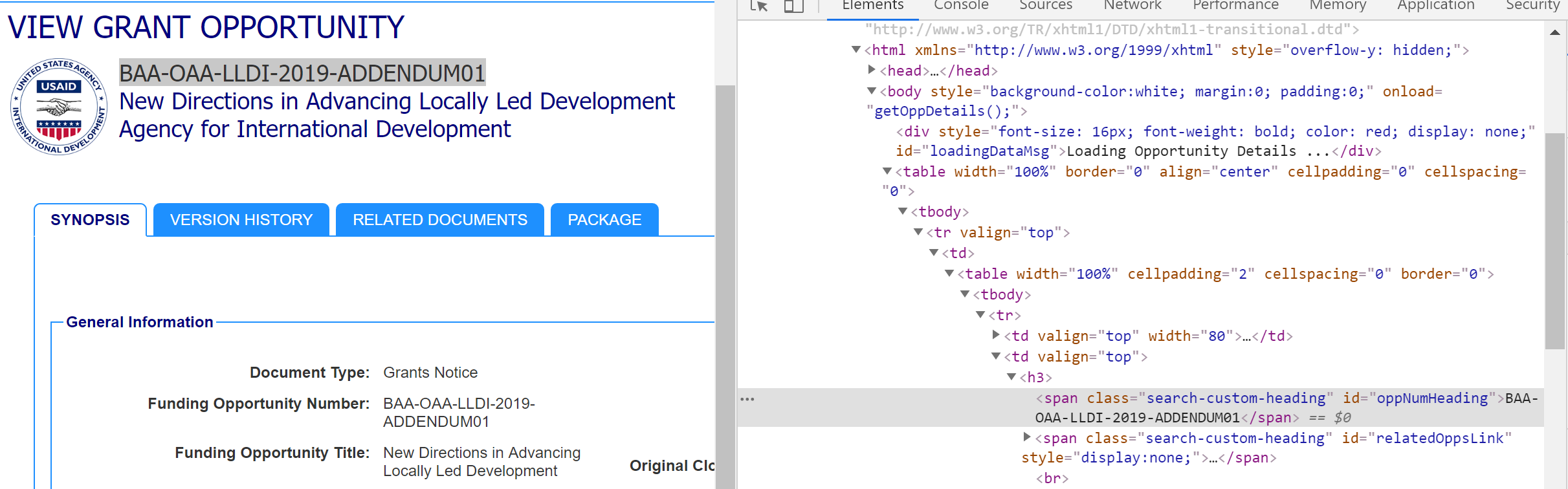
Sure. So, for example, on any grants.gov announcement page (such as this one), I would like to be able to select the name of the grant opportunity. In this case, it’s BAA-OAA-LLDI-2019-ADDENDUM01. I used Chrome’s Inspect tool to find that it has an ID of “oppNumHeading”. (Hopefully this is clear from the screenshot I’ve attached.)

However, if I put #oppNumHeading in the CSS selector field for the clip action I’m trying to create, nothing happens.

Thanks.


  • New Participant
  • October 25, 2019

I believe you would need to “Open Frame in New Tab” and then run the Web Clipper extension on that new Frame. The parent of the frame can’t access a frame’s DOM via CSS.


Forum|alt.badge.img+7
  • Author
  • Known Participant
  • October 26, 2019

I believe you would need to “Open Frame in New Tab” and then run the Web Clipper extension on that new Frame. The parent of the frame can’t access a frame’s DOM via CSS.


Thanks, Chris.

Our organization is wedded to Chrome and it doesn’t have the open frame in new tab function anymore. I did try it in Firefox for kicks (which still has that feature) but just ended up with a mostly empty page.


Justin_Barrett
Forum|alt.badge.img+21

Thanks, Chris.

Our organization is wedded to Chrome and it doesn’t have the open frame in new tab function anymore. I did try it in Firefox for kicks (which still has that feature) but just ended up with a mostly empty page.


This Chrome extension might help. (Haven’t tested it, just did a quick search and found it).