

Problem with SUM and precision

  • May 22, 2017
  • 5 replies
  • 46 views

Forum|alt.badge.img+2

Hello guys… I’ve came across this issue… I’m working on a table with grouped records, and some currency amounts come from rollups and calculations that have been rounded previously by field type.

The issue is that in grouped view the SUM function is still considering “on the background” the amounts without rounding, thus adding them to the final amount.

See the image:
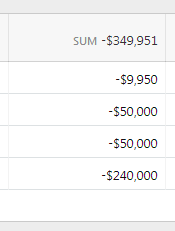
The correct amount, of course, should be -$349,950.

Is there any way to change this behaviour? When dealing with rounded currencies, I think this is very important.

Thanks a lot and keep the great work!

Rodrigo.

5 replies

Forum|alt.badge.img+12
  • Inspiring
  • May 24, 2017

The best way to change this behavior at this time is to use our Formula system to explicitly round the value.

You can use ROUND() in the configuration of the rollup field itself, for example ROUND(SUM(values)), which will cause the underlying value in each cell in this field to be rounded, reflecting the exact displayed value. Or you can create an additional formula field that references this field and uses ROUND().

Sorry that this behavior is opaque and we don’t offer easier ways to configure it. We will revisit this at some point in the future, but there are situations where the current behavior is useful that we want to preserve.


Forum|alt.badge.img+2
  • Author
  • New Participant
  • May 24, 2017

Hello Matt, thanks for the reply!

I followed your advice and it worked like a charm.

I totally understand your view about this feature, but I think that particularly when dealing with currencies this option should be a bit easier/clearer to work with.

Anyway, thanks again!


Forum|alt.badge.img+5
  • Inspiring
  • May 25, 2017

The best way to change this behavior at this time is to use our Formula system to explicitly round the value.

You can use ROUND() in the configuration of the rollup field itself, for example ROUND(SUM(values)), which will cause the underlying value in each cell in this field to be rounded, reflecting the exact displayed value. Or you can create an additional formula field that references this field and uses ROUND().

Sorry that this behavior is opaque and we don’t offer easier ways to configure it. We will revisit this at some point in the future, but there are situations where the current behavior is useful that we want to preserve.


You can use ROUND() in the configuration of the rollup field itself, for example ROUND(SUM(values))…

Matt - Is this true of all/most numeric functions — that is, the enclosing function is applied to each individual field value prior to the rollup?

Thanks!


Forum|alt.badge.img+12
  • Inspiring
  • May 25, 2017

You can use ROUND() in the configuration of the rollup field itself, for example ROUND(SUM(values))…

Matt - Is this true of all/most numeric functions — that is, the enclosing function is applied to each individual field value prior to the rollup?

Thanks!


No, the enclosing function ROUND() is applied only to the single result of SUM(); it is not applied to the multiple individual values.


Forum|alt.badge.img+5
  • Inspiring
  • May 26, 2017

No, the enclosing function ROUND() is applied only to the single result of SUM(); it is not applied to the multiple individual values.


Ah, got it. That’s how I thought it would work, but I conflated the various SUMs.
