Multiple records for all days of the booking period

  • September 29, 2022
  • 6 replies
  • 62 views

Forum|alt.badge.img+2

Hi,

I’m a beginner using an airtable since a week ago.

I run a pet hotel.
When a pet is booked, our staff will record the check-in and check-out dates on the booking table.
Based on this record, I want to automatically create records for all days of the stay in the meal record table.

//////////////////////////////////////////
for example
[Reserved table]
dog name: Charlie
Check-in date: 10/1
Check-out date: 10/3

[Meal record table] automatically create 3records
record1
name: Charlie
Date: 10/1
Meal content: blank (filled in manually by staff after feeding)

record2
name: Charlie
Date: 10/2
Meal content: blank (filled in manually by staff after feeding)

record3
name: Charlie
Date: 10/3
Meal content: blank (filled in manually by staff after feeding)

//////////////////////////////////////////

I set a trigger in airtable’s automation, but I don’t know how to set the action.

Is it possible to achieve the above wishes with automation functions?

Are there other more efficient ways?

Best Regards

This topic has been closed for replies.

6 replies

Forum|alt.badge.img+16
  • Inspiring
  • September 29, 2022

Hi @RIE_HORIUCHI,
I am not aware of a way to create an entry for each day in a range.

I would use an add on called Make.com, it has a learning curve but can do what you are asking.


TheTimeSavingCo
Forum|alt.badge.img+31

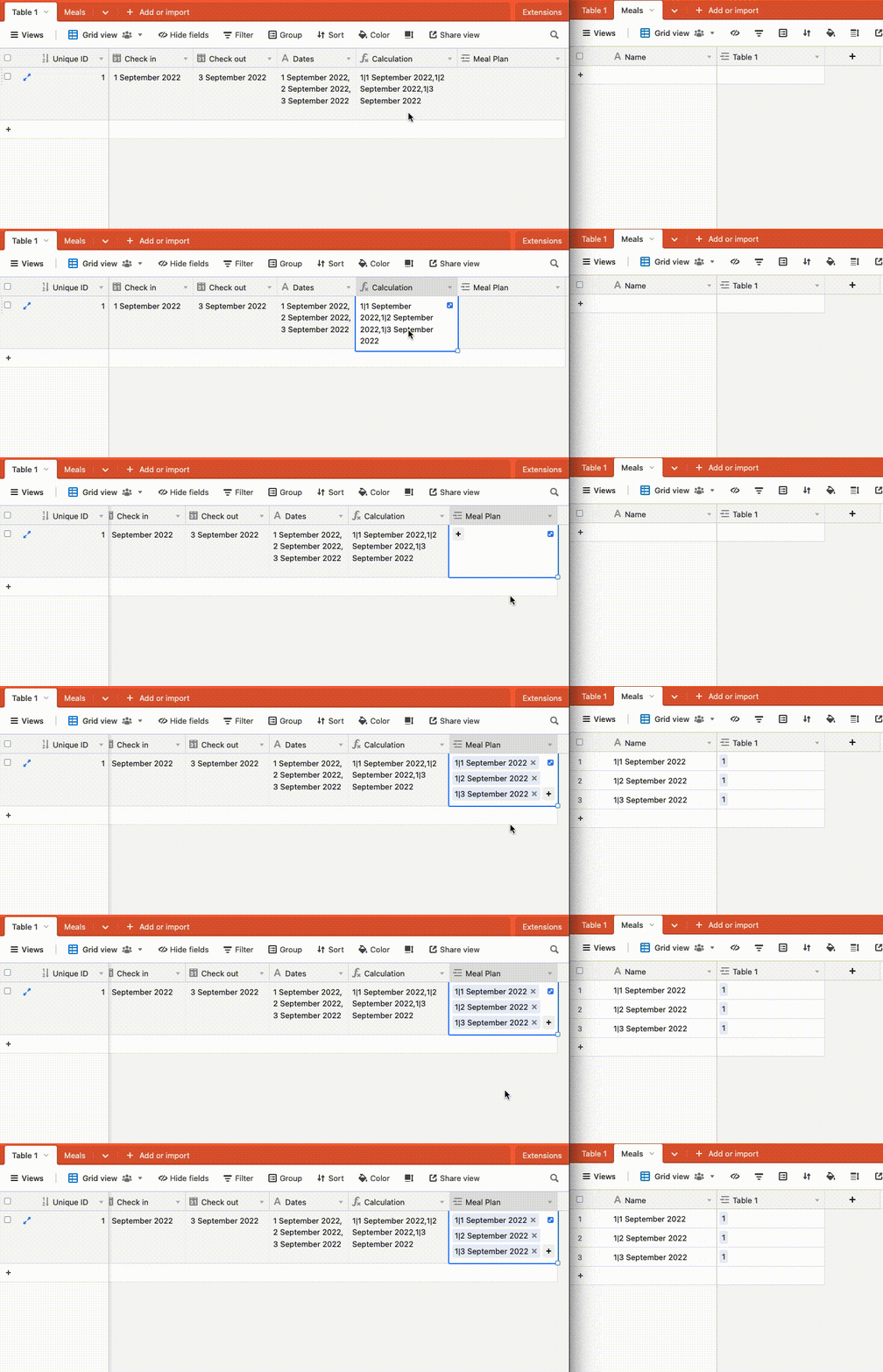
Hmm, once you get the list of dates in the range, you could create a unique comma separated list of values and paste it into a linked field to the meal plan table, which would create the records for you:

To get the dates, you could write a script for it and there’s a formula for sale here that does this apparently Formula: Extract dates between two date fields

You can also hire me to just set it up for you too


ScottWorld
Forum|alt.badge.img+35
  • Genius
  • September 30, 2022

Welcome to the community, @RIE_HORIUCHI !

Just to reiterate what others have said above, the 2 primary ways of doing this would be to:

  1. Write a custom JavaScript script yourself, or hire someone to write a script for you.

  2. Use an external automation tool that supports this behavior.

I don’t believe that Zapier supports this behavior, so I would also recommend Make.com.

However, as @Vivid-Squid mentioned, Make can be challenging to learn, and your request is a challenging one as well.

So this would be extremely time-consuming for me to type up all the steps you would need here.

But if you have a budget for your project and you’d like to hire an expert Airtable/Make consultant to help you create this, please feel free to contact me through my website: Airtable/Make consulting — ScottWorld


Forum|alt.badge.img+2
  • Author
  • New Participant
  • October 1, 2022

Hi @RIE_HORIUCHI,
I am not aware of a way to create an entry for each day in a range.

I would use an add on called Make.com, it has a learning curve but can do what you are asking.


Hi Vivid-Squid,

Thank you for your reply. I will try the method you suggested first.


Forum|alt.badge.img+2
  • Author
  • New Participant
  • October 1, 2022

Hmm, once you get the list of dates in the range, you could create a unique comma separated list of values and paste it into a linked field to the meal plan table, which would create the records for you:

To get the dates, you could write a script for it and there’s a formula for sale here that does this apparently Formula: Extract dates between two date fields

You can also hire me to just set it up for you too


Hi Adam_TheTimeSavingCo,

Thank you for your reply. I see, this kind of formula is also on sale. I understand that. The video was also very easy to understand. I will contact you again if I ask you to set it up.


Forum|alt.badge.img+2
  • Author
  • New Participant
  • October 1, 2022

Welcome to the community, @RIE_HORIUCHI !

Just to reiterate what others have said above, the 2 primary ways of doing this would be to:

  1. Write a custom JavaScript script yourself, or hire someone to write a script for you.

  2. Use an external automation tool that supports this behavior.

I don’t believe that Zapier supports this behavior, so I would also recommend Make.com.

However, as @Vivid-Squid mentioned, Make can be challenging to learn, and your request is a challenging one as well.

So this would be extremely time-consuming for me to type up all the steps you would need here.

But if you have a budget for your project and you’d like to hire an expert Airtable/Make consultant to help you create this, please feel free to contact me through my website: Airtable/Make consulting — ScottWorld


Hi ScottWorld,

Thank you for sorting out the points.
I know very well that my request is not an easy one.
I will consider it again including the budget, so if I ask you, I will contact you again.