Hello community, I’m trying to average geographic coordinates.
First I split the coordinate into lat & lon fields, for example: 41.3310413 and 19.7828039
In Google Sheets I’m using average() with correct result
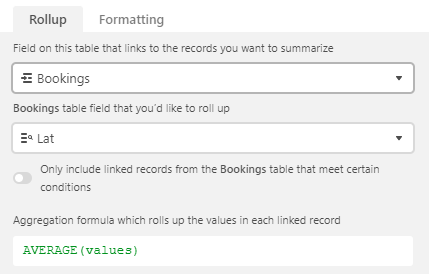
In Airtable the rollup with average() fails with NaN
Does anyone know another way of averaging coordinates?
PS: Also tried to remove the dot with SUBSTITUTE(Lat,".","",1) but am getting an error.
Best answer by Ricardo11
Solution and final setup:
Coordinates / text field: 40.096975653171484, 19.753827595322253
Lat / number field: IF(Coordinates,VALUE(TRIM(LEFT(Coordinates,FIND(",",Coordinates)-1))))
Lon / number field: IF(Coordinates,VALUE(TRIM(RIGHT(Coordinates,LEN(Coordinates)-FIND(",",Coordinates)))))
This enable the rollup with average(values), I’m using it with the Mapbox API to plot POIs on maps. The average of the POIs is needed to center the map.
Good point, the original coordinates is a text field as otherwise it couldn’t store the 41.3310413,19.7828039 value. I believe because of this the consecutive formula split lat/lon fields can’t be recognized as numbers. Perhaps it’s also the dot, I tried to get around this with the substitute function but failed.
Good point, the original coordinates is a text field as otherwise it couldn’t store the 41.3310413,19.7828039 value. I believe because of this the consecutive formula split lat/lon fields can’t be recognized as numbers. Perhaps it’s also the dot, I tried to get around this with the substitute function but failed.
Yeah, just make sure both your Lat and Long fields are number fields (or a formula field resulting in a number), and then you should be fine.
Coordinates / text field: 40.096975653171484, 19.753827595322253
Lat / number field: IF(Coordinates,VALUE(TRIM(LEFT(Coordinates,FIND(",",Coordinates)-1))))
Lon / number field: IF(Coordinates,VALUE(TRIM(RIGHT(Coordinates,LEN(Coordinates)-FIND(",",Coordinates)))))
This enable the rollup with average(values), I’m using it with the Mapbox API to plot POIs on maps. The average of the POIs is needed to center the map.