Auto update a field when record is added

  • June 7, 2019
  • 13 replies
  • 107 views

Forum|alt.badge.img+5
  • Participating Frequently

I have a table of people who could potentially be used as presenters. When a new record is added to the table (usually via a form), I want the field “Status” to update to “Potential”. As a completely separate step, when an event is connected to that person’s record I want the Status to update to “Active”. Any advice? I’ve used zapier for a few things in Airtable, but haven’t been able to figure this out. Thanks in advance.

13 replies

JonathanBowen
Forum|alt.badge.img+18

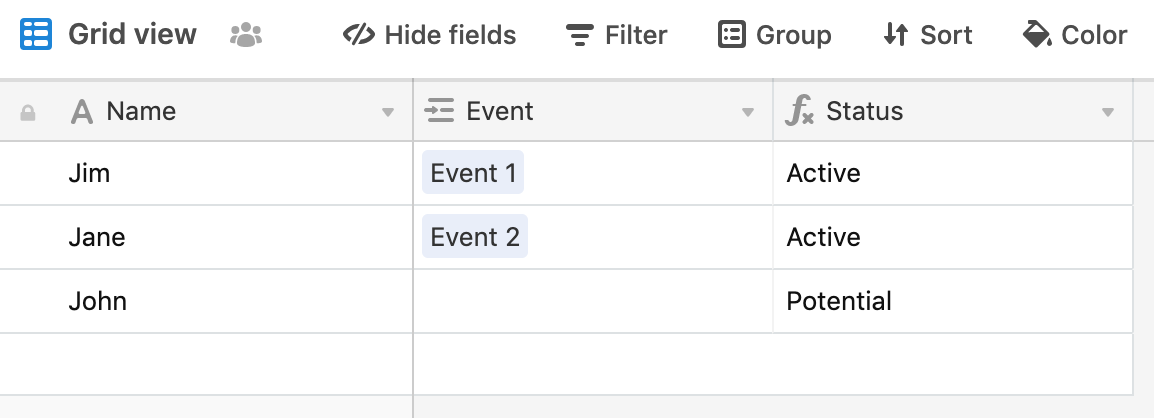
Hi @KVC - it sounds like “Potential” is the default status. If so, I would do something like this:

Then your status field is:

IF(Event, 'Active', 'Potential')

So status shows as “potential” for all records, but if an event is linked, then it changes to “active”.

Is this what you are after?

JB


Forum|alt.badge.img+5
  • Author
  • Participating Frequently
  • June 7, 2019

Hi @JonathanBowen. Thanks! Yes, but sometimes a third status comes into play that is updated manually…so not sure how that fits in?


JonathanBowen
Forum|alt.badge.img+18

Hi @JonathanBowen. Thanks! Yes, but sometimes a third status comes into play that is updated manually…so not sure how that fits in?


What is the 3rd status and what triggers it? Or more specifically what real-world circumstances mean the 3rd status is used?


Forum|alt.badge.img+5
  • Author
  • Participating Frequently
  • June 7, 2019

@JonathanBowen the third status is “Inactive” and I manually change Potential or Active to Inactive if after speaking we someone we determine they are not currently a good fit for what we are looking for.


JonathanBowen
Forum|alt.badge.img+18

OK, what about this:

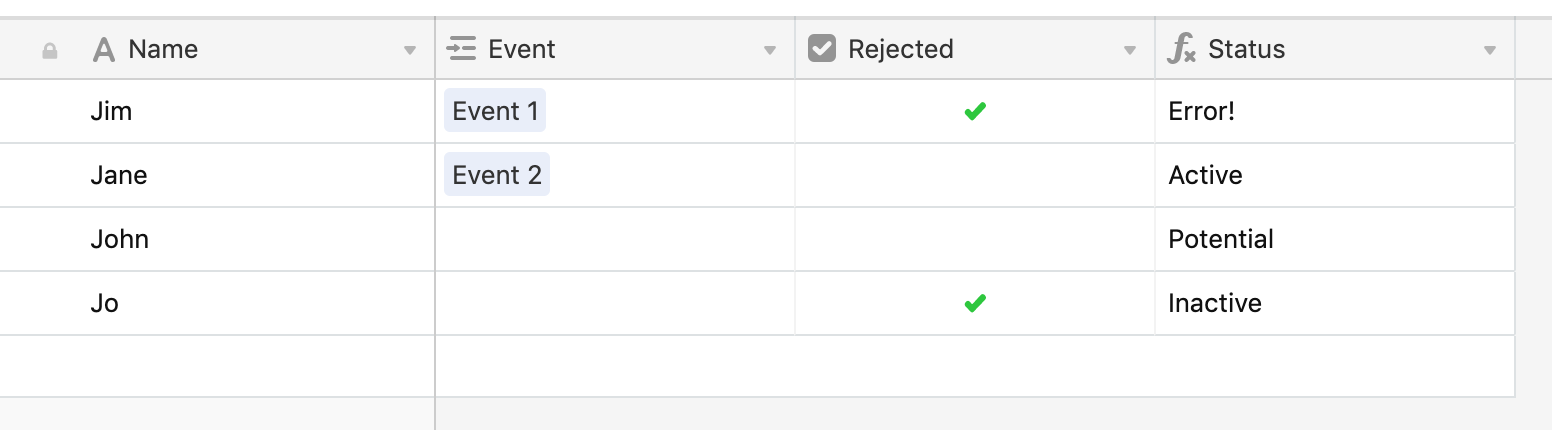
Add a checkbox (or could equally be a “notes”/text field) to “reject” the presenter, then the status formula is:

IF(
  AND({Event}, {Rejected}),
  'Error!',
  IF(
    {Event},
    'Active',
    IF(
      NOT({Rejected}),
      'Potential',
      'Inactive'
    )
  )
)

So this captures the 4 possible combinations:

  • Event and rejected (presumably this shouldn’t happen, hence “error”)
  • Event and not rejected - active
  • No event and not rejected - potential
  • No event and rejected - inactive

Any good?

JB


JonathanBowen
Forum|alt.badge.img+18

OK, what about this:

Add a checkbox (or could equally be a “notes”/text field) to “reject” the presenter, then the status formula is:

IF(
  AND({Event}, {Rejected}),
  'Error!',
  IF(
    {Event},
    'Active',
    IF(
      NOT({Rejected}),
      'Potential',
      'Inactive'
    )
  )
)

So this captures the 4 possible combinations:

  • Event and rejected (presumably this shouldn’t happen, hence “error”)
  • Event and not rejected - active
  • No event and not rejected - potential
  • No event and rejected - inactive

Any good?

JB


Oh, hang on, you can have an event and rejected, yes?


JonathanBowen
Forum|alt.badge.img+18

So that would need this for the status formula:

IF(
  {Rejected},
  'Inactive',
  IF(
    {Event},
    'Active',
    'Potential'
  )
)

Forum|alt.badge.img+5
  • Author
  • Participating Frequently
  • June 7, 2019

So that would need this for the status formula:

IF(
  {Rejected},
  'Inactive',
  IF(
    {Event},
    'Active',
    'Potential'
  )
)

Yes, this works, thank you so much! My only other wish list item would be if we could color code the words like a single select :winking_face:


JonathanBowen
Forum|alt.badge.img+18

Yes, this works, thank you so much! My only other wish list item would be if we could color code the words like a single select :winking_face:


Haha - can’t help with that one I’m afraid :slightly_smiling_face:


Kamille_Parks11
Forum|alt.badge.img+27

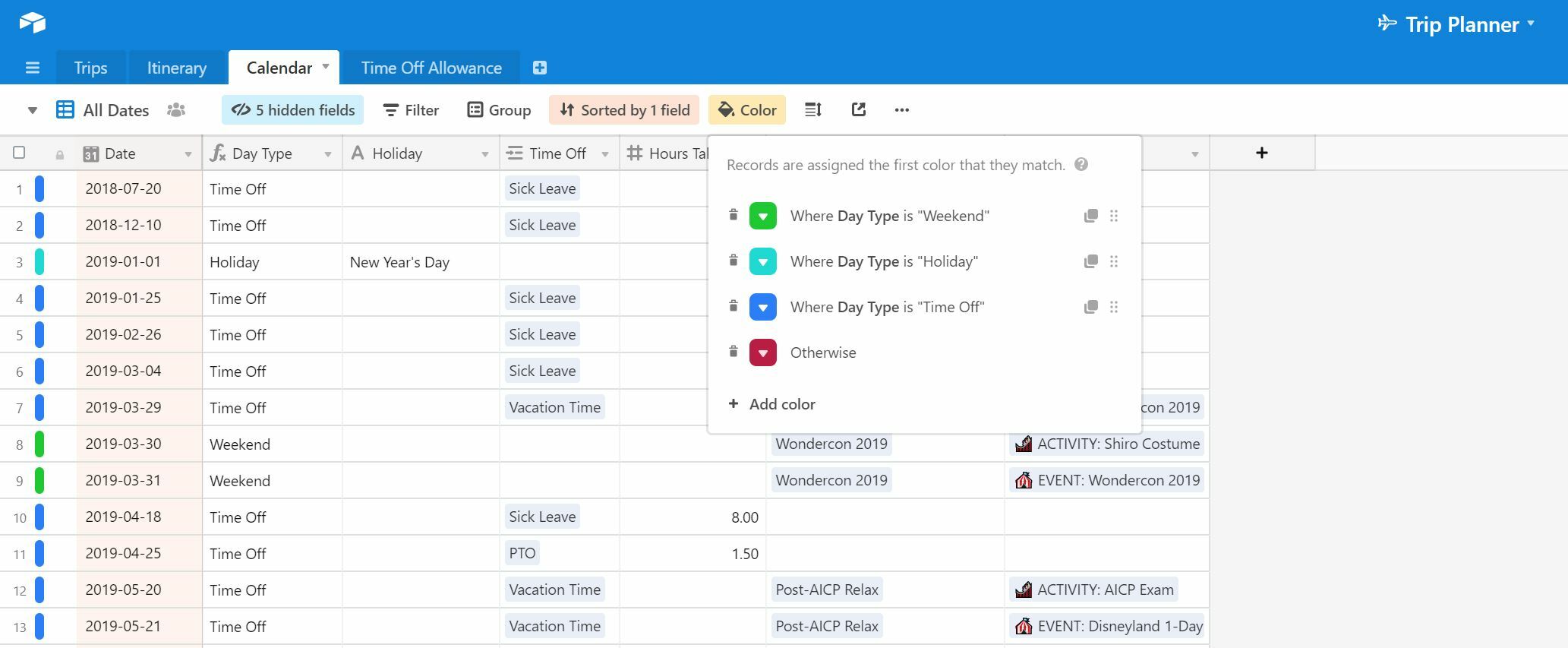
If you have a pro account, you could color code the record based on the formula value.


Forum|alt.badge.img+5
  • Author
  • Participating Frequently
  • June 10, 2019

If you have a pro account, you could color code the record based on the formula value.


I do have a pro account. Could you provide an example? Thanks!


Kamille_Parks11
Forum|alt.badge.img+27

In the example above, I have a table that is color coded based on a calculated field’s value.


Forum|alt.badge.img+5
  • Author
  • Participating Frequently
  • June 10, 2019

In the example above, I have a table that is color coded based on a calculated field’s value.


Oh, yes, I know how to do that. I was hoping to get the words in the field to be color coded like they in a single select. Thanks for showing me this!