

Hi everybody :slightly_smiling_face: !
I working on a simple DATETIME_DIFF() formula but the results I get seems off by on day and I really don’t understand why :confused: … Thus, I don’t seem to be able to correct that :confused: …
The current situation is :
- I’ve got a
{Date}roll-up field simply pulling out a date with aMAX(value)from another table of my base. - This
{Date}field format is set up as local and include a 24h time field.
What I simply want to do is to have in a formula field the numbers of days since that {Date}.
I used this formula to get to that result :
DATETIME_DIFF(TODAY(),{Date},'days')
… which works except for a missing day
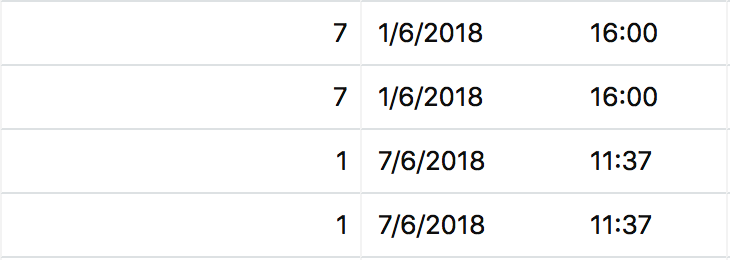
(The 1st number is my DATETIME_DIFF() formula, the 2nd, the {Date} roll-up field)
As of NOW(), where I stand, we are the 9th June 2018 (9/6/2018), so the formula should give me an 8 for the 1/6/2018 and a 2 for the 7/6/2018, am I correct ?
My big question is :
How do I correct this ?
Do I need to change the formula in the roll-up field ? (maybe adding a SET_TIMEZONE() somewhere ?)
Is it because of the time field ? or the general formatting of my roll-up field ?
Change TODAY() in the formula field by a NOW(), TONOW()?
… :thinking:
I’ve searched the community and found some threads reporting this as a bug, but I couldn’t found a solution or a work around…
As often, I feel I’m missing something simple :thinking: …
Many big thank you in advance for the help :winking_face: !
