IF statements with field types

  • July 12, 2018
  • 3 replies
  • 26 views

Can you write a logical if statement based on a data base. So if the information in the database exist it populates and fills out the fields as it does now using look up. If it returns N/A can the field types for each field in that record then be single line text for a manual input. Either by the person in the form filling it out or me inside the table.


3 replies

Forum|alt.badge.img+17

If I understand you, you could:

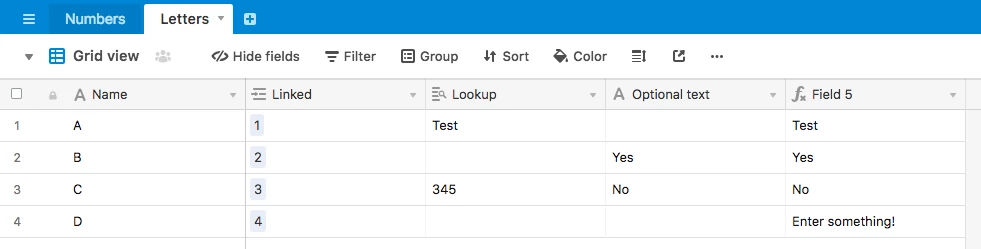
  1. Create a Lookup to get the original linked data
  2. Create a SingleText field to enter the data manually if you want.
  3. Create a Formula field which will be the final field where you can see the result: IF(Manual,Manual,IF(Original, Original, 'Enter something!')))

  • Author
  • New Participant
  • July 12, 2018

If I understand you, you could:

  1. Create a Lookup to get the original linked data
  2. Create a SingleText field to enter the data manually if you want.
  3. Create a Formula field which will be the final field where you can see the result: IF(Manual,Manual,IF(Original, Original, 'Enter something!')))

Thank you. As of now i have it done with a look up to link the data. But can i do it with a formula in the field to automatically link it like look up and if the look up returns empty to switch the field to manully enter the information ?


Forum|alt.badge.img+17

Thank you. As of now i have it done with a look up to link the data. But can i do it with a formula in the field to automatically link it like look up and if the look up returns empty to switch the field to manully enter the information ?


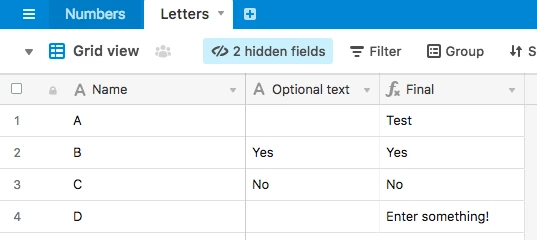
No, you can’t add a formula in a Lookup, nor add a lookup in a Formula. But you could hide the Lookup field that you have.

You can’t switch the type of a field in just one record, you do for all of them (this is not Excel). You can add the third field I told.

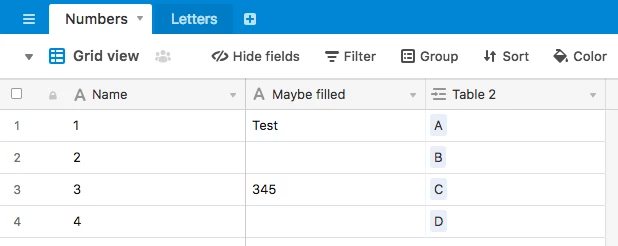
Screenshots:

Cleaner:

Formula:

IF({Optional}, {Optional}, IF(Lookup, Lookup, "Enter something!"))