Linking Records in Different Tables Automatically

  • January 25, 2020
  • 8 replies
  • 71 views

I have a table with 350 records (projects) and another table with about 200 records (clients). Is there a way to link a record in the projects table to a field in the client table without having to individually link 350 records to a specific record in the client table? I am thinking something like a VLOOKUP command in Excel, or an IF command that returns a certain record. I just can’t see having to individually create a specific link for all 350 records. What am I missing?


8 replies

Forum|alt.badge.img+19
  • Inspiring
  • January 25, 2020

Hey Steve - Yes there is. You can do this via the “Link to” feature in Airtable:

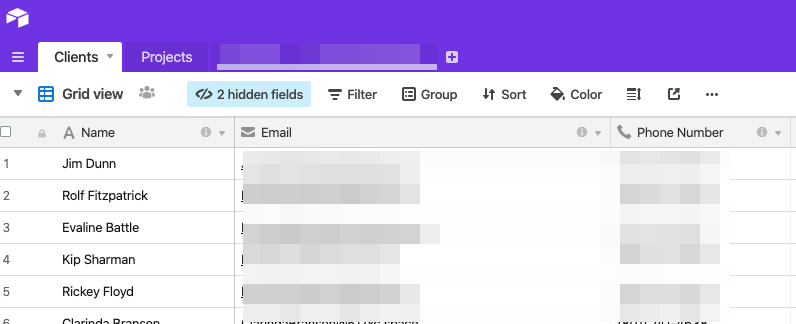
So let’s take this table with example data:

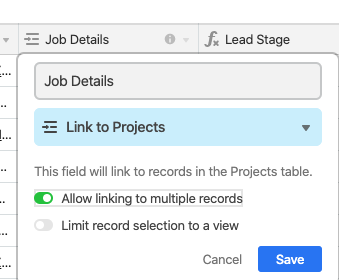
Here we have a list of clients, and we want to link them to projects - We do this via “Link to” field

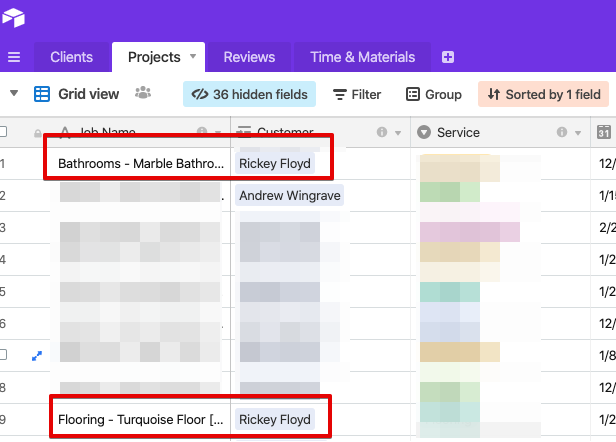
Like the above image. Now, in projects, we can see the projects broken out by the client

Hope that helps!


  • Author
  • New Participant
  • January 25, 2020

Thank you for that. But don’t I still have to go into each of 350 records individually and create the link? I am trying to avoid that and have the column automatically link to another table based on some criteria in the table I am linking from.


Forum|alt.badge.img+19
  • Inspiring
  • January 25, 2020

Hey Steve,

When you change the field to a Link_To, providing the Field text is the same, Airtable will automatically link every field


  • Author
  • New Participant
  • January 25, 2020

But I still have to go to each cell and create the link to the correct record in the other table?

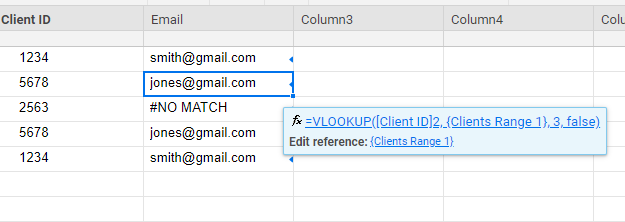
I have also used Smartsheet and it allows me to copy a formula down a column to do a VLOOKUP:


Forum|alt.badge.img+19
  • Inspiring
  • January 25, 2020

But I still have to go to each cell and create the link to the correct record in the other table?

I have also used Smartsheet and it allows me to copy a formula down a column to do a VLOOKUP:


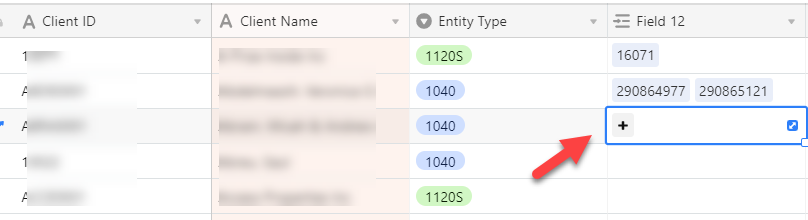
I’m assuming Field 12 is Project ID?

You shouldn’t have to be doing this at all - I’m not understanding where you’re blocked, if you already have a list of the Client IDs and Project IDs, you can paste those Field12s as a comma separated list?


  • Author
  • New Participant
  • January 25, 2020

I’m assuming Field 12 is Project ID?

You shouldn’t have to be doing this at all - I’m not understanding where you’re blocked, if you already have a list of the Client IDs and Project IDs, you can paste those Field12s as a comma separated list?


Field 12 is the Client ID. I would love to just reference a Client ID in my project table, go out to look up that Client ID in my client table, and return an email, address, etc. The only way I see to do that is create Link column and then link a record but do that for each, individual record.

I am thinking I need to use Smartsheet for this since it has a Vlookup capability.


Forum|alt.badge.img+19
  • Inspiring
  • January 25, 2020

Field 12 is the Client ID. I would love to just reference a Client ID in my project table, go out to look up that Client ID in my client table, and return an email, address, etc. The only way I see to do that is create Link column and then link a record but do that for each, individual record.

I am thinking I need to use Smartsheet for this since it has a Vlookup capability.


Initially, yes - You will need to use a vlookup to get the data into Airtable, but once that’s done, you should be able to automate the process with Zapier or Integromat


Forum|alt.badge.img+19
  • Inspiring
  • January 25, 2020

Hey @Steve_T - Try making the first field a formula, instead of the client ID - So it would be something like

{Client ID} & " - " & " {Client Name}

That way you can paste a list of client IDs, and it will do all the lookups for you automatically.