Need help splitting text variants into columns

  • November 30, 2021
  • 3 replies
  • 31 views

Forum|alt.badge.img+2

Hey there,
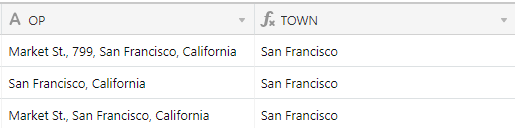
For a specific field “OPPORTUNITY” that I have integrated into Airtable, I get three type of inputs. I need a formula to be able to separate this field in 4 columns.

Input posibilities in “OPPORTUNITY” Field:

  • Option 1: Opportunity in TOWN, CITY
  • Option 2: Opportunity in STREET, TOWN, CITY
  • Option 3: Opportunity in STREET, NUMBER, TOWN, CITY

I need a formula to be able to create the following columns automatically:

  • STREET
  • NUMBER
  • TOWN
  • CITY

Any idea?

Thanks in advance!!
:slightly_smiling_face:

GM

3 replies

Alexey_Gusev
Forum|alt.badge.img+25
  • Brainy
  • November 30, 2021

Hi,

LEN(OP)-LEN(SUBSTITUTE(OP, ',' , '')) to get number of commas
(1-3 in your case)
i will mark the statement as X.
OP is OPORTUNITY (i suggest to rename field to short simple name, put formula, ensure it works, and then rename to original, formula will update itself)

STREET: IF(X>1,LEFT(OP,FIND(’,’,OP)-1),’’)

for others, use SWITCH for different number of commas
use MID for words that are inside, RIGHT for last word, LEN(OP) for end position
use FIND 3rd parameter to find 2nd, 3rd comma

location of second comma FIND(’,’, OP, 1+FIND(’,’,OP))
third: FIND(’,’,OP,1+FIND(’,’,OP,1+FIND(’,’,OP)))

for example, for TOWN:
SWITCH(
LEN(OP)-LEN(SUBSTITUTE(OP, ‘,’ , ‘’))
,1,LEFT(OP,FIND(’,’,OP)-1)
,2,MID(OP, 2+FIND(’,’,OP), -1+FIND(’,’,OP,1+FIND(’,’,OP))-FIND(’,’,OP)-1)
,3,MID(OP, 2+FIND(’,’,OP,1+FIND(’,’,OP)),
-1+FIND(’,’,OP,1+FIND(’,’,OP,1+FIND(’,’,OP)))-FIND(’,’,OP,1+FIND(’,’,OP))-1)
,‘wrong_commas’
)

and so on.
Hope it will help you :slightly_smiling_face:


Forum|alt.badge.img+2
  • Author
  • New Participant
  • December 2, 2021

Hi,

LEN(OP)-LEN(SUBSTITUTE(OP, ',' , '')) to get number of commas
(1-3 in your case)
i will mark the statement as X.
OP is OPORTUNITY (i suggest to rename field to short simple name, put formula, ensure it works, and then rename to original, formula will update itself)

STREET: IF(X>1,LEFT(OP,FIND(’,’,OP)-1),’’)

for others, use SWITCH for different number of commas
use MID for words that are inside, RIGHT for last word, LEN(OP) for end position
use FIND 3rd parameter to find 2nd, 3rd comma

location of second comma FIND(’,’, OP, 1+FIND(’,’,OP))
third: FIND(’,’,OP,1+FIND(’,’,OP,1+FIND(’,’,OP)))

for example, for TOWN:
SWITCH(
LEN(OP)-LEN(SUBSTITUTE(OP, ‘,’ , ‘’))
,1,LEFT(OP,FIND(’,’,OP)-1)
,2,MID(OP, 2+FIND(’,’,OP), -1+FIND(’,’,OP,1+FIND(’,’,OP))-FIND(’,’,OP)-1)
,3,MID(OP, 2+FIND(’,’,OP,1+FIND(’,’,OP)),
-1+FIND(’,’,OP,1+FIND(’,’,OP,1+FIND(’,’,OP)))-FIND(’,’,OP,1+FIND(’,’,OP))-1)
,‘wrong_commas’
)

and so on.
Hope it will help you :slightly_smiling_face:


This worked!! Thanks!!


Justin_Barrett
Forum|alt.badge.img+21

Here are some alternate formulas that use regular expressions:

Street:

REGEX_EXTRACT(OP, SWITCH(LEN(OP) - LEN(SUBSTITUTE(OP, ",", "")), 1, "", "([^,]+)"))

Number:

REGEX_EXTRACT(OP, SWITCH(LEN(OP) - LEN(SUBSTITUTE(OP, ",", "")), 3, "^(?:[^,]*), ?([^,]+)", ""))

Town:

REGEX_EXTRACT(OP, "([^,]*), ?([^,]+)$")

City:

REGEX_EXTRACT(OP, "([^,]+)$")