
Solved

Stop "Suggested Views" from showing

  • November 5, 2020
  • 2 replies
  • 31 views

Is it possible to get the “Suggested Views” to stop showing in the sidebar? This takes up a lot of prime real estate. On my screen I can only see 5 of my many views :stuck_out_tongue:
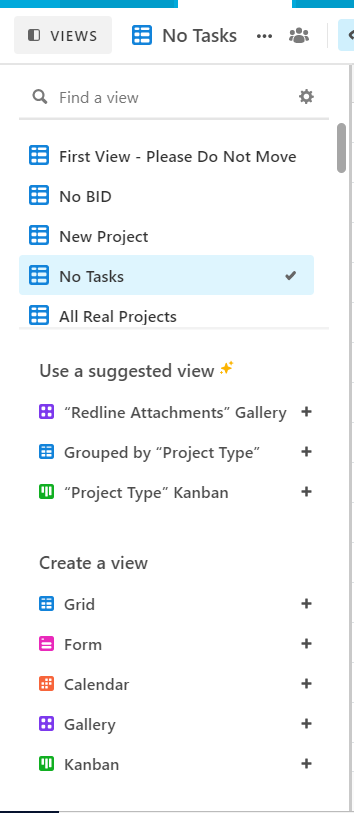
Also, I would prefer to have a single “Create a view button”, but that’s more of a feature request.

Best answer by kuovonne

You can turn off the suggested views by clicking the settings gear in the top right corner of the views sidebar.

This topic has been closed for replies.

2 replies

kuovonne
Forum|alt.badge.img+29
  • Brainy
  • Answer
  • November 6, 2020

You can turn off the suggested views by clicking the settings gear in the top right corner of the views sidebar.


  • Author
  • Known Participant
  • November 6, 2020

You can turn off the suggested views by clicking the settings gear in the top right corner of the views sidebar.


Goregeous! Thank you :slightly_smiling_face: