
I’m creating an employee directory and I’d like to have a record (cell) display an emoji or change colors one week before that person’s birthday. Has anyone figured out how to do that?
- Home
- Community
- Ask the Community
- Other Questions
- Upcoming Birthday Notification
Upcoming Birthday Notification
- May 29, 2018
- 36 replies
- 200 views
This topic has been closed for replies.
36 replies
 +4
+4- Known Participant
- May 29, 2018
Assuming you’ve created a DateOfBirth (Or Birthday, or Whatever) this could work (I didn’t really test it) by adding formula field to your table:
IF(IS_SAME(DATEADD({DateOfBirth},-7,'days'),{DateOfBirth},'L'),"✅","")
If it works, the ’L’ can be change to your liking :winking_face:
- Inspiring
- May 29, 2018
There are a lot of threads like this, the easiest way is using DATETIME_DIFF function.
- Author
- Participating Frequently
- May 29, 2018
Assuming you’ve created a DateOfBirth (Or Birthday, or Whatever) this could work (I didn’t really test it) by adding formula field to your table:
IF(IS_SAME(DATEADD({DateOfBirth},-7,'days'),{DateOfBirth},'L'),"✅","")
If it works, the ’L’ can be change to your liking :winking_face:
Yes a Birthday column is created but unfortunately it didn’t work
- Inspiring
- May 29, 2018
Yes a Birthday column is created but unfortunately it didn’t work
This is not quite so simple as the comments above seem to indicate due to the need to reconcile the date of Birth to the current year.
Is your Birthday field a “Date” field (it includes the “Year” of birth), or is it a “Single Line Text” field that just has the month/day “5/29”?
- Author
- Participating Frequently
- May 29, 2018
This is not quite so simple as the comments above seem to indicate due to the need to reconcile the date of Birth to the current year.
Is your Birthday field a “Date” field (it includes the “Year” of birth), or is it a “Single Line Text” field that just has the month/day “5/29”?
It’s a “Date” field MM/DD/YYYY.
I’m using the Employee Directory template and I wanted to add an additional column that would put an emoji.
Could it be that it’s not working because I’m on the free version?
- Inspiring
- May 29, 2018
It’s a “Date” field MM/DD/YYYY.
I’m using the Employee Directory template and I wanted to add an additional column that would put an emoji.
Could it be that it’s not working because I’m on the free version?
No, you can do this with the free version.
It’s just that, when you compare dates with a formula like DATETIME_DIFF(), it’s going to take the year into account. You want to compare to that employees “Next Birthday”, not their actual “Birth Date”, to get a notification of “1 Week” until their Birthday. It’s just a little more involved, and there are actually a few different approaches you could take. I’m working on what might be the best approach right now.
- Author
- Participating Frequently
- May 29, 2018
No, you can do this with the free version.
It’s just that, when you compare dates with a formula like DATETIME_DIFF(), it’s going to take the year into account. You want to compare to that employees “Next Birthday”, not their actual “Birth Date”, to get a notification of “1 Week” until their Birthday. It’s just a little more involved, and there are actually a few different approaches you could take. I’m working on what might be the best approach right now.
Yea I realized the year might have something to do with it when you mentioned it before. I really appreciate you taking some time to try and help!
+4- Known Participant
- May 29, 2018
Yes a Birthday column is created but unfortunately it didn’t work
I’m sorry :confused: … I was too quick and distracted so I didn’t thought about everything :sweat: :confused: .
I’m leaving the space for the experts :winking_face: …
- Inspiring
- May 29, 2018
Yea I realized the year might have something to do with it when you mentioned it before. I really appreciate you taking some time to try and help!
Ok, next question -
In order to do this, I need to calculate the persons age, as well as the date of their next birthday. Would you like those to be explicit fields that you can see in your table, or would you like them wrapped up into a single field that just gives you a notification of their birth week?
- Author
- Participating Frequently
- May 29, 2018
Ok, next question -
In order to do this, I need to calculate the persons age, as well as the date of their next birthday. Would you like those to be explicit fields that you can see in your table, or would you like them wrapped up into a single field that just gives you a notification of their birth week?
Just the notification of their birthday week. Don’t need to display the age
- Inspiring
- May 29, 2018
Just the notification of their birthday week. Don’t need to display the age
Alright - here’s what I came up with:
First of all, Airtable has some strange quirks under the hood when it comes to dates, times, and timezone recognition. For that reason, in order to make this work, you’ll need to enable the “Time” portion of your “Birthday” field:
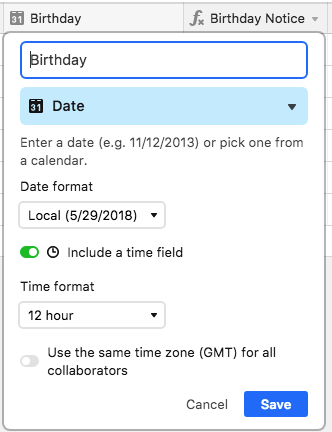
It’s unfortunate, but you’ll see that if you switch that off, the dates in the calculation are thrown off by 1 day, even though I am using timezone conversion in the equation (perhaps I can figure out how to avoid this at a later time, but for now, the easy work-around is just to enable the “Time” portion, and set it to 12:00am as a standard).
And then here is your formula for the Notification:
IF(
  IS_SAME(
    DATETIME_FORMAT(
      SET_TIMEZONE(
        DATEADD(
          Birthday,
          DATETIME_DIFF(
            TODAY(),
            Birthday,
            'years'
          ) + 1,
          'year'
        ),
        'America/Phoenix'
      ),
      'L'
    ),
    TODAY()
  ),
  "🎉 🎂 🎉",
  IF(
    DATETIME_DIFF(
      DATETIME_FORMAT(
        SET_TIMEZONE(
          DATEADD(
            Birthday,
            DATETIME_DIFF(
              TODAY(),
              Birthday,
              'years'
            ) + 1,
            'year'
          ),
          'America/Phoenix'
        ),
        'L'
      ),
      TODAY(),
      'days'
    ) < 8,
    "🎂"
  )
)
This will show :birthday: when it is the week of a person’s birthday (within 7 days, inclusive), and will show :tada: :birthday: :tada: on the day of their birthday.
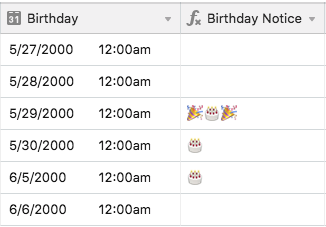
EDIT:
Almost forgot - you need to replace every instance of 'America/Phoenix' (there are 2) in the formula with your timezone from this list:

Supported timezones for SET_TIMEZONE
The SET_TIMEZONE function will allow you to set the timezone for the data from a date type field. This is written in the form "SET_TIMEZONE(datetime, 'timezone identifier')," in which the...
And, of course, use whatever emoji’s or text you want in what get’s displayed…
- Author
- Participating Frequently
- May 29, 2018
Alright - here’s what I came up with:
First of all, Airtable has some strange quirks under the hood when it comes to dates, times, and timezone recognition. For that reason, in order to make this work, you’ll need to enable the “Time” portion of your “Birthday” field:
It’s unfortunate, but you’ll see that if you switch that off, the dates in the calculation are thrown off by 1 day, even though I am using timezone conversion in the equation (perhaps I can figure out how to avoid this at a later time, but for now, the easy work-around is just to enable the “Time” portion, and set it to 12:00am as a standard).
And then here is your formula for the Notification:
IF(
  IS_SAME(
    DATETIME_FORMAT(
      SET_TIMEZONE(
        DATEADD(
          Birthday,
          DATETIME_DIFF(
            TODAY(),
            Birthday,
            'years'
          ) + 1,
          'year'
        ),
        'America/Phoenix'
      ),
      'L'
    ),
    TODAY()
  ),
  "🎉 🎂 🎉",
  IF(
    DATETIME_DIFF(
      DATETIME_FORMAT(
        SET_TIMEZONE(
          DATEADD(
            Birthday,
            DATETIME_DIFF(
              TODAY(),
              Birthday,
              'years'
            ) + 1,
            'year'
          ),
          'America/Phoenix'
        ),
        'L'
      ),
      TODAY(),
      'days'
    ) < 8,
    "🎂"
  )
)
This will show :birthday: when it is the week of a person’s birthday (within 7 days, inclusive), and will show :tada: :birthday: :tada: on the day of their birthday.
EDIT:
Almost forgot - you need to replace every instance of 'America/Phoenix' (there are 2) in the formula with your timezone from this list:
Supported timezones for SET_TIMEZONE
The SET_TIMEZONE function will allow you to set the timezone for the data from a date type field. This is written in the form "SET_TIMEZONE(datetime, 'timezone identifier')," in which the...
And, of course, use whatever emoji’s or text you want in what get’s displayed…
You. Are. AMAZING…It works!!!
Thank you :slightly_smiling_face:
EDIT:
@Jeremy_Oglesby actually it works when it actually is someone’s birthday, but for the days leading up to the person’s birthday it doesn’t work :confused:
EDIT
The code works!!! :slightly_smiling_face:

 +16
+16- Known Participant
- February 27, 2019
Alright - here’s what I came up with:
First of all, Airtable has some strange quirks under the hood when it comes to dates, times, and timezone recognition. For that reason, in order to make this work, you’ll need to enable the “Time” portion of your “Birthday” field:
It’s unfortunate, but you’ll see that if you switch that off, the dates in the calculation are thrown off by 1 day, even though I am using timezone conversion in the equation (perhaps I can figure out how to avoid this at a later time, but for now, the easy work-around is just to enable the “Time” portion, and set it to 12:00am as a standard).
And then here is your formula for the Notification:
IF(
  IS_SAME(
    DATETIME_FORMAT(
      SET_TIMEZONE(
        DATEADD(
          Birthday,
          DATETIME_DIFF(
            TODAY(),
            Birthday,
            'years'
          ) + 1,
          'year'
        ),
        'America/Phoenix'
      ),
      'L'
    ),
    TODAY()
  ),
  "🎉 🎂 🎉",
  IF(
    DATETIME_DIFF(
      DATETIME_FORMAT(
        SET_TIMEZONE(
          DATEADD(
            Birthday,
            DATETIME_DIFF(
              TODAY(),
              Birthday,
              'years'
            ) + 1,
            'year'
          ),
          'America/Phoenix'
        ),
        'L'
      ),
      TODAY(),
      'days'
    ) < 8,
    "🎂"
  )
)
This will show :birthday: when it is the week of a person’s birthday (within 7 days, inclusive), and will show :tada: :birthday: :tada: on the day of their birthday.
EDIT:
Almost forgot - you need to replace every instance of 'America/Phoenix' (there are 2) in the formula with your timezone from this list:
Supported timezones for SET_TIMEZONE
The SET_TIMEZONE function will allow you to set the timezone for the data from a date type field. This is written in the form "SET_TIMEZONE(datetime, 'timezone identifier')," in which the...
And, of course, use whatever emoji’s or text you want in what get’s displayed…
saved me couple of hours. you are great. thank you so much for your efforts.

 +21
+21- Inspiring
- February 28, 2019
saved me couple of hours. you are great. thank you so much for your efforts.
Odd. I copied the exact formula from above, but I get nothing on records where I’ve put a date, and an error on records with no date. No matter what date I enter for someone’s birthday with relation to the current date, the emojis never show.
EDIT: Okay, I got it to work (mostly) by removing the two “+ 1” references from the formula. They were shifting all the years ahead, and nothing was matching. However, there’s still something wrong with the date comparisons. They’re a few hours off or something, because it’s still 2/27 locally, but I only get the exact birthday match if I say the birthday is 2/28. I thought it might be a timezone thing, so I switched every possible date reference to use the SET_TIMEZONE() function, but it’s still not working. If I take the time element off of the birthday field, I can only get a match by setting the birthday to 3/1 (two days off), so now I’m even more confused.
- Inspiring
- February 28, 2019
Odd. I copied the exact formula from above, but I get nothing on records where I’ve put a date, and an error on records with no date. No matter what date I enter for someone’s birthday with relation to the current date, the emojis never show.
EDIT: Okay, I got it to work (mostly) by removing the two “+ 1” references from the formula. They were shifting all the years ahead, and nothing was matching. However, there’s still something wrong with the date comparisons. They’re a few hours off or something, because it’s still 2/27 locally, but I only get the exact birthday match if I say the birthday is 2/28. I thought it might be a timezone thing, so I switched every possible date reference to use the SET_TIMEZONE() function, but it’s still not working. If I take the time element off of the birthday field, I can only get a match by setting the birthday to 3/1 (two days off), so now I’m even more confused.
Odd partial-day time shifts are almost always caused by not having all of your date fields set to use (or not to use) UMT similarly. Take a look at this reply on UMT (aka GMT) issues in calculated datetimes. If yours is a problem that can’t be fixed simply by ensuring all date fields use (or don’t use) UMT, see the second item in this reply on easily restating your local time in terms of UMT.
+21- Inspiring
- February 28, 2019
Odd partial-day time shifts are almost always caused by not having all of your date fields set to use (or not to use) UMT similarly. Take a look at this reply on UMT (aka GMT) issues in calculated datetimes. If yours is a problem that can’t be fixed simply by ensuring all date fields use (or don’t use) UMT, see the second item in this reply on easily restating your local time in terms of UMT.
Your first link held the magic that fixed the problem. I replaced the portions of the formula above that calculated the birthday for the current year with your version, and everything works perfectly. The time option for the Birthday field is no longer necessary, which is an added bonus. Here’s the modified formula:
IF(
    IS_SAME(
        DATETIME_PARSE(
            DATETIME_FORMAT(
                Birthday,
                'MMMM D'
            ) & ' ' &
            YEAR(
                TODAY()
            ),
            'MMMM D YYYY'
        ),
        TODAY()
    ),
    "🎉 🎂 🎉",
    IF(
        ABS(DATETIME_DIFF(
            DATETIME_PARSE(
                DATETIME_FORMAT(
                    Birthday,
                    'MMMM D'
                ) & ' ' &
                YEAR(
                    TODAY()
                ),
                'MMMM D YYYY'
            ),
            TODAY(),
            'days'
        )) < 8,
        "🎂"
    )
)
EDIT: So there’s still a problem. The < 8 comparison means that any birthday date prior to the current date—which generates a negative difference—will trigger the second part of the condition. To fix this, I wrapped ABS() around the DATETIME_DIFF().
- New Participant
- February 19, 2020
Your first link held the magic that fixed the problem. I replaced the portions of the formula above that calculated the birthday for the current year with your version, and everything works perfectly. The time option for the Birthday field is no longer necessary, which is an added bonus. Here’s the modified formula:
IF(
    IS_SAME(
        DATETIME_PARSE(
            DATETIME_FORMAT(
                Birthday,
                'MMMM D'
            ) & ' ' &
            YEAR(
                TODAY()
            ),
            'MMMM D YYYY'
        ),
        TODAY()
    ),
    "🎉 🎂 🎉",
    IF(
        ABS(DATETIME_DIFF(
            DATETIME_PARSE(
                DATETIME_FORMAT(
                    Birthday,
                    'MMMM D'
                ) & ' ' &
                YEAR(
                    TODAY()
                ),
                'MMMM D YYYY'
            ),
            TODAY(),
            'days'
        )) < 8,
        "🎂"
    )
)
EDIT: So there’s still a problem. The < 8 comparison means that any birthday date prior to the current date—which generates a negative difference—will trigger the second part of the condition. To fix this, I wrapped ABS() around the DATETIME_DIFF().
Justin, this is awesome, thank you so much!
One tweak I need though: I have a list of people and some do have birthdays and some don`t.
The formular you posted produces an “#ERROR!” once there is no birthday entry. Is there any way to hide that error output?
Thanks :slightly_smiling_face:
+21- Inspiring
- February 21, 2020
Justin, this is awesome, thank you so much!
One tweak I need though: I have a list of people and some do have birthdays and some don`t.
The formular you posted produces an “#ERROR!” once there is no birthday entry. Is there any way to hide that error output?
Thanks :slightly_smiling_face:
Welcome to the community, @Steffen_Pidun! :grinning_face_with_big_eyes: The easiest way to address that is to wrap the formula above inside another IF() function that only executes the rest if the {Birthday} field contains data:
IF(Birthday, [everything else in here] )- New Participant
- February 21, 2020
Justin, thanks for your time. :slightly_smiling_face:
I played around with your idea but I`m afraid I cannot get this to work.
Would you mind pasting the whole formular in here?
+21- Inspiring
- February 23, 2020
Justin, thanks for your time. :slightly_smiling_face:
I played around with your idea but I`m afraid I cannot get this to work.
Would you mind pasting the whole formular in here?
It’s literally just wrapping a single IF() function around the longer formula I wrote above. Assuming the birthday date field in your base is named Birthday, it should work. Just for completeness, though, here’s the whole shebang:
IF(Birthday,
    IF(
        IS_SAME(
            DATETIME_PARSE(
                DATETIME_FORMAT(
                    Birthday,
                    'MMMM D'
                ) & ' ' &
                YEAR(
                    TODAY()
                ),
                'MMMM D YYYY'
            ),
            TODAY()
        ),
        "🎉 🎂 🎉",
        IF(
            ABS(DATETIME_DIFF(
                DATETIME_PARSE(
                    DATETIME_FORMAT(
                        Birthday,
                        'MMMM D'
                    ) & ' ' &
                    YEAR(
                        TODAY()
                    ),
                    'MMMM D YYYY'
                ),
                TODAY(),
                'days'
            )) < 8,
            "🎂"
        )
    )
)
 +18
+18- Inspiring
- February 24, 2020
It’s literally just wrapping a single IF() function around the longer formula I wrote above. Assuming the birthday date field in your base is named Birthday, it should work. Just for completeness, though, here’s the whole shebang:
IF(Birthday,
    IF(
        IS_SAME(
            DATETIME_PARSE(
                DATETIME_FORMAT(
                    Birthday,
                    'MMMM D'
                ) & ' ' &
                YEAR(
                    TODAY()
                ),
                'MMMM D YYYY'
            ),
            TODAY()
        ),
        "🎉 🎂 🎉",
        IF(
            ABS(DATETIME_DIFF(
                DATETIME_PARSE(
                    DATETIME_FORMAT(
                        Birthday,
                        'MMMM D'
                    ) & ' ' &
                    YEAR(
                        TODAY()
                    ),
                    'MMMM D YYYY'
                ),
                TODAY(),
                'days'
            )) < 8,
            "🎂"
        )
    )
)
Hi Justin, what software do you use to build this formula? I tried to do this in a simple texteditor but the tabs are positioned differently.
Regards,
André
- New Participant
- February 24, 2020
Thanks Justin, your help and time is very much appreciated :slightly_smiling_face:
+21- Inspiring
- February 24, 2020
Hi Justin, what software do you use to build this formula? I tried to do this in a simple texteditor but the tabs are positioned differently.
Regards,
André
I use BBEdit on the Mac for editing complex formulas. If it’s not nested too deeply, I’ll do it directly in the Airtable editor. Depending on your editor, you may be able to edit the tab settings to your liking.
- New Participant
- September 14, 2020
It’s literally just wrapping a single IF() function around the longer formula I wrote above. Assuming the birthday date field in your base is named Birthday, it should work. Just for completeness, though, here’s the whole shebang:
IF(Birthday,
    IF(
        IS_SAME(
            DATETIME_PARSE(
                DATETIME_FORMAT(
                    Birthday,
                    'MMMM D'
                ) & ' ' &
                YEAR(
                    TODAY()
                ),
                'MMMM D YYYY'
            ),
            TODAY()
        ),
        "🎉 🎂 🎉",
        IF(
            ABS(DATETIME_DIFF(
                DATETIME_PARSE(
                    DATETIME_FORMAT(
                        Birthday,
                        'MMMM D'
                    ) & ' ' &
                    YEAR(
                        TODAY()
                    ),
                    'MMMM D YYYY'
                ),
                TODAY(),
                'days'
            )) < 8,
            "🎂"
        )
    )
)
Thank you so much! I’m so happy with this. You make my day :slightly_smiling_face: :slightly_smiling_face:

- New Participant
- November 13, 2020
Just want to remind folks that some people have no clue where or how to even implement this script.
Enter your E-mail address. We'll send you an e-mail with instructions to reset your password.
Scanning file for viruses.
Sorry, we're still checking this file's contents to make sure it's safe to download. Please try again in a few minutes.
OKThis file cannot be downloaded
Sorry, our virus scanner detected that this file isn't safe to download.
OK