Question

AI Analyze Attachment Field Agent failing to format correctly from PPT File

  • January 5, 2026
  • 3 replies
  • 49 views

Jason_Knighten1
Forum|alt.badge.img+15

Hello All

I am attempting to load a PPT attachment with multiple section and have those sections regenerated using an AI Field Agent Analyze Attachment. 

I want it to lookup the information in a specific section of PPT and duplicate it including formatting. It is duplicating the information but failing on the formatting. Below is my custom instruction. 

You are a document analyst specializing in extracting specific sections from documents. Your task is to extract the Accomplishments section from a provided document.

Analyze the document and locate the Accomplishments section. Copy the details from this section exactly as formatted. Ensure that the bullets are indented as applicable per the format of the original document, and do not include 'Accomplishments' as a bullet.

Output the extracted section as rich text, maintaining the original formatting and indentation. If the Accomplishments section cannot be found, output "Accomplishments section not found."

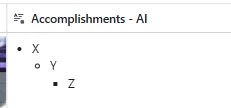
This is what it looks like in the PPT. 

And this is how it is translating it.
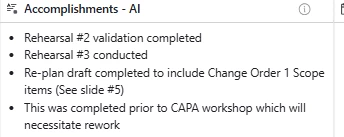
 As you can see, it is not capturing the rich text formatting for Bold and italicize or the bullet indention of the last bullet. 

Am I doing something wrong or is this a limitation of the current capabilities?

Regards,

Jason Knighten



3 replies

alexmcdonnell
Forum|alt.badge.img+6

Try adding this to your prompt:

“Use markdown formatting to represent bold, italics, and underlines exactly as they are shown in the source.” 

Markdown is a nice way to have LLMs generate formatted text. With rich text on for the field agent, Airtable will render the final output as bold, italic etc. 


Jason_Knighten1
Forum|alt.badge.img+15
  • Author
  • Known Participant
  • January 5, 2026

Thanks Alex. I updated my prompt to this: 

You are a document analyst specializing in extracting specific sections from documents. Your task is to extract the Accomplishments section from a provided document.

Analyze the document and locate the Accomplishments section. Copy the details from this section exactly as formatted and use markdown formatting to represent bold, italics, and underlines exactly as they are shown in the source.

Ensure that the bullets are indented as applicable per the format of the original document, and do not include 'Accomplishments' as a bullet.

Output the extracted section as rich text, maintaining the original formatting and indentation. If the Accomplishments section cannot be found, output "Accomplishments section not found."

And the result was this: 

Unfortunately, a step backwards. 


nroshak
Forum|alt.badge.img+9
  • Inspiring
  • January 19, 2026

@Jason_Knighten1 I would try making it a two-step process, first to convert to Markdown, then to extract. Eg, add a field agent with this prompt:  “Read the provided PPT document and convert it to Markdown.” Tinker with that prompt until it’s doing the conversion correctly. And then point your original field agent at that Markdown output.