Introducing Document Automator

  • June 14, 2022
  • 63 replies
  • 492 views

Show first post

63 replies

Tristan-ARG
Forum|alt.badge.img+14
  • Known Participant
  • June 15, 2022

Yeah, I’m confused about why Airtable didn’t invest more money into improving Page Designer, instead of rolling out another document creator that, in many ways, is more lacking than Page Designer?

Page Designer needs:

  1. Multipage support (for multiple records and/or linked records).
  2. Headers & footers.
  3. Ability to automatically generate PDF files.
  4. Ability to be automated via Airtable’s Automations.

Totally agree, instead of making a new APP, just add this four features to the Page Deisgner. That was enough.

Instead of a fully working feature there are three incomplete corpses.


kuovonne
Forum|alt.badge.img+29
  • Brainy
  • June 15, 2022

Yeah, I’m confused about why Airtable didn’t invest more money into improving Page Designer, instead of rolling out another document creator that, in many ways, is more lacking than Page Designer?

Page Designer needs:

  1. Multipage support (for multiple records and/or linked records).
  2. Headers & footers.
  3. Ability to automatically generate PDF files.
  4. Ability to be automated via Airtable’s Automations.

I believe that Airtable is working on both, just with different teams. At the Daretable conference a few months ago, Airtable staff mentioned that work was being done on Page Designer, but did not include a timeline or a feature list.


Forum|alt.badge.img+17

Yeah, I’m confused about why Airtable didn’t invest more money into improving Page Designer, instead of rolling out another document creator that, in many ways, is more lacking than Page Designer?

Page Designer needs:

  1. Multipage support (for multiple records and/or linked records).
  2. Headers & footers.
  3. Ability to automatically generate PDF files.
  4. Ability to be automated via Airtable’s Automations.

I agree. Seems odd to have another document creating option. Will confuse new users.

Though I will find it useful, it’s no where near as powerful as Automated Documents for Airtable | On2Air or Documint.


Forum|alt.badge.img+17

Without the ability to sort record lists/grids in automations, I’m not really able to use this feature.

For example: I want to produce a check-in list for front desk staff to sign in event attendees. I can query for RSVPs by event, but unless I can also sort that list by last name, it’s effectively useless.


You can do exactly that. Just sort / filter your view the way you want it first


Forum|alt.badge.img+15
  • Inspiring
  • June 15, 2022

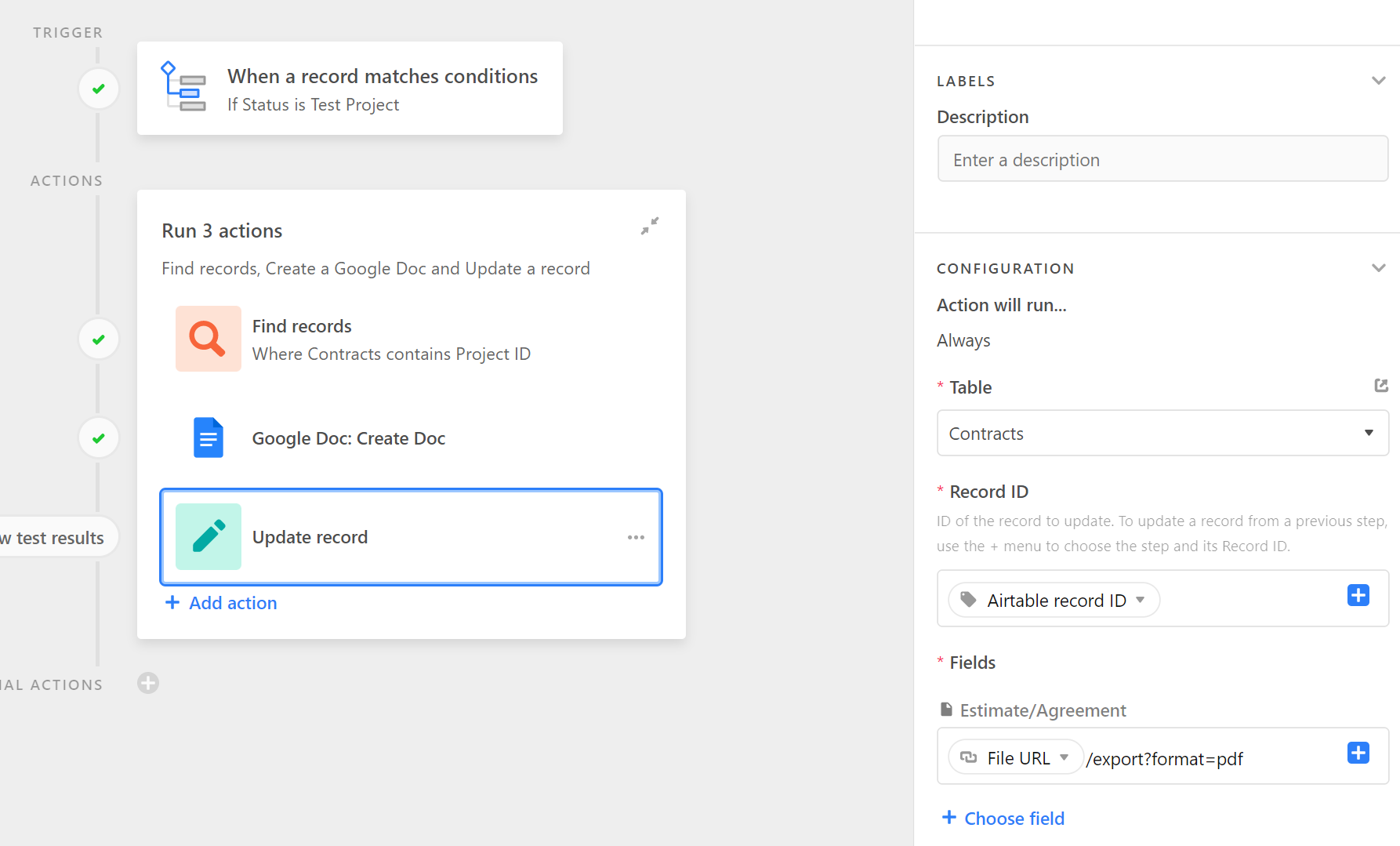
The hidden feature here that I learned from @openside and @Kamille_Parks is that after a document is generated, you can automatically generate a PDF of that document and then insert it into an Airtable attachment field.

You just need to add /export?format=pdf after the URL.

Note: This feature requires that your document be generated in a publicly-accessible folder.

Here’s a screenshot that @Kamille_Parks provided for me:


I wonder why is this feature hidden?


ScottWorld
Forum|alt.badge.img+35
  • Genius
  • June 15, 2022

I wonder why is this feature hidden?


Honestly, I think it’s because Airtable didn’t even know it existed. It’s a Google Docs feature that several Airtable consultants knew about, but the Airtable people probably didn’t. This is a fantastic example of why Airtable should value their consultant ecosystem more highly.

More tricks are listed here, which @openside turned me onto:


Rupert_Hoffsch1
Forum|alt.badge.img+21

Can only second what @ScottWorld and others have said here: Instead of coming up with a new way to create Google Docs, it would have been very good to improve Page Designer (esp. include automations).

I’ve been creating Google Docs out of Airtable (with the help of Zapier) for years and won’t stop using that solution with this new release by Airtable.


ScottWorld
Forum|alt.badge.img+35
  • Genius
  • June 15, 2022

Can only second what @ScottWorld and others have said here: Instead of coming up with a new way to create Google Docs, it would have been very good to improve Page Designer (esp. include automations).

I’ve been creating Google Docs out of Airtable (with the help of Zapier) for years and won’t stop using that solution with this new release by Airtable.


I recommend Make instead of Zapier, but yeah, the best thing about using external apps is that you can base those documents on complex document templates that contain formatting, headers & footers, fonts, colors, tables, margins, etc.

Even better, Make can ALSO create complex spreadsheets with Google Sheets based on a complex spreadsheet template as well.

So personally, I’m having some difficulty understanding why people would choose Airtable’s Document Automator over any of these other options.

It still seems to me like improving Page Designer would’ve been the path to go down, since Page Designer has already started taking its very first baby steps down the path of creating these sorts of complex documents.

In the meantime, here are 4 popular solutions for generating documents from Airtable that can do what people are looking to do:

  1. DocuMint — the original document creation app for Airtable. Creates PDF files.
  1. DocsAutomator — creates Google Docs documents or PDF files. 
  1. Make’s integrations — which can be integrated with any document-creation app of your choosing, even something as simple as custom Microsoft Word documents.

    If you’ve never used Make before, I’ve assembled a bunch of Make training resources in this thread. For example, here is one way that you can instantly trigger a Make automation from Airtable.
  1. Fillout’s advanced forms for Airtable — which offers hundreds of features that Airtable’s forms don’t offer, such as the ability to automatically generate custom PDF files from a form submission.

    I show off this feature on this Airtable podcast episode:

    Using Fillout to create an eSignature approval process with PDF file creation.

Howver, if you really need to have a database app that can create multi-page documents from within the app itself (i.e. no 3rd-party apps required), then you would need to upgrade to a more advanced database platform, such as my personal favorite, Apple’s FileMaker.

I used to be a File!aker developer for nearly 30 years, so if you need a referral to a top FileMaker developer, feel free to contact me through my website: Certified FileMaker Developer - ScottWorld

Hope this helps!

If you’d like to hire the best Airtable consultant to help you with this or anything Airtable-related, please feel free to contact me through my website: Airtable consultant — ScottWorld


Forum|alt.badge.img+13

Hi David,

It is possible to achieve what you describe by taking the following steps:

  1. Create a view containing the data you want, sorted the way you want
  2. In automations, add a “Find records” action based on the view you created in step 1
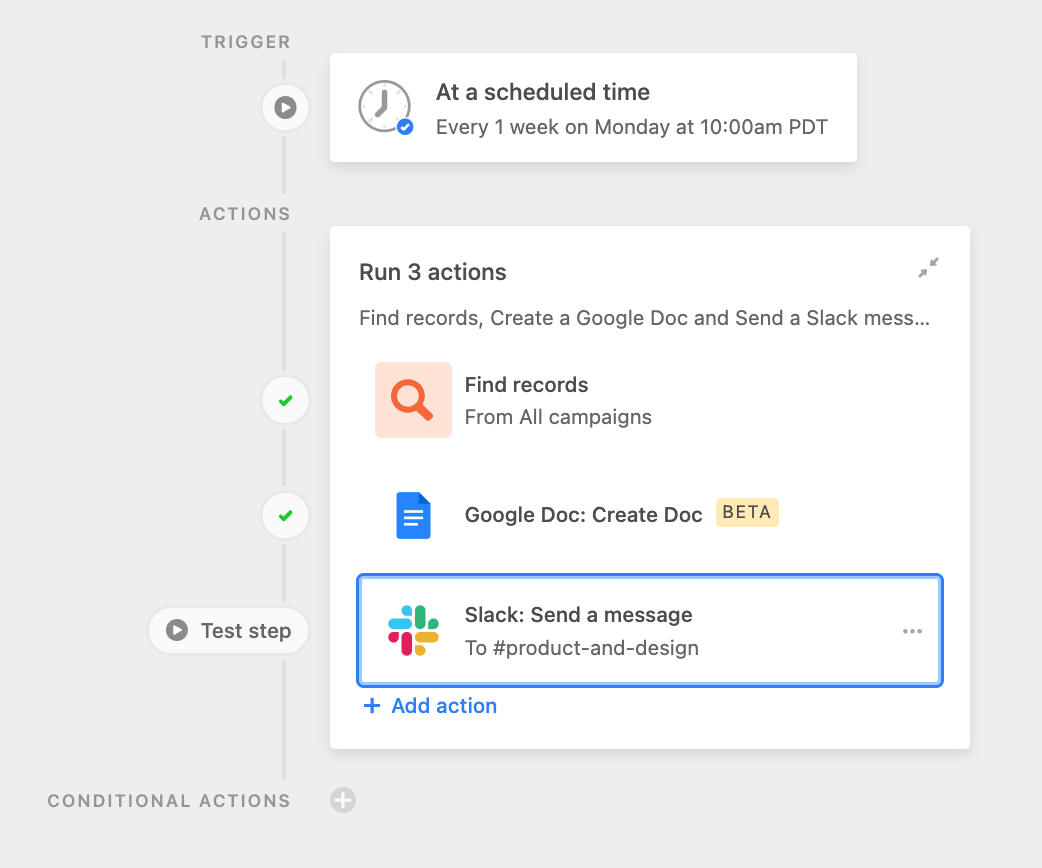
  3. In automations, add a “Create doc” action (using doc automator), and reference the data from step 2.
  4. The data in the document should reflect the sort order of your view

Hope that helps!


Thanks, Scott. My mistake!


Forum|alt.badge.img+17

Yeah, the best thing about using Zapier (or Make.com or On2Air: Actions) to create Google Docs is that you can base those documents on complex document templates that contain formatting, headers & footers, fonts, colors, tables, margins, etc.

Even better, all of those tools can ALSO create complex spreadsheets with Google Sheets based on a complex spreadsheet template as well.

DocuMint also creates documents based on a template, but it uses its own template editor that doesn’t require Google Docs.

So personally, I’m having some difficulty understanding why people would choose Airtable’s Document Automator over any of these other options.

It still seems to me like improving Page Designer would’ve been the path to go down, since Page Designer has already started taking its very first baby steps down the path of creating these sorts of complex documents.


Good points - (I have used Documint and am now using on2Air Actions)

But an advantage that Airtable’s new Document Automator has over both of those products is that it can easily create a document based on a view. With Documint / on2Air - you have to start with a single record (which then receives the PDF) and work with linked records.

So I will be using both products.


ScottWorld
Forum|alt.badge.img+35
  • Genius
  • June 15, 2022

Good points - (I have used Documint and am now using on2Air Actions)

But an advantage that Airtable’s new Document Automator has over both of those products is that it can easily create a document based on a view. With Documint / on2Air - you have to start with a single record (which then receives the PDF) and work with linked records.

So I will be using both products.


This is true. And many people will likely turn to Document Automator because it’s so easy & it’s built right into the product — it’s just one simple action step.


Karlstens
Forum|alt.badge.img+24
  • Brainy
  • June 15, 2022

Ok, I spent some time testing Document Automator - love the MarkDown approach. A side note to MarkDown is that I wish Airtable supported image embed through Markdown.

I’d like to see the abilty to pull in a Google Doc template, that can then be appended with AirTable data - that would absolutely be a game changer and a likely replacement for Page Designer.

Realistically, Page Designer needs to be built up in parallel to support similar/same functionality - unless Airtable can gear Document Automator to output to the same degree of Page Designer (whilst catering for expanding/shrink data tables)

Love this add-in though, keen to see it progress!

EDIT: Oh, keen to have full control of the output data too, none of this sneaky " Generated 6/15/22 22:06 UTC — View [latest on Airtable.]" nonsense plz. :slightly_smiling_face:


Forum|alt.badge.img+2

This looks quite useful but a couple of thoughts I have…

  • My requirements air more on presentations rather than docs and therefore being able to have a monthly stakeholder pack in Google Slides which could be mostly automatically generated would remove one stress from my life. As I understanding it, this is only the equivalent of an MS Word file (not super familiar with Google Apps).
  • Also, I find that I am more likely to want to share elements from the Interface dashboard rather than the detail level. It would be great to have a simple, automated way of automatically dropping charts and other more visual elements from my interfaces into slides in preparation for that stakeholder review.

ScottWorld
Forum|alt.badge.img+35
  • Genius
  • June 16, 2022

My requirements air more on presentations rather than docs and therefore being able to have a monthly stakeholder pack in Google Slides which could be mostly automatically generated would remove one stress from my life.


You will want to use Make’s Google Slides integrations for that.

If you’ve never used Make before, I’ve assembled a bunch of Make training resources in this thread. For example, here is one of the ways that you could instantly trigger a Make automation from Airtable.

I also give live demonstrations of how to use Make in many of my Airtable podcast appearances. For example, in this video, I show how to work with Airtable arrays in Make.

Hope this helps! If you’d like to hire the best Airtable consultant to help you with anything Airtable-related, please feel free to contact me through my website: Airtable consultant — ScottWorld


Hannah_Wiginton
Forum|alt.badge.img+19

This looks quite useful but a couple of thoughts I have…

  • My requirements air more on presentations rather than docs and therefore being able to have a monthly stakeholder pack in Google Slides which could be mostly automatically generated would remove one stress from my life. As I understanding it, this is only the equivalent of an MS Word file (not super familiar with Google Apps).
  • Also, I find that I am more likely to want to share elements from the Interface dashboard rather than the detail level. It would be great to have a simple, automated way of automatically dropping charts and other more visual elements from my interfaces into slides in preparation for that stakeholder review.

Hey Stephen,

As Scott mentioned, our On2Air Actions app uses Google Docs, Google Slides, or Google Sheets and has several additional features that are not available in the new Google Docs automation.

Our app also has a way where you can use charts from Sheets and add them in Slides.

Feel free to start a free account and try it out.

We’re glad to give you a demo and help you get set up as well


Forum|alt.badge.img+17

Hey Stephen,

As Scott mentioned, our On2Air Actions app uses Google Docs, Google Slides, or Google Sheets and has several additional features that are not available in the new Google Docs automation.

Our app also has a way where you can use charts from Sheets and add them in Slides.

Feel free to start a free account and try it out.

We’re glad to give you a demo and help you get set up as well


Highly recommend On2Air actions for this. I had a Demo from Dan a couple of months ago and am amazed at how cool it is and what it can do


Hannah_Wiginton
Forum|alt.badge.img+19

Highly recommend On2Air actions for this. I had a Demo from Dan a couple of months ago and am amazed at how cool it is and what it can do


Thanks so much Andrew!

I’m working on a comparison right now and our app is still much more powerful.


Forum|alt.badge.img+18

Yep. Agreed. What we really need is a vastly improved Page Designer. It’s what all of us have been hoping for!


Yes totally agreed with you.


  • New Participant
  • June 18, 2022

This is perfect except it doesn’t work with Shared Drives. For most Google Business Workspace users, we generate these docs within our own team/corporate shared drives. Currently when saving to shared drives it shows error. We really need this to work with shared drives please for the corporate environment please!


Forum|alt.badge.img+19
  • Inspiring
  • June 19, 2022

This is perfect except it doesn’t work with Shared Drives. For most Google Business Workspace users, we generate these docs within our own team/corporate shared drives. Currently when saving to shared drives it shows error. We really need this to work with shared drives please for the corporate environment please!


Our On2air solution supports Shared Drives if interested to check it out


Forum|alt.badge.img+17

Hi all

Really finding this a useful feature.

@Scott_White Is there anyway Of including the summary values in the report? (Ie Sum / count of the records in the group)

I use it to generate a snapshot of a budget every week so would like to see totals.

Thanks

Andrew


Forum|alt.badge.img+5
  • Participating Frequently
  • June 20, 2022

Hi all

Really finding this a useful feature.

@Scott_White Is there anyway Of including the summary values in the report? (Ie Sum / count of the records in the group)

I use it to generate a snapshot of a budget every week so would like to see totals.

Thanks

Andrew


Could you create summary fields in the sheet, and include those in the report?


Forum|alt.badge.img+17

Thanks Rob

Good idea. I guess I could - though as I’m looking for a total of a group - it wouldn’t make much sense appearing in a column.

But will give it a go. Thank you.


Forum|alt.badge.img+17

Thanks Rob

Good idea. I guess I could - though as I’m looking for a total of a group - it wouldn’t make much sense appearing in a column.

But will give it a go. Thank you.


I tried this - but couldn’t get it to work. Ended up using Make to calculate the group totals instead.

Would love to see this feature built in so group totals can be included natively in the report.


Forum|alt.badge.img+6
  • Participating Frequently
  • June 29, 2022

Hi, it could be a very useful feature. Is there a restriction on the number of records or is there something I’ve done wrong? It shows only the first 100 records.
Also it’ be great if we had the capability to see the Sum, Average etc on each filed as we have it on the table.