Introducing Interface Designer 🎉

  • November 9, 2021
  • 176 replies
  • 501 views

Show first post

176 replies

Forum|alt.badge.img+5
  • New Participant
  • April 22, 2022

Any word on the pivot table in interface?


Not that I’ve seen. I actually was just trying this again yesterday and didn’t see that function.


Forum|alt.badge.img+18
  • Inspiring
  • April 23, 2022

You may have already checked them out, but tools like Stacker (disclosure: I built that!) and others can allow you to create sites and customer portals to share your Airtable data externally – including behind a secure password @Hendrick_Yap.


Thanks for the info. And yes I’ve checked Stacker previously but the pricing for the functionalities I want is quite steep for our department.


Forum|alt.badge.img+5
  • Participating Frequently
  • April 23, 2022

Thanks for the info. And yes I’ve checked Stacker previously but the pricing for the functionalities I want is quite steep for our department.


I completely agree. It’s not priced to the market for my client’s applications.


Karlstens
Forum|alt.badge.img+24
  • Brainy
  • May 6, 2022

A couple of things on my interface use.

  • The entire interface reloads for a few seconds after I start typing. Waiting it out is one thing, but my text entry location losing focus is a real pain. I keep my interface open the entire working day, and as it’s a private base I don’t understand the need for this loading routine that executes multiple times a day. Often I am on the phone entering information from that conversation but having to wait for the reload and reposition my cursor.

  • Could a method be added for a persistent note area, so that as I cycle through records, the persistent text area stays the same? Been thinking about this a lot lately. It’s like I need two side-by-side record views open… maybe I just do that in two different browser windows. :thinking:


:clap: Looks very promising!

One wish🙏 The Interface Designer would be perfect for creating easy-to-use apps for clients that do not have access to a base or workspace. Eg. when a client needs to be able to see statuses on video productions and be able to approve them.

So the ability to share an “access without an account” interface with a client would be amazing. Any plans on this?


I agree! Being able to publicly access these interfaces would be extremely beneficial. Let’s hope as soon as it’s coming out of beta that it will be available without an airtable account - and that a couple of these interfaces will be available on the free tier as well.


  • New Participant
  • June 22, 2022

You may have already checked them out, but tools like Stacker (disclosure: I built that!) and others can allow you to create sites and customer portals to share your Airtable data externally – including behind a secure password @Hendrick_Yap.


Stacker is way too expensive! If Airtables just allowed Interface designer to be used like how shared views are used. this would be awesome.


Forum|alt.badge.img+5
  • Participating Frequently
  • June 22, 2022

Stacker is way too expensive! If Airtables just allowed Interface designer to be used like how shared views are used. this would be awesome.


Agreed!

Not sure why that’s the case…


Forum|alt.badge.img+4

Stacker is way too expensive! If Airtables just allowed Interface designer to be used like how shared views are used. this would be awesome.


Looks like it might be closer. At least they said something about the go to base button going away.


Forum|alt.badge.img+11

Looks like it might be closer. At least they said something about the go to base button going away.


And now old apps are called extensions so interfaces could be the next no-code apps Airtable step.


Forum|alt.badge.img+8
  • Participating Frequently
  • September 29, 2022

@Jack_P Thanks so much for passing this feedback along, I definitely see how discarding unpublished changes would be useful for many reasons! - I have submitted it to our team and they may reach out to you if they have additional questions. :slightly_smiling_face:


Hi,

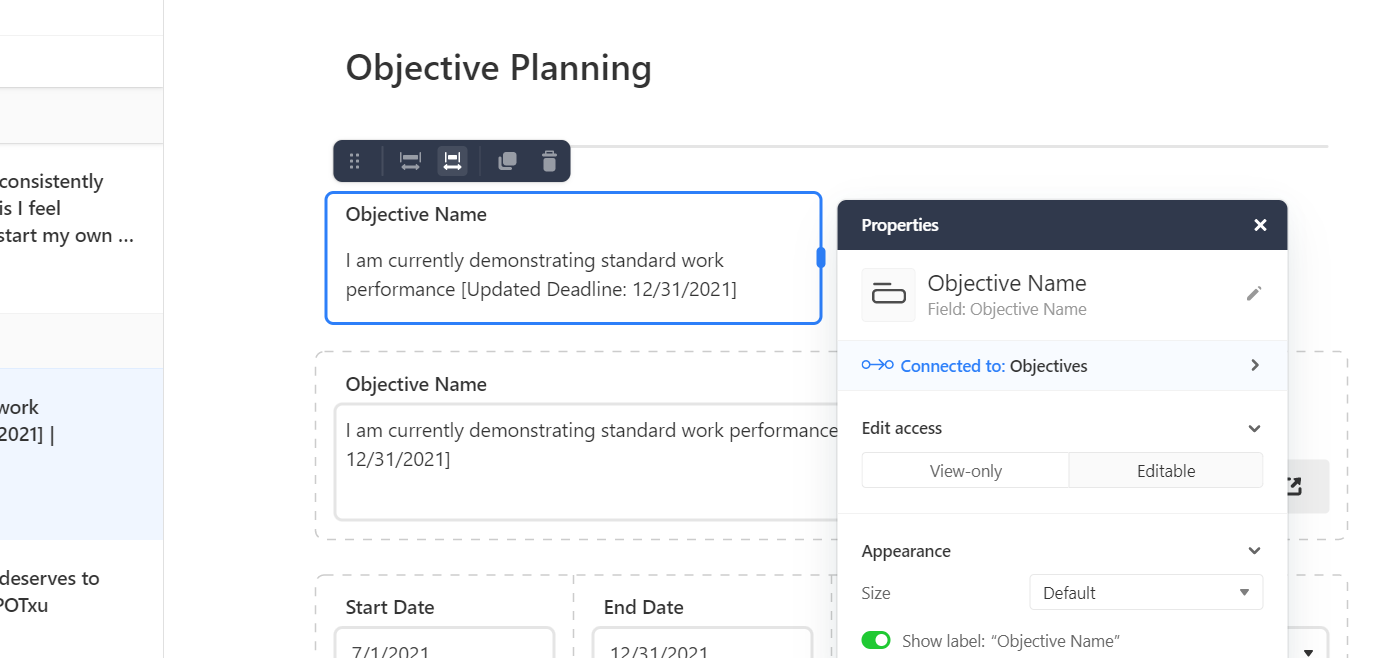
I submitted a couple of bug requests for this this morning, but also wanted to post here just in case, because it is an urgent problem that needs fixing as it is interfering with the work I can do in AirTable today. The bug I am referring to is when you add a field to an interface page, the “editable” button is selected but you can not edit the field. I tried to select “View-Only” to see if toggling it would make it work and it would not. So it seems the toggle is stuck on “editable” and the field is not editable. Below is a screenshot of what I’m talking about. The top objective field is the field in question was added this morning. The bottom objective field was added yesterday before I experienced this problem and that is what the top field should look like. Please fix this ASAP. I’m unable to publish my interface pages I’m building without it. And I needed to publish them today! Please help.


Forum|alt.badge.img+16
  • Inspiring
  • September 29, 2022

Hi,

I submitted a couple of bug requests for this this morning, but also wanted to post here just in case, because it is an urgent problem that needs fixing as it is interfering with the work I can do in AirTable today. The bug I am referring to is when you add a field to an interface page, the “editable” button is selected but you can not edit the field. I tried to select “View-Only” to see if toggling it would make it work and it would not. So it seems the toggle is stuck on “editable” and the field is not editable. Below is a screenshot of what I’m talking about. The top objective field is the field in question was added this morning. The bottom objective field was added yesterday before I experienced this problem and that is what the top field should look like. Please fix this ASAP. I’m unable to publish my interface pages I’m building without it. And I needed to publish them today! Please help.


I saw this too, I assume this will be fixed shortly, in the meantime. If you duplicate an existing editable record and change it to the field you want, you can edit it.


Forum|alt.badge.img+19
  • Author
  • Retired Employee
  • September 29, 2022

Hi,

I submitted a couple of bug requests for this this morning, but also wanted to post here just in case, because it is an urgent problem that needs fixing as it is interfering with the work I can do in AirTable today. The bug I am referring to is when you add a field to an interface page, the “editable” button is selected but you can not edit the field. I tried to select “View-Only” to see if toggling it would make it work and it would not. So it seems the toggle is stuck on “editable” and the field is not editable. Below is a screenshot of what I’m talking about. The top objective field is the field in question was added this morning. The bottom objective field was added yesterday before I experienced this problem and that is what the top field should look like. Please fix this ASAP. I’m unable to publish my interface pages I’m building without it. And I needed to publish them today! Please help.


Thank you for flagging this! Confirming that a hot fix will be out for this today :slightly_smiling_face:


Forum|alt.badge.img+8
  • Participating Frequently
  • September 29, 2022

Thank you for flagging this! Confirming that a hot fix will be out for this today :slightly_smiling_face:


Thank you, I appreciate it!! Looks like it’s fixed now!


Karlstens
Forum|alt.badge.img+24
  • Brainy
  • October 11, 2022

Good morning @Jordan_Scott1 ,

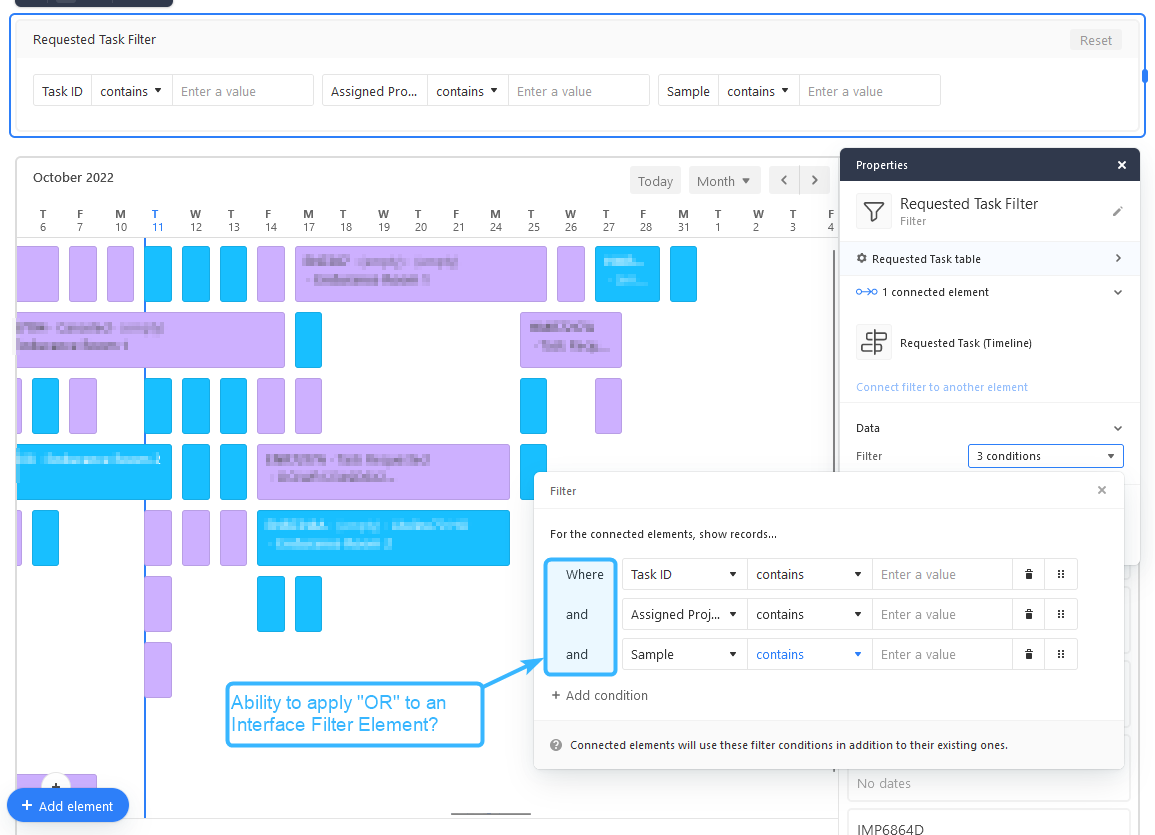
When you have a moment, could you check with the team regarding if an “OR” operand is planned for the Interface Filter Element? We just hit a very big snag after discovering a Filter Element appears to be hard-coded to “AND”, whilst also disallowing Conditional Groups… it’s a real problem. :thinking:

Screenshot below.

I suspect as a workaround, I can guide the user possibly to use the TimeLine View via a base, which will allow for “OR” filtering… I think… I hope. :expressionless:

EDIT: As a workaround, thankfully the TimeLine View within a Base doesn’t have this same limitation. I’d consider this feature mission critical for the success of using Timelines within an Interface - hopefully it can be patched in soon.


Forum|alt.badge.img+19
  • Author
  • Retired Employee
  • October 12, 2022

Good morning @Jordan_Scott1 ,

When you have a moment, could you check with the team regarding if an “OR” operand is planned for the Interface Filter Element? We just hit a very big snag after discovering a Filter Element appears to be hard-coded to “AND”, whilst also disallowing Conditional Groups… it’s a real problem. :thinking:

Screenshot below.

I suspect as a workaround, I can guide the user possibly to use the TimeLine View via a base, which will allow for “OR” filtering… I think… I hope. :expressionless:

EDIT: As a workaround, thankfully the TimeLine View within a Base doesn’t have this same limitation. I’d consider this feature mission critical for the success of using Timelines within an Interface - hopefully it can be patched in soon.


Thanks for flagging this, @Karlstens

I’ve just filed an escalation internally about this - will keep you posted!


Forum|alt.badge.img+3
  • Participating Frequently
  • October 12, 2022

With this change, the Record comment thread is no longer rolling up comments on attachment fields. is this intentional?


Karlstens
Forum|alt.badge.img+24
  • Brainy
  • October 12, 2022

Thanks for flagging this, @Karlstens

I’ve just filed an escalation internally about this - will keep you posted!


Greatly appreciate your help here - I’m hoping that we’ll see the familiar options found within a Base Table Filter, including And, Or and Filter Group features - that can then all be used in the same manner within the Interface Filter Element. Fingers crossed… :crossed_fingers:t2:


Forum|alt.badge.img+10
  • Known Participant
  • October 13, 2022

Is there a plan to include the ability to drop apps into the interface, such as pivot tables, or maps?


I’d also love that! The pivot table is really missing in the interface designer.


Forum|alt.badge.img+2
  • Participating Frequently
  • October 14, 2022

Thank you so much for this!

I couldn’t wait to start playing with it. Here is an initial attempt at building an interface for creating a new record with data validation.

It runs off of formula fields and a single automation script.


Hi kuovonne.
Can you share the background automations?


Karlstens
Forum|alt.badge.img+24
  • Brainy
  • October 25, 2022

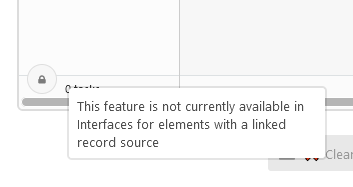
Erk, I’ve just realised that the Link Record Grid Element doesn’t allow for the creation of new records :sob:

This makes it next to useless. :cry: And the default Link Record Card element is a few too many clicks in comparison with lots of white space… functionality it’s OK, but I suspect that the Grid would be a lot more desirable to use in most cases - assuming the Add Record lock is resolved.


Forum|alt.badge.img+18
  • Inspiring
  • October 25, 2022

Erk, I’ve just realised that the Link Record Grid Element doesn’t allow for the creation of new records :sob:

This makes it next to useless. :cry: And the default Link Record Card element is a few too many clicks in comparison with lots of white space… functionality it’s OK, but I suspect that the Grid would be a lot more desirable to use in most cases - assuming the Add Record lock is resolved.


Yes, it is very unfortunate. I hope they can get it fixed


Forum|alt.badge.img+10
  • Known Participant
  • October 25, 2022

Erk, I’ve just realised that the Link Record Grid Element doesn’t allow for the creation of new records :sob:

This makes it next to useless. :cry: And the default Link Record Card element is a few too many clicks in comparison with lots of white space… functionality it’s OK, but I suspect that the Grid would be a lot more desirable to use in most cases - assuming the Add Record lock is resolved.


This limitation is the one thing keeping me from using Interfaces for my business, which would otherwise be a huge productivity booster. I’ve made a thread about it before but adding/duplicating records through linked record grids doesn’t seem to be very high up the priority list.

I do hope this feature is going to be added soon.


Forum|alt.badge.img+3
  • New Participant
  • October 27, 2022

Erk, I’ve just realised that the Link Record Grid Element doesn’t allow for the creation of new records :sob:

This makes it next to useless. :cry: And the default Link Record Card element is a few too many clicks in comparison with lots of white space… functionality it’s OK, but I suspect that the Grid would be a lot more desirable to use in most cases - assuming the Add Record lock is resolved.


@Karlstens - We use interface button + script automation to get around the add record grid limitations. Just a few lines of script to get running.

// get source record ID that we want to add. Configure as input for your code within automation.
const sourceID = input.config().sourceRecordID;
const parentTbl = base.getTable(‘ParentTable’);
const childTbl = base.getTable(‘ChildTable’);
const parentRecord = await parentTbl.selectRecordAsync(sourceID);
if (parentRecord ) {
// create new child record and link to the parent ID.
let newRecordID = await childTbl.createRecordAsync({[‘ParentField’]: [{id:parentRecord.id}], });
}


Karlstens
Forum|alt.badge.img+24
  • Brainy
  • October 27, 2022

@Karlstens - We use interface button + script automation to get around the add record grid limitations. Just a few lines of script to get running.

// get source record ID that we want to add. Configure as input for your code within automation.
const sourceID = input.config().sourceRecordID;
const parentTbl = base.getTable(‘ParentTable’);
const childTbl = base.getTable(‘ChildTable’);
const parentRecord = await parentTbl.selectRecordAsync(sourceID);
if (parentRecord ) {
// create new child record and link to the parent ID.
let newRecordID = await childTbl.createRecordAsync({[‘ParentField’]: [{id:parentRecord.id}], });
}


Yah, buttons and their individual Automations are a lot to develop, track and maintain - and although I haven’t checked, when an Interface button triggers an automation to create a record, I assume that records Created By field would then read “Automation”, rather than the user who clicked that mock-up “Create Record” button?

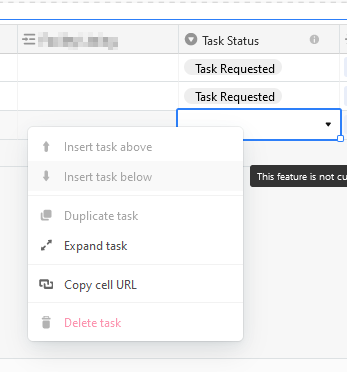
Perhaps Airtable Devs are needing bugs to be solved before they unlock these features, but it just seems strange that we have all the options users needing via the Right-Click menu, it’s just they’re greyed out.

I’m concerned that they’ll remain locked/greyed out forever due to system limitations? Would be good to know what’s going on here, before I commit time to developing work-arounds.


Forum|alt.badge.img+9
  • Known Participant
  • November 10, 2022

Isn’t there some inconsistency when creating records from the Interface Designer? When I create a new record from the record list I can specify the form design and which fields are required, but if a new record is created from a record picker (creating a new linked record) I have no control whatsoever on the corresponding design and required fields. Am I missing something?