
Introducing the Airtable Connected Apps Platform™

  • October 12, 2022
  • 70 replies
  • 244 views

Show first post

70 replies

ScottWorld
Forum|alt.badge.img+35
  • Genius
  • October 16, 2022

Whoa, good spot! And note that they’re also coloured too! :rainbow:


Ha! You’re right! I wish that was a part of the product!


Forum|alt.badge.img+18

Hi @Kelly_OShaughnessy,

Two questions regarding the video at the link below:

  1. At 0:26 in this video, the video shows a user changing the value of 2 lookup fields. Lookup fields have always been read-only. Is this behavior changing?

  2. At 1:13 in the video, the video highlights the new button functionality in interfaces that allows the button to show 2 different states: a “before action state” and an “after action state”. Is there any way for us to revert the button back to its original “before action state” again? For example, if we wanted to revert the record back to “needing review” again?

Thanks,
Scott


I’ve played around with this, and I couldn’t find a way to do it with one button, but I was able to do it with additional buttons that do opposite actions.

For example, a button that checks a checkbox field will stay in its “Done” position once it is clicked to check the checkbox, and clicking it again will not do anything.

But adding a second button whose action is to uncheck that same checkbox field will cause the first button to revert back to the “Not Done” state.

So the same could be done for a single select field if you made a button for each option you’d like to toggle between. May not be as simple as just making the Single Select field itself editable, though :man_shrugging:t2:

Hopefully that makes sense.


ScottWorld
Forum|alt.badge.img+35
  • Genius
  • October 17, 2022

I’ve played around with this, and I couldn’t find a way to do it with one button, but I was able to do it with additional buttons that do opposite actions.

For example, a button that checks a checkbox field will stay in its “Done” position once it is clicked to check the checkbox, and clicking it again will not do anything.

But adding a second button whose action is to uncheck that same checkbox field will cause the first button to revert back to the “Not Done” state.

So the same could be done for a single select field if you made a button for each option you’d like to toggle between. May not be as simple as just making the Single Select field itself editable, though :man_shrugging:t2:

Hopefully that makes sense.


Oh wow, this is a great find, @Jeremy_Oglesby! :grinning_face_with_big_eyes:

Thank you for figuring this out, and I am going to play with this in the morning! :cowboy_hat_face: :raised_hands:


Forum|alt.badge.img+5
  • Participating Frequently
  • October 17, 2022

Whoa, good spot! And note that they’re also coloured too! :rainbow:


At the moment, when I create a button, I can not link it to an automation anymore (the automation does not appear in the drop-down menu). I have reported it as a bug. But what I really would like to do in the interface is create a page where there are 4 smilies. Personeel that enters and leaves, clicks on a smiley on how they feel at that moment. With this tool, I have the enter and exit times and dates and I can use this as an attendance tracker. Airtable-hivemind: Does anyone know if this is possible? Thanks in advance!!!


Forum|alt.badge.img+16
  • Inspiring
  • October 17, 2022

At the moment, when I create a button, I can not link it to an automation anymore (the automation does not appear in the drop-down menu). I have reported it as a bug. But what I really would like to do in the interface is create a page where there are 4 smilies. Personeel that enters and leaves, clicks on a smiley on how they feel at that moment. With this tool, I have the enter and exit times and dates and I can use this as an attendance tracker. Airtable-hivemind: Does anyone know if this is possible? Thanks in advance!!!


Ensure that the automation is active.

You can put the emoji :grinning: as a button text and have that update a field in your record.


Forum|alt.badge.img+5
  • Participating Frequently
  • October 18, 2022

Ensure that the automation is active.

You can put the emoji :grinning: as a button text and have that update a field in your record.


Thanks Vivid-Quid! That is fantastic advice for the emoticon!

For the automation:
I can not activate the automation, because I can not get past step 4 to connect:

This trigger is not currently associated with any buttons in an interface.
To connect:

  1. Open an interface
  2. Create or select a button
  3. Select “Trigger an automation” under “Button Type” in the properties pane
  4. Choose this automation from the list

I have created buttons before, and it always worked.
Does anyone else experience the same?

Thanks in advance.


Thank you @Kelly_OShaughnessy !
Quick question on the two-way sync as I am really looking forward to it. I see it should already be available for Enterprise plans but I can’t find the way to create them in my company plan. I had synced tables already but they didn’t update to two-way sync. I tried creating a new sync to see if it would propose the two-way option but it didn’t.

Would you know when it will be available? Or do I need to enable something in the parameters?

Thank you in advance ! :slightly_smiling_face:


Databaser
Forum|alt.badge.img+25
  • Brainy
  • October 18, 2022

Thank you @Kelly_OShaughnessy !
Quick question on the two-way sync as I am really looking forward to it. I see it should already be available for Enterprise plans but I can’t find the way to create them in my company plan. I had synced tables already but they didn’t update to two-way sync. I tried creating a new sync to see if it would propose the two-way option but it didn’t.

Would you know when it will be available? Or do I need to enable something in the parameters?

Thank you in advance ! :slightly_smiling_face:


Hi @Francois_Weber1 and welcome to the community!

Have you read the support page on this topic?


Hi @Francois_Weber1 and welcome to the community!

Have you read the support page on this topic?


Hi @Databaser, I just did thank you! Even though I am using the enterprise plan, I don’t have the options the article describes.

Just spotted in the doc that it is “Currently in limited beta availability”. Would you, or someone from the community, know how to be part of this “beta”? :thinking:


Karlstens
Forum|alt.badge.img+24
  • Brainy
  • October 18, 2022

:rotating_light: :exclamation: :rotating_light: Having lost the previous in-place editing of Linked Records is slowing my active production users right down. While the entire full-page-form redirect for Linked Record editing may have its uses, it certainly shouldn’t be the only option. Critically, we’re needing either a small window to pop-up for users to make the Linked Record changes (whilst still seeing the primary record interface still in place) - or, direct editing with the Linked Record card itself.

Where the main problem lies - when users clicking back to the main page from editing the Linked record, they are returned to the top of the main record - meaning they then have to scroll scroll and scroll to then continue editing Linked Records, where they then click into the next Linked Record and the entire painful process repeats over and over for each Linked Record. :sob:

Also - I’ve created a new Feature Enhancement request, that allows for an option for users to “Delete Record” from a Linked Record field, and not just “Unlink Record”.


WilliamPorter
Forum|alt.badge.img+19

Thanks Vivid-Quid! That is fantastic advice for the emoticon!

For the automation:
I can not activate the automation, because I can not get past step 4 to connect:

This trigger is not currently associated with any buttons in an interface.
To connect:

  1. Open an interface
  2. Create or select a button
  3. Select “Trigger an automation” under “Button Type” in the properties pane
  4. Choose this automation from the list

I have created buttons before, and it always worked.
Does anyone else experience the same?

Thanks in advance.


The process of linking a button on an interface to an automation is a bit finicky and it’s confused me a few times. The button needs to be configured so that the action is “run automation”. You may also need to specify a “source”. Then, over in your automations page, you must have an automation whose trigger is “when a button is clicked”. At that point, it should be possible to return to the interface designer and select that script from the Automation list. That list will only show automations whose trigger is “when a button is clicked” and which are not already linked to another button.

As I said, it’s a slightly confusing process with a bit of back and forth but I’m confident you’ll get it if you haven’t already.

William


Karlstens
Forum|alt.badge.img+24
  • Brainy
  • October 19, 2022

The process of linking a button on an interface to an automation is a bit finicky and it’s confused me a few times. The button needs to be configured so that the action is “run automation”. You may also need to specify a “source”. Then, over in your automations page, you must have an automation whose trigger is “when a button is clicked”. At that point, it should be possible to return to the interface designer and select that script from the Automation list. That list will only show automations whose trigger is “when a button is clicked” and which are not already linked to another button.

As I said, it’s a slightly confusing process with a bit of back and forth but I’m confident you’ll get it if you haven’t already.

William


I’m really hoping to have Automation Script output feed back into the Interface too via a pop-up prompt.


Forum|alt.badge.img+5
  • Participating Frequently
  • October 19, 2022

The process of linking a button on an interface to an automation is a bit finicky and it’s confused me a few times. The button needs to be configured so that the action is “run automation”. You may also need to specify a “source”. Then, over in your automations page, you must have an automation whose trigger is “when a button is clicked”. At that point, it should be possible to return to the interface designer and select that script from the Automation list. That list will only show automations whose trigger is “when a button is clicked” and which are not already linked to another button.

As I said, it’s a slightly confusing process with a bit of back and forth but I’m confident you’ll get it if you haven’t already.

William


Thank you William,

Thanks you for your explanation! It was indeed a source problem, I have deleted and rebuild the table in the base and now it miraculously works. Before the source did not come up as an option, but now it does. Not sure what the problem was, but happy that it works now.

Kind regards and again thank you for your input,

Greetje


Databaser
Forum|alt.badge.img+25
  • Brainy
  • October 19, 2022

Hi @Databaser, I just did thank you! Even though I am using the enterprise plan, I don’t have the options the article describes.

Just spotted in the doc that it is “Currently in limited beta availability”. Would you, or someone from the community, know how to be part of this “beta”? :thinking:


I’ve heard that you have to actively request this beta. So best get in contact with your SPOC at Airtable or the support team.


Forum|alt.badge.img+8
  • Participating Frequently
  • October 20, 2022

I miss being able to see the record edit history from the interfaces when i clicked expand record button. Is there a way to see that still from within the interface? or only from the database now?


Forum|alt.badge.img+3
  • New Participant
  • October 20, 2022

I miss being able to see the record edit history from the interfaces when i clicked expand record button. Is there a way to see that still from within the interface? or only from the database now?


@Traci_Franssen - I have the same gap. The ability to see 1) record history details from interface and 2) comment count from interface grid were really helpful for us. For example, when viewing many records within a grid, the comment count surfaced those with any meaningful events - and opening the record would show those comments plus the detailed record changes.


Forum|alt.badge.img+1
  • New Participant
  • October 20, 2022

:rotating_light: :exclamation: :rotating_light: Having lost the previous in-place editing of Linked Records is slowing my active production users right down. While the entire full-page-form redirect for Linked Record editing may have its uses, it certainly shouldn’t be the only option. Critically, we’re needing either a small window to pop-up for users to make the Linked Record changes (whilst still seeing the primary record interface still in place) - or, direct editing with the Linked Record card itself.

Where the main problem lies - when users clicking back to the main page from editing the Linked record, they are returned to the top of the main record - meaning they then have to scroll scroll and scroll to then continue editing Linked Records, where they then click into the next Linked Record and the entire painful process repeats over and over for each Linked Record. :sob:

Also - I’ve created a new Feature Enhancement request, that allows for an option for users to “Delete Record” from a Linked Record field, and not just “Unlink Record”.


Would like to echo this -

Has anyone figured out how to delete linked records? We used to be able to do this before the updates


Forum|alt.badge.img+5
  • Participating Frequently
  • October 30, 2022

@Kamille_Parks - great question!

An app is any software that performs a specific function to automate or scale workflows. That can look differently depending on your workflow in Airtable. At a high level, we see an “app” as the full workflow you’ve built in Airtable. This includes a data layer which is the data in your base, logic set up for that data which can be done via automations, formulas, scripting, and more, and an interface for your team to interact with that app.

An interface is not an app, but it is the way that your teammates interact with your app. We’ll go further in depth in our AMA later this month!


Hi Kelly, I love the interface and its functionality!
I was wondering if it is possible to get the time tracker (which I now have build in extensions) on an interface. In my case, I would like to have a play and pause button for coaching sessions, so I can see how much coaching time I have spend per client.
I can imagine that having a time tracker in the interface would be very useful for many business types.

Thanks in advance!
Kind regards,
Greetje


Forum|alt.badge.img+4
  • New Participant
  • December 15, 2022

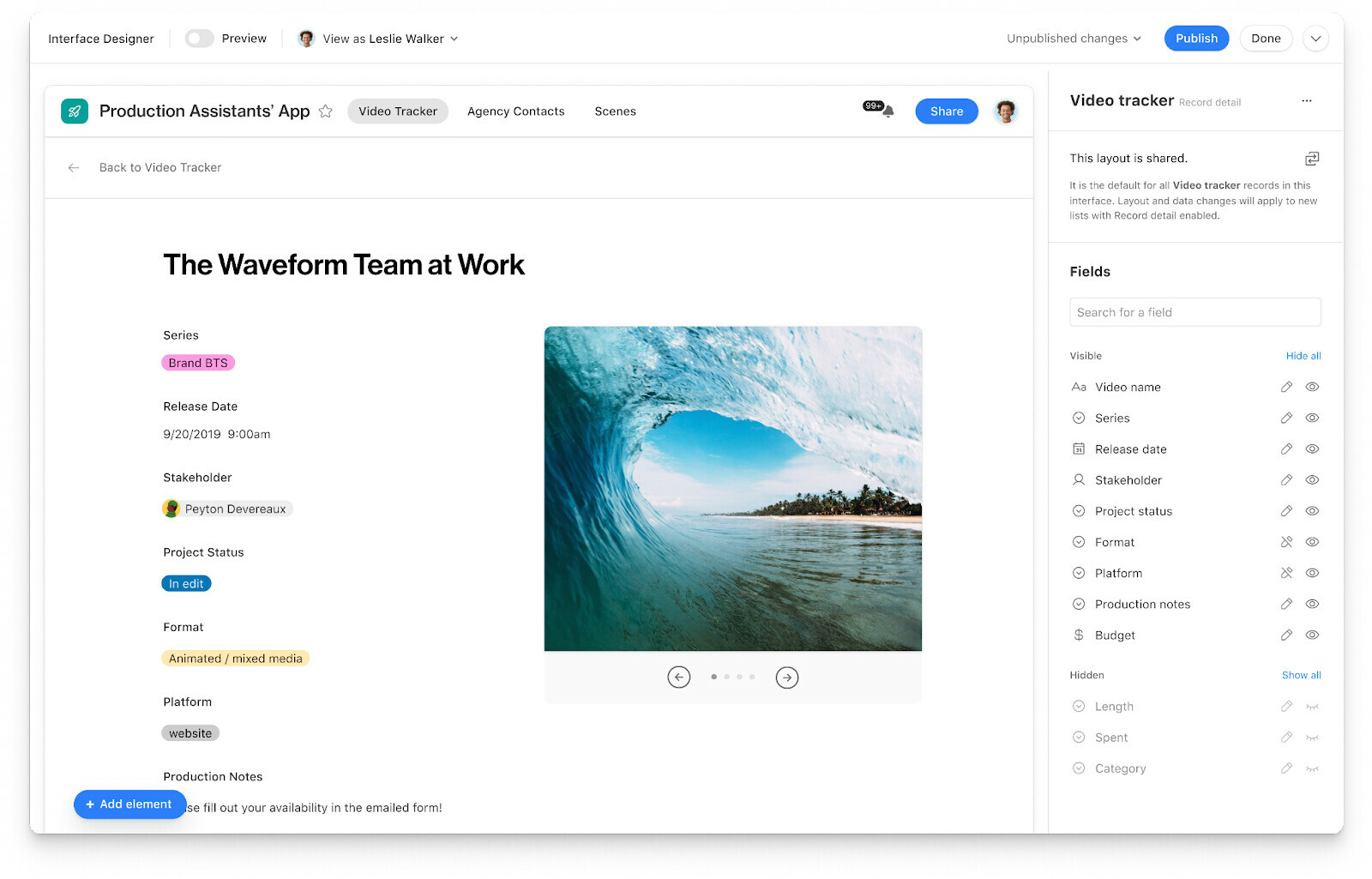
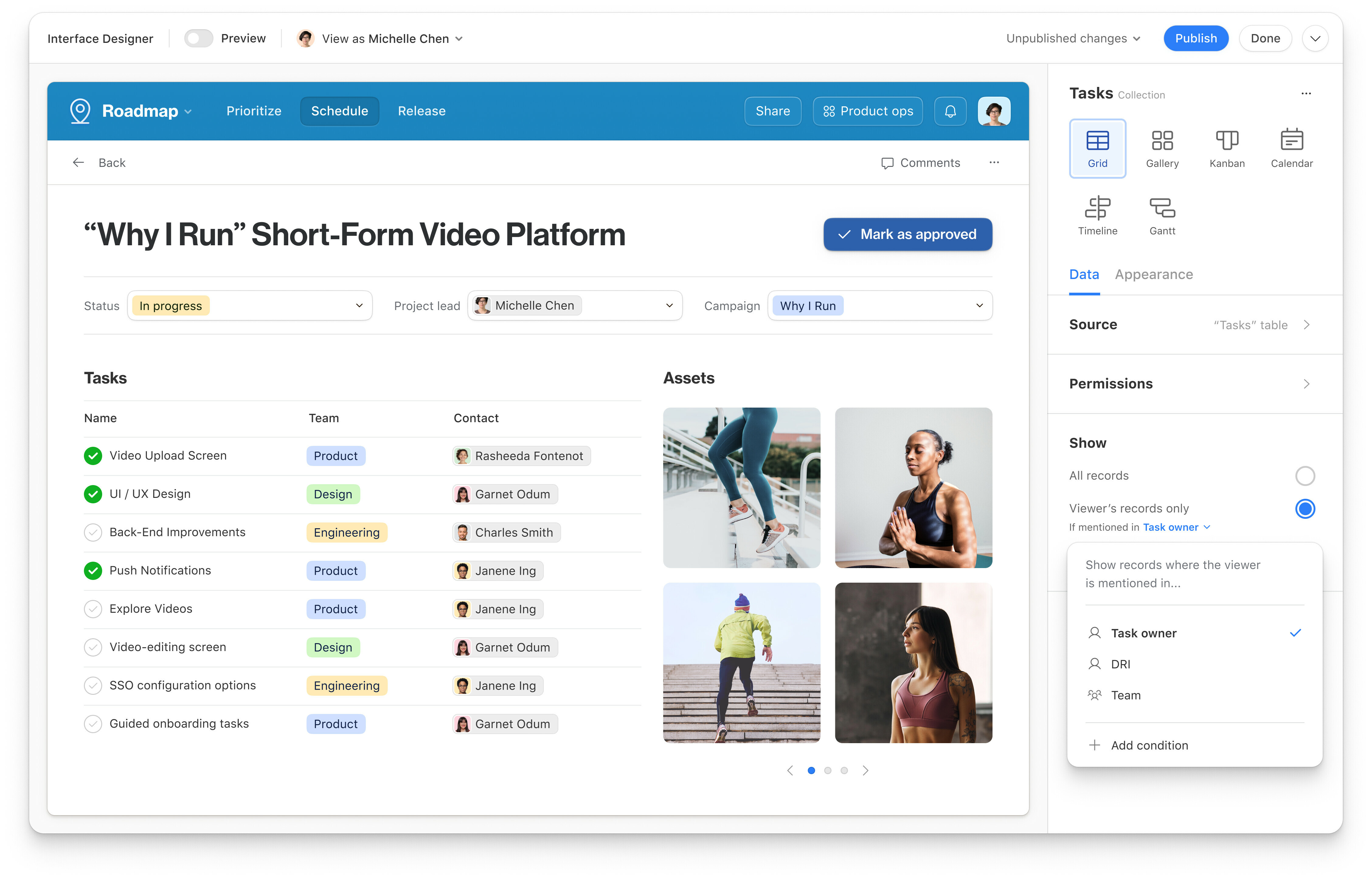
I am searching for more ways to make interface seamless for my team, I noticed the preview image shared in your announcement appears to have more aesthetic control than what Airtable is currently capable of... I am confused because it is labeled as currently available. Is this going to be a feature in future, is exclusive to Enterprise plan, or am I really just flat out missing something? 

Thank you. 


Aristeidis_Zagk
Forum|alt.badge.img+16


this video was uploaded 2 weeks ago. but as far as I know...there are no connected apps yet...any update?

https://www.youtube.com/watch?v=HsqhnJxPbAY