Product Update: Improvements to Base Navigation

  • July 12, 2022
  • 59 replies
  • 314 views

Show first post

59 replies

Forum|alt.badge.img+18
  • Inspiring
  • August 4, 2022

Thanks for this functionality. A few possible enhancements:

  • bulk edit fields from this screen (thinking particularly select and delete several fields at once)

  • setting field visibility in expanded record view; some fields are entirely admin, part of a formula calc or automation, or otherwise irrelevant and distracting even in “show hidden fields” view - would this be a place to take those completely out of the picture? I’ve long wanted more ability to control what happens in expanded record view based on different views or contexts, but until that day it would be nice to at least be able to kill some fields entirely outside of certain grid views.

From a UX perspective it’s very uncool to limit full Dependencies viewing to Enterprise users. Data integrity should be the most baseline feature/requirement across all Airtable use cases, and it sucks to get an alert essentially saying “Sure, you can delete this field, but it may have some damaging consequences. We know what those are but we’re not going to tell you because you are not big enough to deserve that information. Now go figure it out for yourself, loser!” We sometimes hear that Airtable is “Excel on Steroids,” but Excel lets everyone trace dependencies - this is more like “Excel On a Bad Diet and Lack of Exercise.”


You nailed it! :thumbs_up: :thumbs_up: :thumbs_up: It seems to me that Airtable just blindly chase Enterprise customers without caring other plans. It doesn’t follow its motto of democratizing database.


ScottWorld
Forum|alt.badge.img+35
  • Genius
  • August 4, 2022

It’s like having access to the airport’s lounge as a Business class passenger but when you visit the buffet, the cookie jar is for First class passengers only.


Lol, great analogy! :grinning_face_with_sweat: Airtable is probably the most disrespectful tech company I have ever dealt with in my entire life.


  • Participating Frequently
  • August 4, 2022

Hey there @Rotimi_Iziduh, can I add one piece of feedback?

In the new bar we now have a permanent ‘Insights :sparkles: ’ tab. When I click it, it helpfully suggests that I ‘Upgrade to Enterprise Plan to get insights…’

There is zero chance I, or the vast majority of people, are ever going to upgrade to your Enterprise plan. Primarily because I’m not a massive company that employs thousands of people.

So now I just have to look at this button until the end of time. This is really poor UX. Please give me some option to make this button go away.


  • New Participant
  • August 9, 2022

Do you know if there are any plans to allow users to export the Manage Fields view? What I want to do is capture how each field is currently designed – saves a lot of documentation!


ScottWorld
Forum|alt.badge.img+35
  • Genius
  • August 10, 2022

Do you know if there are any plans to allow users to export the Manage Fields view? What I want to do is capture how each field is currently designed – saves a lot of documentation!


@Jack_Chan

You might want to check out On2Air: Schemas:


  • Participating Frequently
  • August 11, 2022

How do I submit a feature request? My table is grouped by field and it’s a pain when manually adding new records, the record alignment doesn’t stay at the bottom until a user has it entered at some point. Also the back button in Manage Fields should be directly underneath and not all the way to the left.


Karlstens
Forum|alt.badge.img+24
  • Brainy
  • August 21, 2022

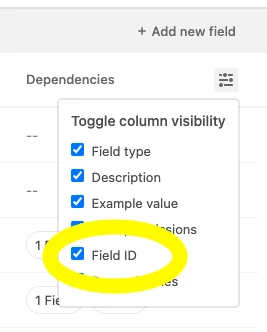
Hi all - since the new “Manage Fields” tab (aka “Field Manager”) functionality was mentioned in the comments here, I wanted to let the community know that we added Field ID to be accessible from this surface.

You can toggle it on:

You’ve always been able to retrieve field IDs from your base’s API docs, but this should save you some clicks/browser tabs. :tada:


Good morning everyone,

@marks - Could you speak with the team to have that Field ID return via the search results? Often when writing an Automation, if it fails and the log returns the failed Field ID, I have to search for that manually.

It would be great if we could just paste the failed field ID into the search and have the field in question returned;

Note how searching (as per above screenshot) for a field ID, it fails to return anything.


WilliamPorter
Forum|alt.badge.img+19

How do I submit a feature request? My table is grouped by field and it’s a pain when manually adding new records, the record alignment doesn’t stay at the bottom until a user has it entered at some point. Also the back button in Manage Fields should be directly underneath and not all the way to the left.


Go here:

Create another view specifically for creating new records, and configure that view so that it does NOT group records. Simple as that.

I usually have a view called “New and Recent” that is filtered on the Creation Date, so that it shows records created (say) today or yesterday. I move it near the top of the views list and train users to go to that view to create new records. This view is NOT grouped.

Hmmm. Not sure I agree with you there. This is one of those UI/UX problems that must be solved, but which don’t have any one solution that is clearly best. That said, when I want to go back — in any app, on my phone or my computer — I tend to look to the left side of the display for a button. (On my Samsung phone the < button is at the bottom on the right, so that’s an exception that I’ve gotten used to.) In any case, if they move the Back button underneath “Manage fields” (where I am guessing you’d like to see it), then people will complain that it’s not in the upper left area. They can’t win on this one, and ultimately some of us just have to learn where it is and get used to it. :slightly_smiling_face:

But note: If you’re done working in Manage fields and want to go back, just click Manage fields again. It’s a toggle!

William


Forum|alt.badge.img+6
  • Inspiring
  • September 14, 2022

I recommend that you pair your script writing process with an external code editor such as VS Code and a git version control system such as GitHub. Save your in-progress code locally in VS Code. Store and track versions of your code in GitHub. Have a copy/paste workflow between the VS Code and the Airtable code editor.


Thanks, I suppose that is what I’ll have to do.

Before the previous automation release, there was a final step to make a change live (can’t remember what it was called) after you had tested it. It would have been great to have that functionality again.