Solved

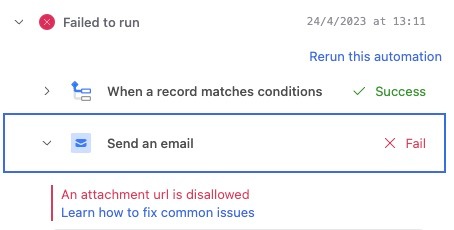
Attachments in Send Email Automation not Working anymore

  • April 24, 2023
  • 37 replies
  • 450 views

Show first post
This topic has been closed for replies.

37 replies

Forum|alt.badge.img+10

Here is the response from enterprise support with a workaround for this behavior. I am not sure why this issue has popped up after months of it not being a problem.

Based on the error message you're seeing, it's likely the automation is firing before the attachment has been fully imported into our storage. Once a file has been fully uploaded into our storage, the attachment will then feature its unique Airtable URL instead.

We're working on improvements to this behavior, but in the meantime, there are a couple of ways to delay the automation (depending on your particular use case) to give the attachment time to fully process would be:

  • If you're using a singular attachment field, and the field will contain one or more attachment(s) within the field, you can create a formula field in the table where your attachment field lives and use the following formula which will output "RUN": 

IF((LEN(Attachments)-LEN(SUBSTITUTE(Attachments,",",""))+1)*15=(LEN(Attachments)-LEN(SUBSTITUTE(Attachments,"dl.airtable.com",""))),"RUN")

From here, you'll add conditions to your trigger step saying "When Attachment formula contains 'RUN' " (like this)

  • If you need an email to be sent even if there is no attachment present, you could use the following formula to output "NO ATTACHMENT" when there is no attachment and "RUN" when there is. The automation condition would be "When Attachment formula is not empty" (like this😞

IF(NOT(Attachments), "NO ATTACHMENT", IF((LEN(Attachments)-LEN(SUBSTITUTE(Attachments,",",""))+1)*15=(LEN(Attachments)-LEN(SUBSTITUTE(Attachments,"dl.airtable.com",""))),"RUN"))

Now, the automation should wait until the attachment is processed before being triggered.


Forum|alt.badge.img+3
  • Participating Frequently
  • June 29, 2023

Here is the response from enterprise support with a workaround for this behavior. I am not sure why this issue has popped up after months of it not being a problem.

Based on the error message you're seeing, it's likely the automation is firing before the attachment has been fully imported into our storage. Once a file has been fully uploaded into our storage, the attachment will then feature its unique Airtable URL instead.

We're working on improvements to this behavior, but in the meantime, there are a couple of ways to delay the automation (depending on your particular use case) to give the attachment time to fully process would be:

  • If you're using a singular attachment field, and the field will contain one or more attachment(s) within the field, you can create a formula field in the table where your attachment field lives and use the following formula which will output "RUN": 

IF((LEN(Attachments)-LEN(SUBSTITUTE(Attachments,",",""))+1)*15=(LEN(Attachments)-LEN(SUBSTITUTE(Attachments,"dl.airtable.com",""))),"RUN")

From here, you'll add conditions to your trigger step saying "When Attachment formula contains 'RUN' " (like this)

  • If you need an email to be sent even if there is no attachment present, you could use the following formula to output "NO ATTACHMENT" when there is no attachment and "RUN" when there is. The automation condition would be "When Attachment formula is not empty" (like this😞

IF(NOT(Attachments), "NO ATTACHMENT", IF((LEN(Attachments)-LEN(SUBSTITUTE(Attachments,",",""))+1)*15=(LEN(Attachments)-LEN(SUBSTITUTE(Attachments,"dl.airtable.com",""))),"RUN"))

Now, the automation should wait until the attachment is processed before being triggered.


that is super complicate, do you have a simple solution?


Forum|alt.badge.img+10

Here is another solution I can think of that would be simpler.

Create a formula field called "Send Email" with this formula:

IF(CREATED_TIME()<(DATEADD(NOW(),-20,"seconds")),"Yes","No")

Change your automation trigger from 'when a form is submitted' to 'when a record matches conditions'.

Make the trigger condition 'when Send Email contains Yes'.

Although this would appear to delay the automation by 20 seconds, in reality it will delay the automation by up to 5 minutes, since "NOW()" in Airtable only updates every 5 min or so. If the email going out 5 minutes later is better than the automation failing, this may work for you.


Erica_Bass
Forum|alt.badge.img+9
  • New Participant
  • June 30, 2023

Same issue on many business critical automations 😭


Moni_Singh
Forum|alt.badge.img+6
  • Inspiring
  • July 1, 2023

Here is another solution I can think of that would be simpler.

Create a formula field called "Send Email" with this formula:

IF(CREATED_TIME()<(DATEADD(NOW(),-20,"seconds")),"Yes","No")

Change your automation trigger from 'when a form is submitted' to 'when a record matches conditions'.

Make the trigger condition 'when Send Email contains Yes'.

Although this would appear to delay the automation by 20 seconds, in reality it will delay the automation by up to 5 minutes, since "NOW()" in Airtable only updates every 5 min or so. If the email going out 5 minutes later is better than the automation failing, this may work for you.


This works well for us. Hopefully this issue gets resolved. Thanks 


Forum|alt.badge.img+3
  • Participating Frequently
  • July 1, 2023

Here is another solution I can think of that would be simpler.

Create a formula field called "Send Email" with this formula:

IF(CREATED_TIME()<(DATEADD(NOW(),-20,"seconds")),"Yes","No")

Change your automation trigger from 'when a form is submitted' to 'when a record matches conditions'.

Make the trigger condition 'when Send Email contains Yes'.

Although this would appear to delay the automation by 20 seconds, in reality it will delay the automation by up to 5 minutes, since "NOW()" in Airtable only updates every 5 min or so. If the email going out 5 minutes later is better than the automation failing, this may work for you.


It works ! Thank you


Forum|alt.badge.img+11

Here is another solution I can think of that would be simpler.

Create a formula field called "Send Email" with this formula:

IF(CREATED_TIME()<(DATEADD(NOW(),-20,"seconds")),"Yes","No")

Change your automation trigger from 'when a form is submitted' to 'when a record matches conditions'.

Make the trigger condition 'when Send Email contains Yes'.

Although this would appear to delay the automation by 20 seconds, in reality it will delay the automation by up to 5 minutes, since "NOW()" in Airtable only updates every 5 min or so. If the email going out 5 minutes later is better than the automation failing, this may work for you.


A fix that seems to work ok for me so far (sent 2 emails) is to create a formula field which is equal to the attachment field, and in the automation I just put When {formula fieldname} contains dl.airtable in the conditions.

They send straight away.


Mario_Granero
Forum|alt.badge.img+5
  • Participating Frequently
  • October 2, 2023

Here is another solution I can think of that would be simpler.

Create a formula field called "Send Email" with this formula:

IF(CREATED_TIME()<(DATEADD(NOW(),-20,"seconds")),"Yes","No")

Change your automation trigger from 'when a form is submitted' to 'when a record matches conditions'.

Make the trigger condition 'when Send Email contains Yes'.

Although this would appear to delay the automation by 20 seconds, in reality it will delay the automation by up to 5 minutes, since "NOW()" in Airtable only updates every 5 min or so. If the email going out 5 minutes later is better than the automation failing, this may work for you.


20 seconds isn't working for me with this before the send action with a delay in script

function delay(ms) { var limit = new Date(); limit = limit.setMilliseconds(limit.getMilliseconds() + ms); while ((new Date()) < limit) { // do nothing ; } } delay(20000); //delay 20 second

Forum|alt.badge.img+3
  • Participating Frequently
  • November 3, 2023

Here is another solution I can think of that would be simpler.

Create a formula field called "Send Email" with this formula:

IF(CREATED_TIME()<(DATEADD(NOW(),-20,"seconds")),"Yes","No")

Change your automation trigger from 'when a form is submitted' to 'when a record matches conditions'.

Make the trigger condition 'when Send Email contains Yes'.

Although this would appear to delay the automation by 20 seconds, in reality it will delay the automation by up to 5 minutes, since "NOW()" in Airtable only updates every 5 min or so. If the email going out 5 minutes later is better than the automation failing, this may work for you.


This works well for us. The problem is solved, Thanks


Forum|alt.badge.img+1
  • New Participant
  • November 24, 2023

Here is another solution I can think of that would be simpler.

Create a formula field called "Send Email" with this formula:

IF(CREATED_TIME()<(DATEADD(NOW(),-20,"seconds")),"Yes","No")

Change your automation trigger from 'when a form is submitted' to 'when a record matches conditions'.

Make the trigger condition 'when Send Email contains Yes'.

Although this would appear to delay the automation by 20 seconds, in reality it will delay the automation by up to 5 minutes, since "NOW()" in Airtable only updates every 5 min or so. If the email going out 5 minutes later is better than the automation failing, this may work for you.


This is amazing. Thank you!


Forum|alt.badge.img
  • New Participant
  • February 8, 2024

This is happening to our base today. It was working perfectly up until today. 

Our trigger is when a pdf is put in the attachment field, an email is sent to three people in our company that is just the pdf that was added to the record.

I've tried changing a few things around and we keep getting a fail to run.


Forum|alt.badge.img+1
  • New Participant
  • November 7, 2024

On my end as I try to add an ICS attachement to the email, I have no error but the attachement is not sent.