Solved

Automate END TIME based on START TIME, DURATION

  • March 10, 2021
  • 7 replies
  • 165 views

Forum|alt.badge.img+11

I’m following up on a previous solution ScottWorld provided for another user. I apologize if there’s a better way to link to the old closed post.

Anyway, the goal is to Automate the END TIME based on START TIME, and DURATION. The formula Scott suggested was:

DATEADD({Start Time}, {Duration}, ‘minutes’)

When I put this Formula into the END TIME formula field exactly as is, and the DURATION field empty, the END TIME is automatically set to 5 hrs after the START TIME. When I enter “3:00” (3 hrs) into the DURATION field, the END TIME is automatically set to 7 Days and 20 Hrs later.

Obviously, I’m misunderstanding something.

Best answer by kuovonne

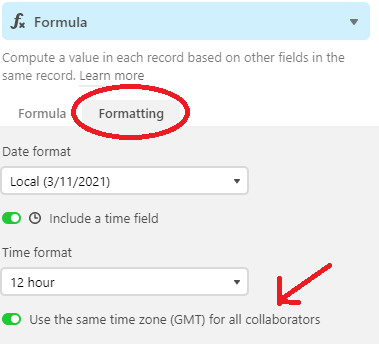
Change the time zone settings for the {Start Time} and the formula field so that they match (local time vs. GMT).

7 replies

Kamille_Parks11
Forum|alt.badge.img+27

Test using seconds as the time unit. If you don’t want to calculate a date when Duration is empty, wrap your current formula in an IF statement.

IF({Duration}, DATEADD({Start Time}, {Duration}, 'seconds'))


Forum|alt.badge.img+11
  • Author
  • Inspiring
  • March 11, 2021

I’m getting the same issue, but at least it’s consistent. The END TIME is always 8 hours later than I expect.

If the START TIME is 11am, and the DURATION is set to 3 hrs, END TIME is 10pm.
If the START TIME is 11am, and the DURATION is set to 61 seconds, END TIME is 7:01pm.

note: if I enter the duration directly into the formula, as opposed to referencing a DURATION field, I get the same exact issue.


kuovonne
Forum|alt.badge.img+29
  • Brainy
  • Answer
  • March 11, 2021

Change the time zone settings for the {Start Time} and the formula field so that they match (local time vs. GMT).


Forum|alt.badge.img+11
  • Author
  • Inspiring
  • March 11, 2021

Change the time zone settings for the {Start Time} and the formula field so that they match (local time vs. GMT).


Thank you. I’m not exactly sure what you mean. How do I change the Time Zone settings?

In the meantime, I set the formula to:
DATEADD({Start Time}, {Duration}-8, ‘hours’)
which gives me the results I want, but I wonder if this workaround might cause some issues down the road.


kuovonne
Forum|alt.badge.img+29
  • Brainy
  • March 11, 2021

Thank you. I’m not exactly sure what you mean. How do I change the Time Zone settings?

In the meantime, I set the formula to:
DATEADD({Start Time}, {Duration}-8, ‘hours’)
which gives me the results I want, but I wonder if this workaround might cause some issues down the road.


Forum|alt.badge.img+11
  • Author
  • Inspiring
  • March 11, 2021


Whew. I was making it way harder than it had to be. I saw that option in the Start Time field but neglected it in the End Time Formula field. But you already knew that.
Thanks!


blaclair
Forum|alt.badge.img+3
  • New Participant
  • July 21, 2023

Hello! 

Does anyone know how to possibly prefill a Duration column? I'm currently working on an employee scheduling base and instead of having to manually input Start and End times I'm using the formula above. However, for breaks I already know they will be 15mins. I don't want to have to input that in ever time I do the scheduling. 

Any help would be greatly appreciated!