Question

Automate repeating calendar events

  • January 15, 2026
  • 3 replies
  • 20 views

Forum|alt.badge.img+10

I manage a statewide calendar on which people submit their events via a form. Many of these dates repeat weekly. How do I set up an automation to add subsequent events automatically rather than having to do it manually? 

3 replies

DisraeliGears01
Forum|alt.badge.img+21

This is a bit of a pain point as Airtable doesn’t really like to automate re-occurrences. 

Solely inside Airtable, you could try to add a reoccurrence field and use that in conjunction with DATEADD() delineated in weeks, but you’ll probably need a number of conditionals. There might also be a scripting solution (which is generally beyond me).

The way I mostly handle this kind of thing is by separating the events into an event table and a dates table, and then using Fillout Forms as my form provider. With Fillout you can add new records inside a linked field, so people can create and attach as many dates as they want to an event to represent reoccurrence. It means the submitter has to specifically add  1/20/26, and 1/27/26, and 2/3/26, and etc. In my mind this works for up to maybe 5 repeating before it gets anti-user...


ScottWorld
Forum|alt.badge.img+35
  • Genius
  • January 16, 2026

Fantastic ideas & tips from ​@DisraeliGears01 above!

I always recommend Fillout to everyone, because it is 100% free and it can do hundreds of things that Airtable’s native forms can’t do.

Here is Fillout’s support article on creating new linked records with a form.

Fillout also allows you to:
update Airtable records using a form
- create custom PDF files from a form submission
- accept payments on forms
- pre-fetch dynamic data from an Airtable record
- customize a theme for your form
- display Airtable lookup fields on forms
- create multi-page forms with conditional paths
add a login page to your form
- perform math or other live calculations on your forms
- collect signatures on a form
- and much more

I show how to use a few of the advanced features of Fillout on these 2 Airtable podcast episodes:

Hope this helps!

If you’d like to hire the best Airtable consultant to help you with anything Airtable-related, please feel free to contact me through my website: Airtable consultant — ScottWorld


TheTimeSavingCo
Forum|alt.badge.img+31

Hm, how far in advance do the events need to be created?  I’ve worked on something similar where we had to create them one week in advance and I’ve put it together here for you to check out
 

Each Program has a Start and End date and is linked to multiple Calendar records, where each Calendar record is a single Event for that Program.  We use a rollup field to grab the latest Event date, and then use a formula to help us figure out when the next meeting is


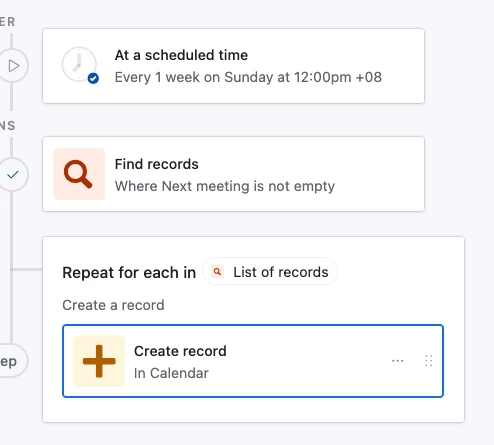
An automation then runs once a week on Sunday at 12am and looks for all Programs that have a ‘Next Meeting’ value.  As you can see, Program 2 doesn’t have a value in ‘Next Meeting’, as its next meeting would have been 22 Jan, which is after the End date that was set for it


And here’s what the automation would look like: