Answer

Automating a task to disappear once marked complete

  • October 30, 2022
  • 2 replies
  • 51 views

Forum|alt.badge.img+2

Hi - I’m brand new to Airtable and am building a capacity tracker/task tracker for my team. In my capacity tracker table, individual team members are assigned an “at capacity” or “available” marker based on a formula that is triggered by the number of tasks they are linked to in the task tracker table. When a task is marked complete in my task tracker table, I want it to disappear from the column/rows it is linked to in the capacity table, so a team member’s capacity level is always accurate. I hope that makes sense.

Is it possible to do this with an automation? I’ve been perusing the forums but can’t find anything that is super clear.

Thanks!

Best answer by TheTimeSavingCo

Hmm, if I were you I’d use a conditional rollup field in the Team Members table that would only rollup on tasks that are not completed, no automation needed. That should do what you’re looking for I think?

2 replies

Forum|alt.badge.img+11
  • Inspiring
  • October 30, 2022

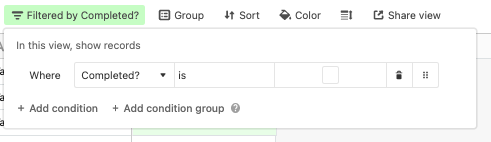
You should be able to create a filter based on marking the task as complete.

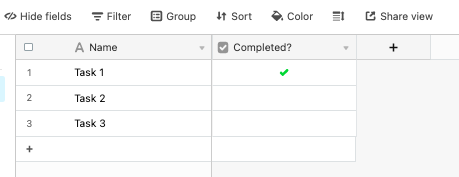
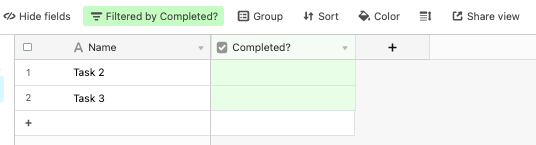
Here are the screenshot of the filter you’d need:

Prior to filter:

Creation of Filter:

After Filter Applied:


TheTimeSavingCo
Forum|alt.badge.img+31

Hmm, if I were you I’d use a conditional rollup field in the Team Members table that would only rollup on tasks that are not completed, no automation needed. That should do what you’re looking for I think?