Automation email - include some fields

  • January 31, 2022
  • 3 replies
  • 75 views

The automation is simple:

  • a new record submitted by form → sends office an email saying someone signed up
  • emails sends fine ✓

How/can you include some of the record fields in the email?
I’ve tried the Attachments +Add option but can’t get the {Insert} button to stay active after choosing some fields.

  • tried adding a trigger before the email step (ie Find Records where create day is today)

Looking for this:

“A new signup has occurred on Airtable.”

URL to Record: {recordURL}
Name: {what they entered}
Address: {what they entered}
Service: {what they entered}
etc

Thanks

3 replies

Forum|alt.badge.img+18
  • Inspiring
  • January 31, 2022

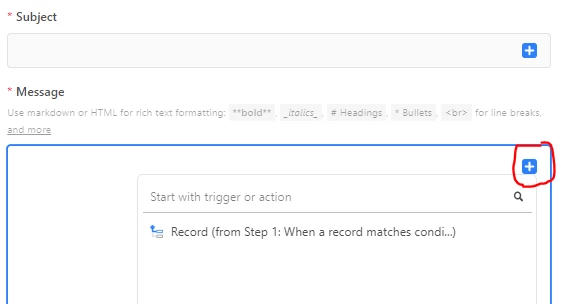
In the send email action, look for this plus sign in the message window.

Does that help or did I misunderstand?


  • Author
  • New Participant
  • February 2, 2022

Ah yes. Thanks so much :raised_hands:
I was going down and clicking in the Record (from Step 1…) line where “continue” pops up
Added some fields as you suggested ✓.

adding the URL doesn’t seem to work…
it would be helpful for the office staff to be able to click through to the new record

  • i did try it while logged in to an account that has access permission for the table

Thanks


Forum|alt.badge.img+4
  • Participating Frequently
  • July 12, 2022

In the send email action, look for this plus sign in the message window.

Does that help or did I misunderstand?


Great tip augmented, thank you. It took me hours to find why I couldn’t get ‘Insert’ to activate - same problem as Steve_Chiasson describes.