Question

Automation for a metrics table

  • December 11, 2025
  • 4 replies
  • 18 views

Forum|alt.badge.img+1

Very new to the platform and I’m getting a little tired of my AI support running me around in endless loops…

I am trying to build a table that extracts a number of metrics out of my data through a series of rollups.  I would like this metrics table to auto-populate based on the name field, so that each individual in my database has their metrics pulled in. 

Right now my trigger is When a record matches the conditions-->Name is not empty;

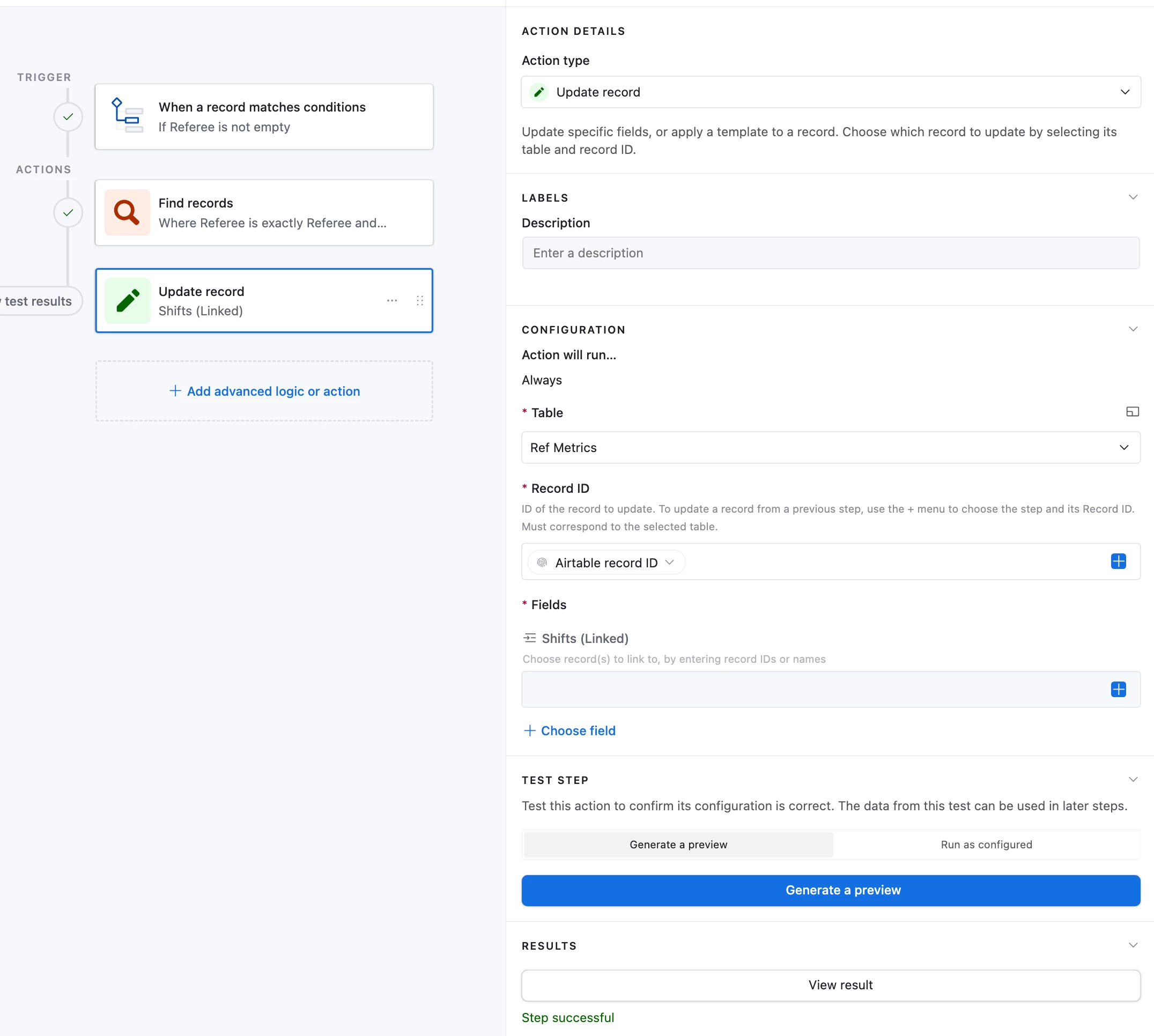
then a Find Records step aimed at my database table, based on the condition Where Name is exactly Name--->make a new list of… ID;

and last is an Update record step aimed at my Metrics table Airtable record ID, using the field Shifts (linked) - which is a field in the metrics table that is linked to the data. However I’m not sure what choice to make in the Choose record(s) to link to, which is set to dynamic, in order to automatically find all the entries for that name in the database table and then carry those across to put into this Shifts (linked) field.  
 

4 replies

Mike_AutomaticN
Forum|alt.badge.img+28

Hey ​@andrewf,

Shat you will probably want to do, assuming that you are doing one metric record per Staff member:
- Have a Staff table
- Make sure that Staff table has a linked record field to Metrics table
- Make sure that Shifts has a linked record field to Staff
- Create a new record on the Metrics table, link it to a single given Staff member record
- Change the trigger on the automation for: When a record from the Metrics table matches condition where Staff is not empty.
- Set conditions on the Find records so that it will find records from the Shifts table where Staff is exactly Staff of the record that triggered the automation.
- Use list of record ids of Find records action, to link shifts to your Metrics table.


Does this make sense?
Please let me know if you need further help!!! Also, trigger can be discussed -as well as update metrics record workflows :D

Feel free to grab a slot using this link if you need to go through it together.

Mike, Consultant @ Automatic Nation 
YouTube Channel 


Forum|alt.badge.img+1
  • Author
  • New Participant
  • December 11, 2025

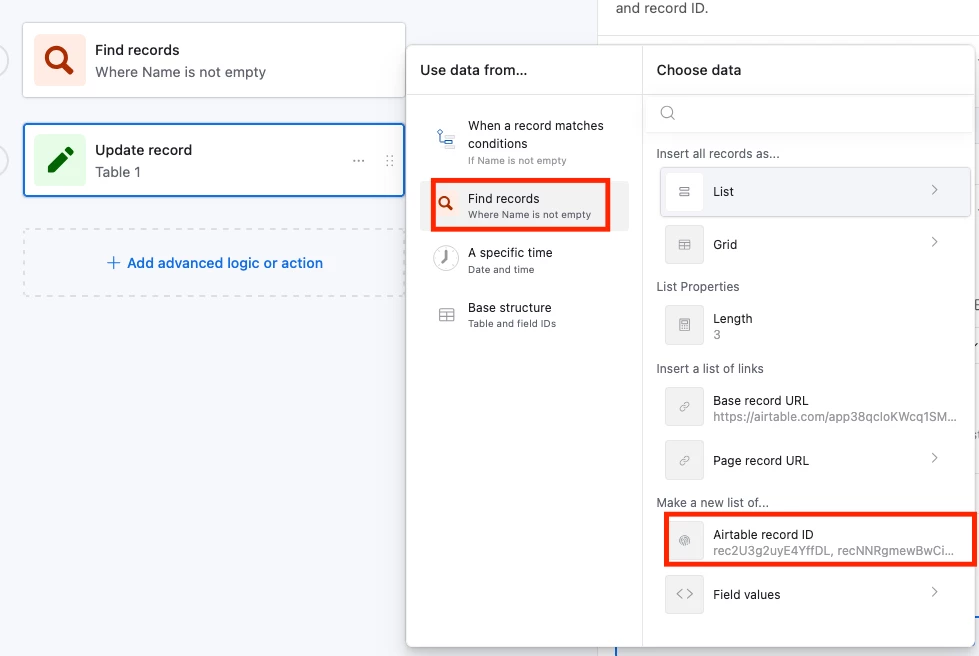
- Use list of record ids of Find records action, to link shifts to your Metrics table.


I think this is where I am losing track - everything else seems to be in place, but I can’t locate the list of record IDs.  In the screenshot above, it seems like something I’m not seeing in the *Fields, Shifts (Linked) window


Mike_AutomaticN
Forum|alt.badge.img+28

Hey! You’ll have to click on the blue + button found next to the field calld Shifts (Linked), that will show a “pop-up” with different options. On the left pannel of such pop-up you’ll see the Find Records action block. Click on it, and then you’ll select the list of record ids!

Please let me know if you need further help!

Mike, Consultant @ Automatic Nation 
YouTube Channel 


TheTimeSavingCo
Forum|alt.badge.img+31

You’re trying to link the results of the ‘Find Records’ action to a record of your choice, is that right?  If so, try this: