Answer

Automation Script in Deleting a records when I will change the status to Delete

  • May 5, 2022
  • 7 replies
  • 110 views

Forum|alt.badge.img

Hi there,

How can I create automation script to delete a record when I’m changing the status to Delete.

I hope someone can help me. Thank you!

@kuovonne help!

Best answer by Ragie_Trigo

I got it! It works now life a charm! Thank you @kuovonne

7 replies

kuovonne
Forum|alt.badge.img+29
  • Brainy
  • May 5, 2022

Welcome to the Airtable community!

This thread should help.


Forum|alt.badge.img
  • Author
  • Inspiring
  • May 13, 2022

HI @kuovonne It doesn’t work on my end.

I tried this script

let table = base.getTable(“BILLING”);
let inputConfig = input.config();
let recordId = inputConfig[‘recordId’]
await table.deleteRecordAsync(recordId);
But it has an error with this

ERROR
TypeError: Invalid arguments passed to table.deleteRecordAsync(recordOrRecordId):
• recordOrRecordId →
recordOrRecordId should be a Record, not undefined
or recordOrRecordId should be a string, not undefined

at main on line 4

hope you can help me with this.

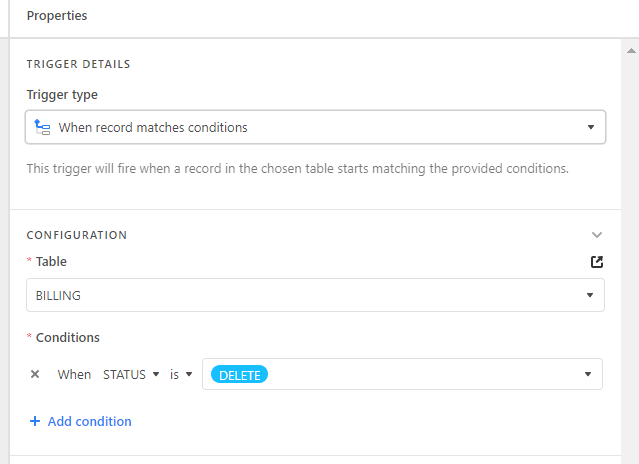
I want all statuses with “DELETE” will be deleted on the BILLING table.


kuovonne
Forum|alt.badge.img+29
  • Brainy
  • May 13, 2022

Have you set up recordId as the input variable for the script?


Forum|alt.badge.img
  • Author
  • Inspiring
  • May 13, 2022

Hi, thank you for your response. How will I do that?

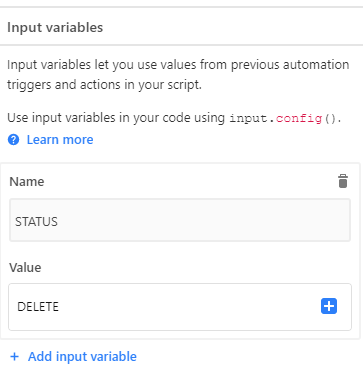
What I did is like this.


kuovonne
Forum|alt.badge.img+29
  • Brainy
  • May 13, 2022

The status of delete needs to go in the automation trigger, not the input variable for the script.

You need to create an input variable named recordId and select the value of the record id of the triggering record. (Use the blue plus sign to select the value.)


Forum|alt.badge.img
  • Author
  • Inspiring
  • May 13, 2022

I think I’ve already done that. Can you please check if this correct?


Forum|alt.badge.img
  • Author
  • Inspiring
  • Answer
  • May 13, 2022

I got it! It works now life a charm! Thank you @kuovonne