Question

Automation to email specific persons defined by email address lists specific to them

  • January 6, 2026
  • 8 replies
  • 80 views

Forum|alt.badge.img+2
  • Participating Frequently

I have 20 project managers. Every Monday i need to email each of them independently their list of jobs that meet specific criteria they need to take action on. I am starting to run out of automations for this base and am trying to consolidate this into a single automation rather than an automation per PM.


Here is what I am trying to accomplish

  1. at scheduled time (good on this part)
  2. find records - find the PM by email address (this is a record within the table) I've taken this line out because it does not seem to be able to dynamically pull each PM, but m not sure how tog et the automation to accomplish this step.
  3. find records - when status1 <100%, and status1 due date is empty (good on this part)
  4. find record - when status2 <100% and status2 due date is empty (good on this part)
  5. send email - the PM defined in pm email address in the table gets an email listing the records in parts 3 and 4. These records are specific to projects he is running (cant get this to work correctly in a single automation).

I've tried several iterations of this and can only seem to get it to work if i break this out into an automation per PM. which is also not the most scalable route. if we add a PM i have to create a new automation and as i said in the beginning, I'm almost out of automations anyway. there must be a way to consolidate this into a single automation.. Any help is appreciated


8 replies

TheTimeSavingCo
Forum|alt.badge.img+31

Hm, what if you tried:

  1. Triggers at scheduled time
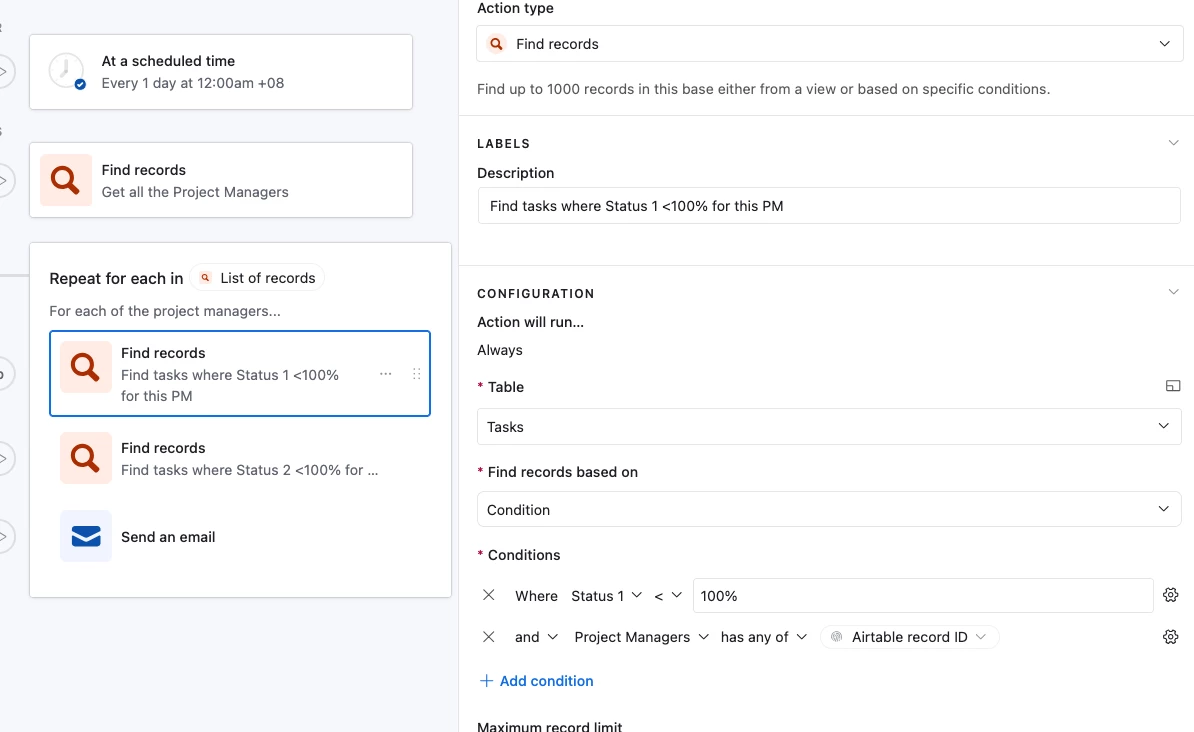
  2. Find Record action to grab all the active PMs
  3. Repeating Group with:
    1. Find Records to look for Status1 < 100%, Status1 due date empty
    2. Find Records to look for Status2 < 100%, Status2 due date empty
    3. Send an email to that PM

It’d look something like this and I’ve set it up here for you to check out


Mike_AutomaticN
Forum|alt.badge.img+28

Hey ​@MRC228,

First part of the video below is what I believe you are looking for (small tweak, you will want to include that extra Find Records actions within the repeating group as shown by Adam above).


Mike, Consultant @ Automatic Nation 
YouTube Channel  


Forum|alt.badge.img+2
  • Author
  • Participating Frequently
  • January 7, 2026

Hm, what if you tried:

  1. Triggers at scheduled time
  2. Find Record action to grab all the active PMs
  3. Repeating Group with:
    1. Find Records to look for Status1 < 100%, Status1 due date empty
    2. Find Records to look for Status2 < 100%, Status2 due date empty
    3. Send an email to that PM

It’d look something like this and I’ve set it up here for you to check out


Adam,

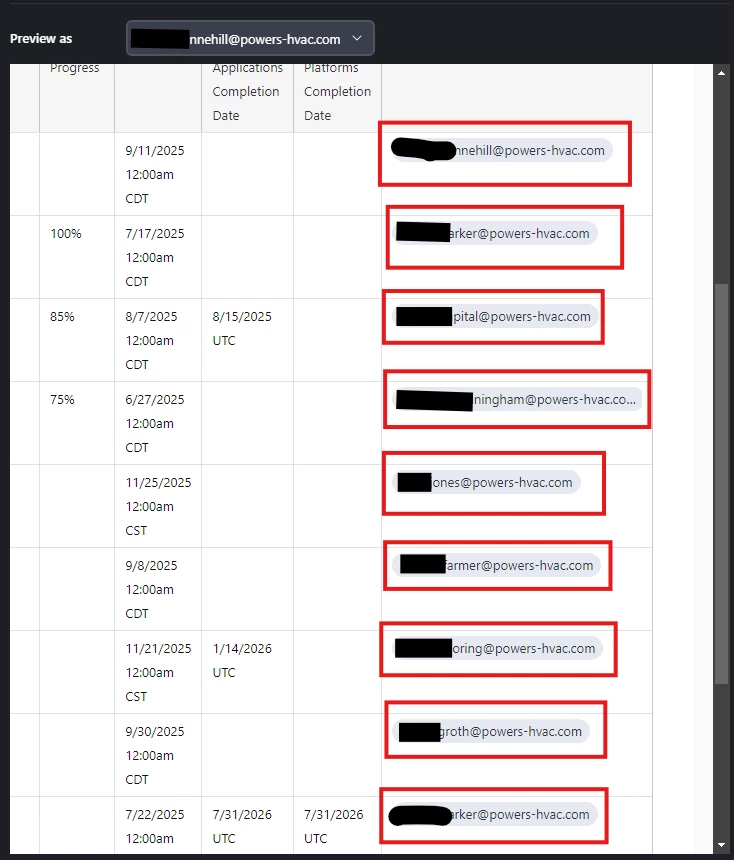
In the example provided, when i test the functionality at the email level the grid view in the test email contains projects from multiple PM’s. The grid view within the email needs to send to  each pm as an individual email. their email should only show projects assigned to them.


If Jon.doh@email.com is the PM, he will receive an email containing a list of his projects only. below is what the “test” results provided. As you can see, this PM only gets 1 of his jobs but also gets a list of jobs he in not involved with.


TheTimeSavingCo
Forum|alt.badge.img+31

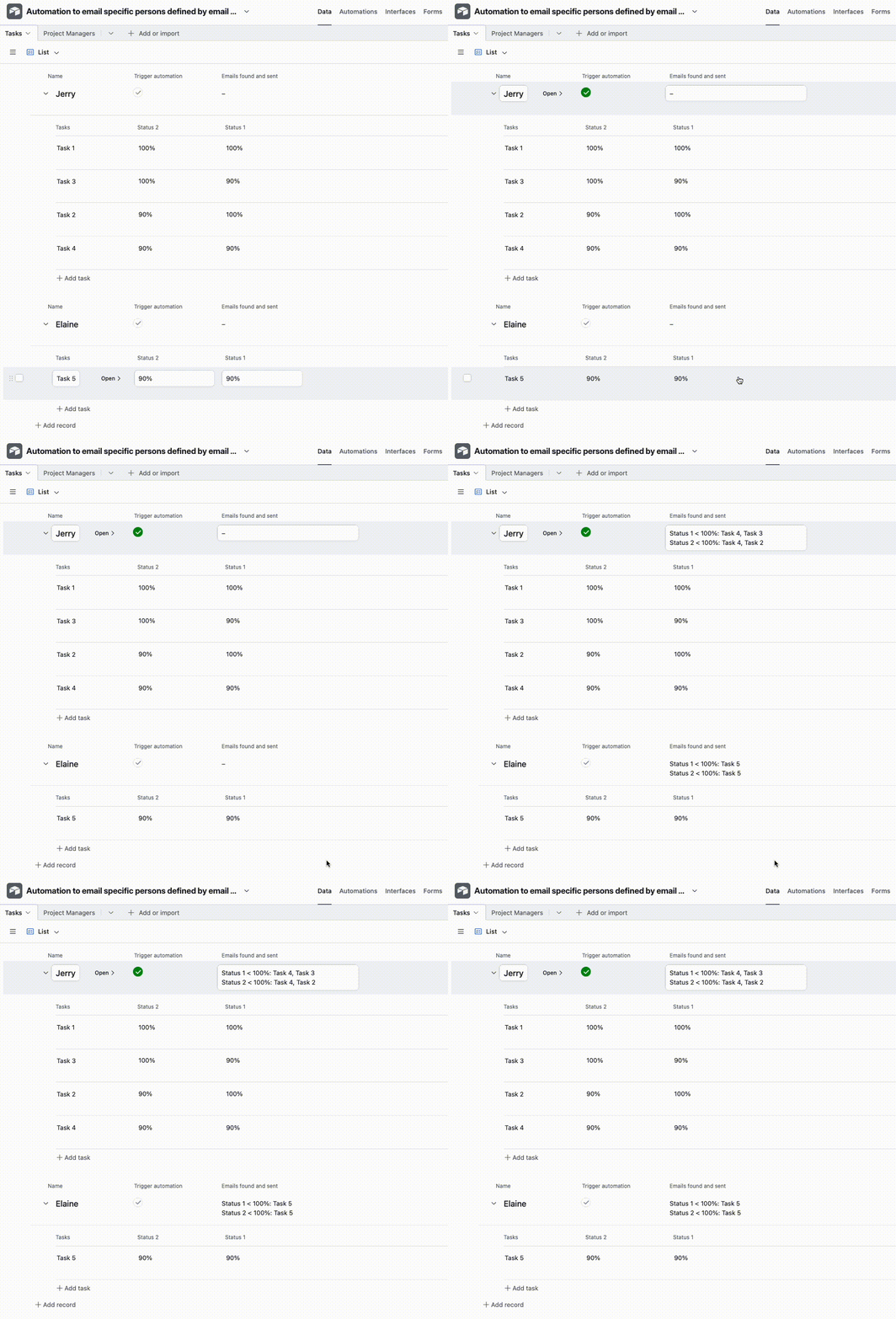
Ah, here’s what happens when I run a test on the example base I provided, it’s working fine?

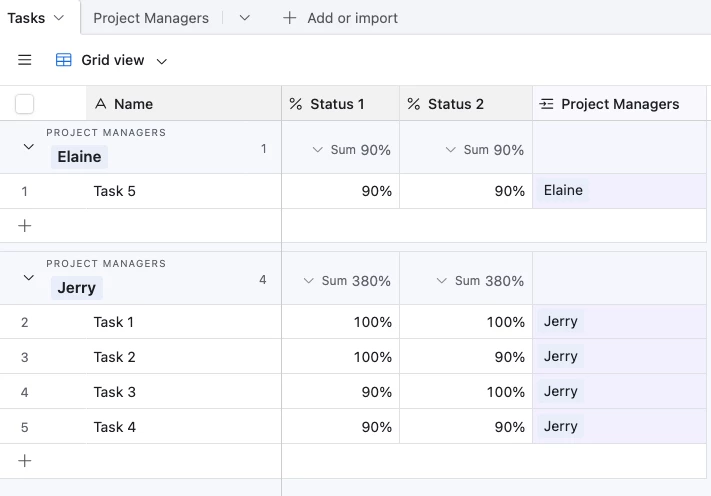
Here’s the data:

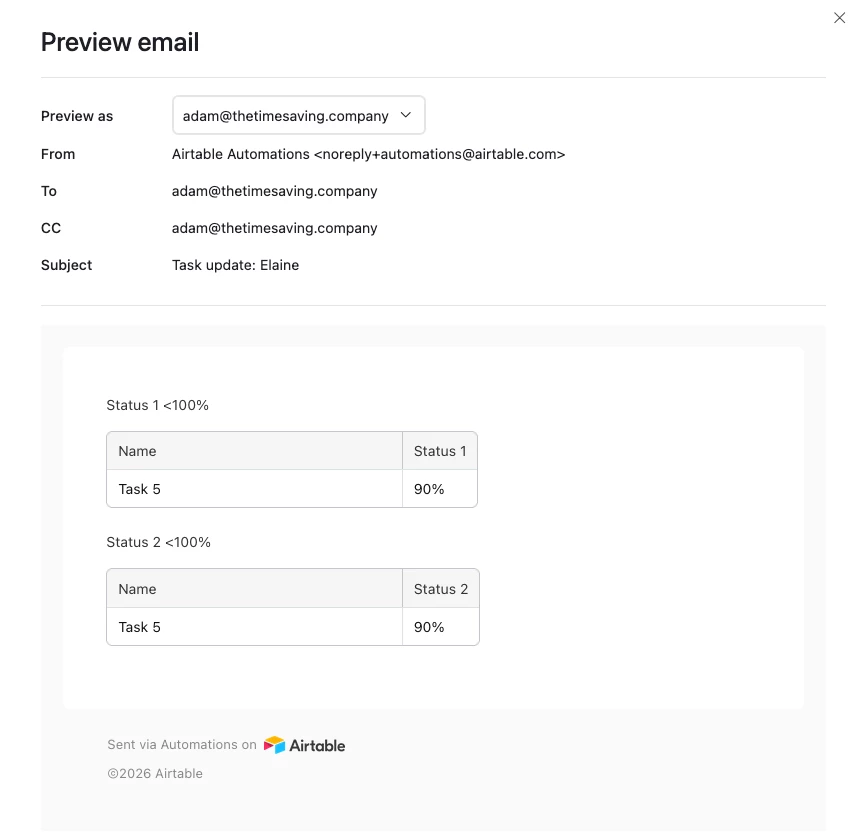
And here’s the email that gets generated for Elaine:

To show the full data pull, I duplicated the original automation and made it update the Project Manage record instead with the Find Record action results, and you can see that each PM only gets the tasks that are tied to them and are relevant


Jerry gets Task 2, 3, 4.  Elaine gets Task 5


If you could provide some screenshots of your tables I could try to help you troubleshoot your setup if you’d like?  Or if you could invite me to your base I could set it up for you too!


Forum|alt.badge.img+2
  • Author
  • Participating Frequently
  • January 8, 2026

Ah, here’s what happens when I run a test on the example base I provided, it’s working fine?

Here’s the data:

And here’s the email that gets generated for Elaine:

To show the full data pull, I duplicated the original automation and made it update the Project Manage record instead with the Find Record action results, and you can see that each PM only gets the tasks that are tied to them and are relevant


Jerry gets Task 2, 3, 4.  Elaine gets Task 5


If you could provide some screenshots of your tables I could try to help you troubleshoot your setup if you’d like?  Or if you could invite me to your base I could set it up for you too!

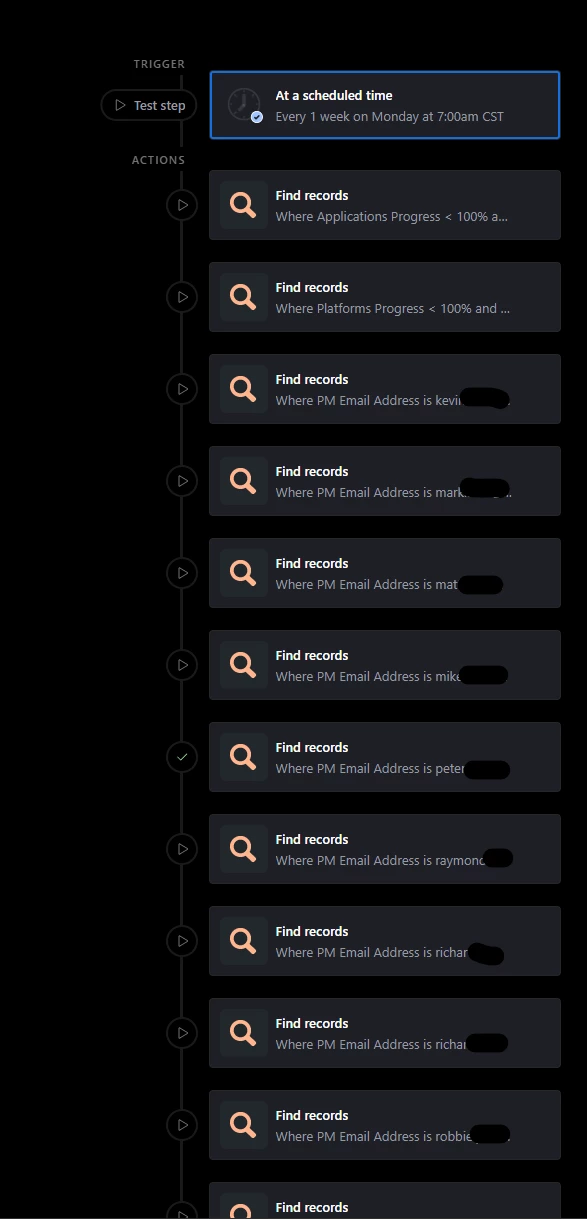
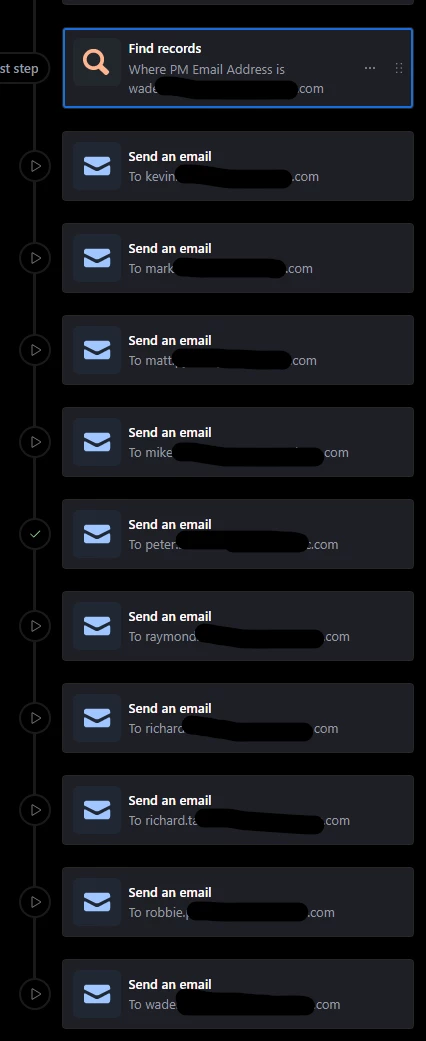
I spend some time last night with this and finally got it working correctly. here’s what the automation looks like. I'm not sure if its the most efficient way of doing it, but i was able to get all the PM’s via 2 automations.

In the email sections, I have the lists setup as a grid. I wasn't understanding that when setting up the grid, i had to point it at the “find record” for the individual PM’s. That's why the list was showing all the projects instead of their specific projects.


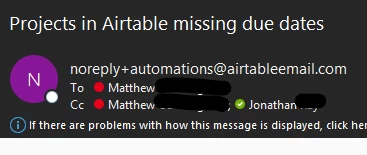
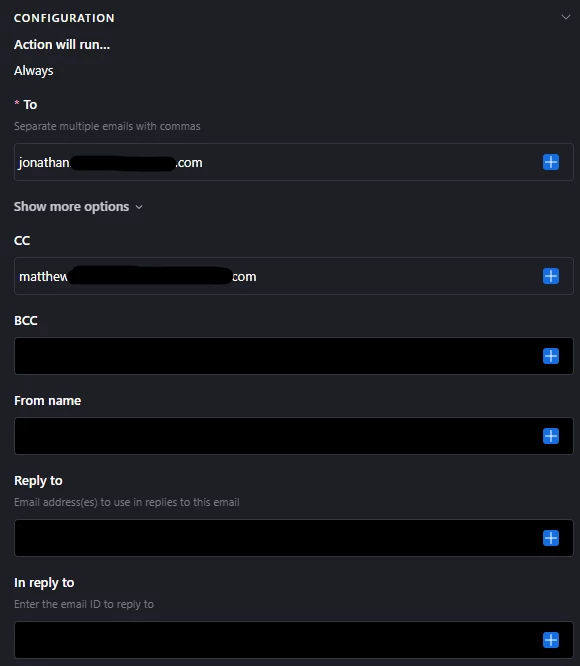
The only thing that is odd, is how the email is being sent. I have each PM listed in the “to” field, and myself in the “cc” field, bue when the email sends, its flipped. im in the to and the pm is in the cc. (last screenshots)


emails


TheTimeSavingCo
Forum|alt.badge.img+31

The only thing that is odd, is how the email is being sent. I have each PM listed in the “to” field, and myself in the “cc” field, bue when the email sends, its flipped.

Ah, yeah that’s a known limitation I’m afraid, here’s the docs:

https://support.airtable.com/docs/send-an-email-action#understanding-expected-behavior-in-to-cc-and-bcc-fields

---

Hm, with the way you’ve set it up you’ll need to update this automation when a PM joins / leaves, which I think is fine as that’s going to be really rare.  Since it works just stick with it I reckon!


Forum|alt.badge.img+2
  • Author
  • Participating Frequently
  • January 9, 2026

The only thing that is odd, is how the email is being sent. I have each PM listed in the “to” field, and myself in the “cc” field, bue when the email sends, its flipped.

Ah, yeah that’s a known limitation I’m afraid, here’s the docs:

https://support.airtable.com/docs/send-an-email-action#understanding-expected-behavior-in-to-cc-and-bcc-fields

---

Hm, with the way you’ve set it up you’ll need to update this automation when a PM joins / leaves, which I think is fine as that’s going to be really rare.  Since it works just stick with it I reckon!

Right. I’m not exactly thrilled with knowing I’ll have to manually update each time a pm leaves or is highered. Plus you can only have 25 actions per automation, which is reasonable, but at the Same time means as we grow, I’ll have to add another automation. I really wish I could figure out how to make this work “right”. But this works for now and at least gets things moving. 


TheTimeSavingCo
Forum|alt.badge.img+31

I really wish I could figure out how to make this work “right”. But this works for now and at least gets things moving. 

Yeah...if you invite me to your base I can just set it up for you if you’d like?  Not sure how else I can help, sorry!