Solved

Automations - multiple actions

  • December 23, 2025
  • 9 replies
  • 74 views

Forum|alt.badge.img+11

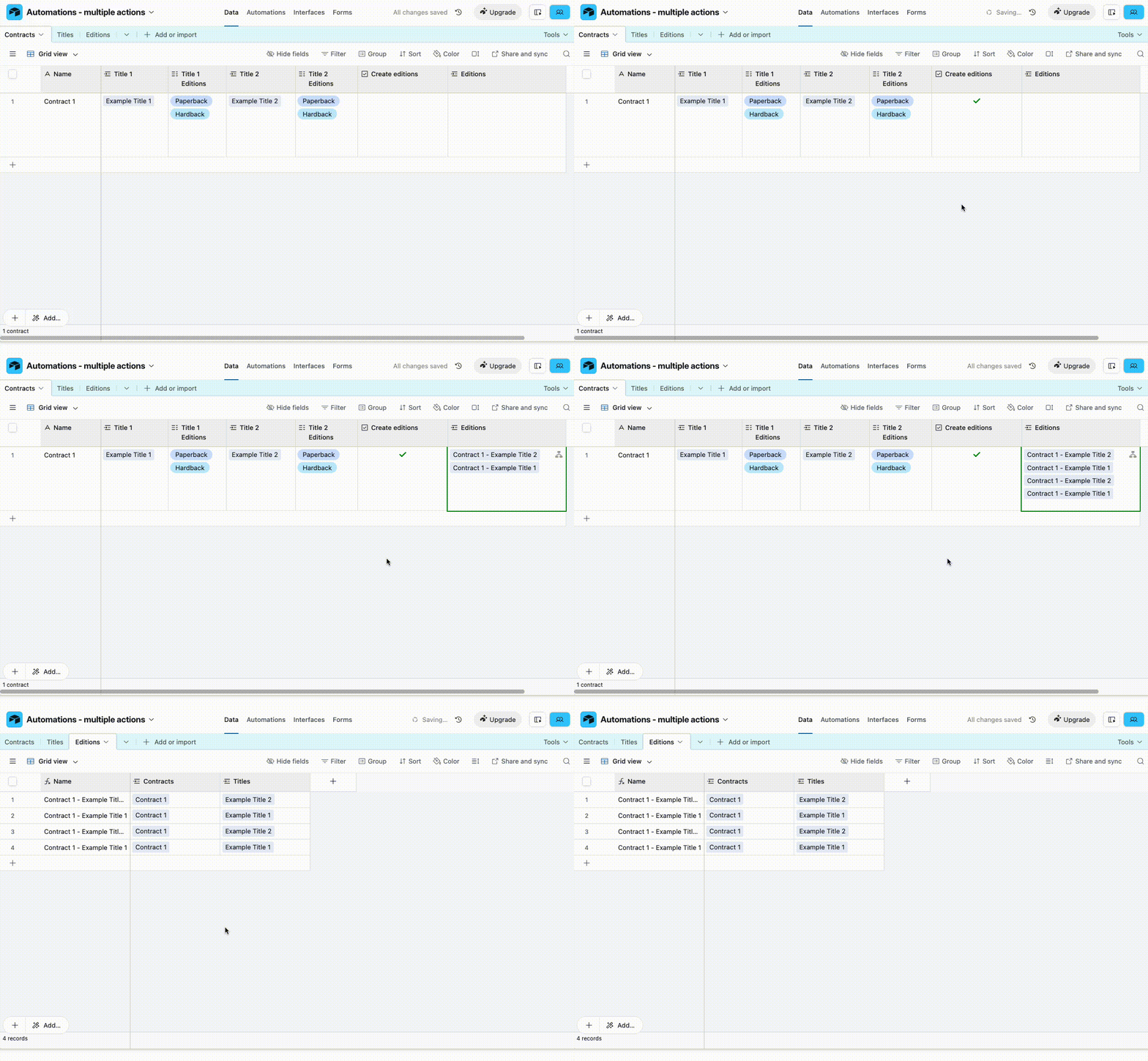
I’m trying to work out if I can create an automation to do multiple tasks or if they all have to be separate (which might max out my allowance)…

I have a table which tracks my book contracts. Each contract may have up to 5 titles on it and each title could be produced in up to 6 editions.



I’d like an automation that creates a record in my edition table for each planned edition…

So,

Test title 1 Hardback

Test tile 1 Paperback

etc

I can get this to work if each automation is separate but feel like there should be a way to group it somehow. However, at the moment when I try to create a chain it comes up as ‘otherwise’ so it doesn’t run the paperback if there is a hardback. What am I missing? 
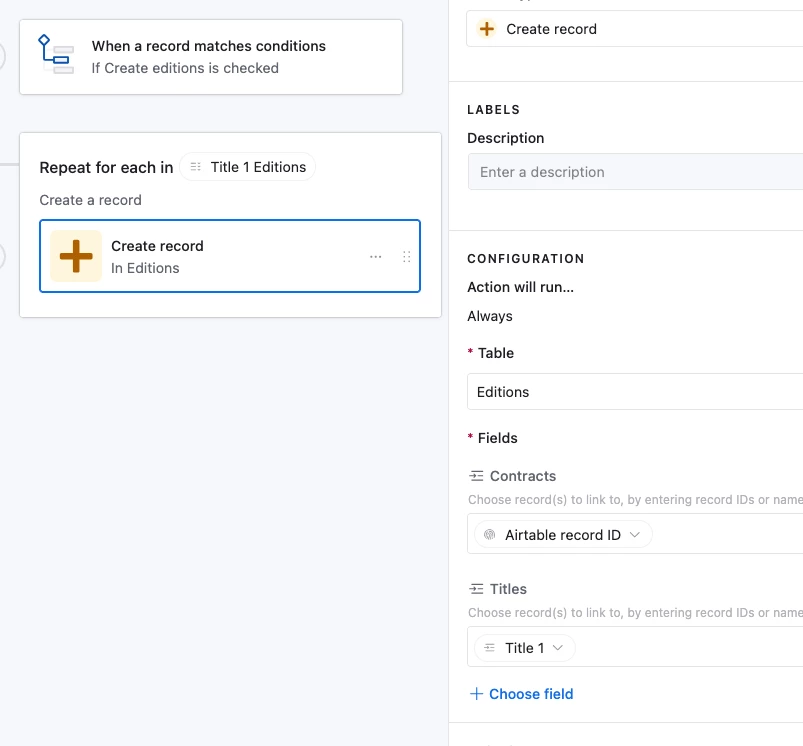
Best answer by TheTimeSavingCo

Hm, without scripting, the minimum you’d need would be 5 automations (one per title) and I’ve set it up here for you to check out


If you were to do it with scripting you could handle it within one automation, but that might be more work than it’s worth, really.  If this is really something you’d like to explore I’d suggest trying to use ChatGPT to help with this and if you hit a wall let me know and I’ll see what I can do to help!

9 replies

TheTimeSavingCo
Forum|alt.badge.img+31

Hm, without scripting, the minimum you’d need would be 5 automations (one per title) and I’ve set it up here for you to check out


If you were to do it with scripting you could handle it within one automation, but that might be more work than it’s worth, really.  If this is really something you’d like to explore I’d suggest trying to use ChatGPT to help with this and if you hit a wall let me know and I’ll see what I can do to help!


Forum|alt.badge.img+11
  • Author
  • Known Participant
  • December 24, 2025

Fab, thanks so much!


felipe-saucedo
Forum|alt.badge.img+10

Hi Hanna this would be a simple scripting, you can ask GPT, i find it to be good on making these simple scripts and then with a keen eye you can always fix it or amend it. 


Mike_AutomaticN
Forum|alt.badge.img+28

Hey ​@HannahS,

If I may suggest an additional update to your setup:
You cound split you current Contracts table into the following two tables:
Contracts
Titles

You should link your Editions table to your Titles table rather than to your Contracts table.

In this case, Contracts would be linked to one or multiple (5) titles. Each title will be its own record in the Titles table. Fruthermore, each title will have its corresponding Planned Editions (which by the way I would suggest having Edition Types as a completely different table and have a linked record field to Edition Types rather than having a multiple select for Planned Editions).

You can now create a new field at the Contract Level -checkbox for exmaple- called Create Planned Editions.
You can have a lookup of Planned Editions field at the Titles level.
For last you can set the trigger on the automation to run when Planned Editions (from Titles) lookup field is not empty at the Titles level.
In this way, and using repeating groups as shown by Adam above, you (a) woud have a more robust and scalable database architecture, and (b) you would only need one unique automation to get the job done.

Hope this helps!

Mike, Consultant @ Automatic Nation 
YouTube Channel


Forum|alt.badge.img+11
  • Author
  • Known Participant
  • December 26, 2025

Hi ​@Mike_AutomaticN There is a titles database and the editions will be linked to it - but from a workflow perspective it’s easiest if they’re created when I’m inputting the contract details. Also from the point of view of tracking what has paid out on each contract it makes sense to me to have them linked there. What would be the benefit to having them linked to the titles table instead?

I’m also intrigued by the comment re having edition types as its own table. What would that enable that having them as multiple select doesn’t? Why might I need them as a linked record? 

Thanks


Mike_AutomaticN
Forum|alt.badge.img+28

Oh, I’m sorry ​@HannahS I just see you mention that you already have a Titles table.

In any way, I would still make a small change to the architecture. Rather than having multiple linked record fields (Title 1 field, Title 2 field, Title 3 field, etc), why not have just one linked record field that supports multiple records linked through it?

This would be leaner and cleaner. Right? If you need numbering of such titles (1, 2, 3, etc), you can still do this at a Title level (e.g. number field for 1, 2, 3, 4, 5). If still need this data shown individually on different fields at a Contract level, you can have conditional lookups to show data from Title 1, or Titlw 2, etc.

This makes for a more robust architecture, as mapping in automations, filters, etc do not need to reference multiple different fields (tbd).

Keeping your options of a given dropdown (e.g. Types) as a seperate table -and a corresponding linked record field to it rateher than as a single select- is really helpful when you forsee using such exact same list on different tables. In this way, you do not need to worry about typos, or keeping the list updated on each single select on each table. You just keep a unique centralized version of the list on a table (which I usually call smth like “Types: Library”).

Furthemore, this also helps for:
Reporting (e.g. rollups at a Types level)
Accuracy and scalability (e.g. use record ID rather than actual text on your automation).

Does this bring some light to the discussion? Please send overy any follow up questions you might have!

Mike, Consultant @ Automatic Nation 
YouTube Channel


Forum|alt.badge.img+11
  • Author
  • Known Participant
  • December 26, 2025

Hi ​@Mike_AutomaticN If I did the one record field containing multiple titles, would I be able to then record for instance if title 1 was assigned $45000 and would be published in Hardback, paperback, ebook and audio, but titles 2 and 3 were assigned $25000 each and would only be published in paperback, ebook and audio (I didn’t include the payment fields in the screen shot I posted but there’s other information recorded at the contract level that won’t be the same for every title on the contract. Would the method you’re suggesting account for that? 


Mike_AutomaticN
Forum|alt.badge.img+28

Hey ​@HannahS,

Yes but at a different level (I might be getting a bit lost on your architecture). But as I see it, you will want to keep track of $ on the Titles table rather than on the Contracts table. If you want to consume data on $ from each title individually, you would do so from the Titles table (or an interface showing each title). If you want to consume data on $ for the whole Contract, you would have a rollup at the Contract level.

Does this make sense?

Mike, Consultant @ Automatic Nation 
YouTube Channel 


Forum|alt.badge.img+11
  • Author
  • Known Participant
  • December 26, 2025

@Mike_AutomaticN sort of, yes...but from a workflow perspective, at the moment I can get a contract, input the bulk of the detail in one place and from there link it to each title. But if I’m doing most stuff at title level it makes the inputting much more complicated - also, from a keeping track of payments perspective, the money will be actioned on some editions of the title, not the title itself (so there might be payouts on Hardback but not audio or ebook for instance) so it makes sense to me to have those at edition level which then feeds back to the title and keeps track of the top level stuff there. It feels more intuitive to me that the title is where all the disparate parts are pulled together with rollups rather than that that’s where the information sits...but then I’m doing this big redesign because my first attempt wasn’t working once I started scaling up so I’m interested to try to think this through.