Question

Conditional Automations with Multiple Options

  • December 15, 2025
  • 4 replies
  • 23 views

Forum|alt.badge.img

Hello!

I am currently working on a form and want the ability for individuals to make multiple selections and get specific emails depending on their responses.


For instance, we have 3 trainings with their own Zoom calendar invite that individuals can select on the form. Lets say Jane picks Training 1 and Training 3. We have an automation to send Jane an email that contains a Zoom calendar invite for Training 1 but want an automation that will also send her Training 2 in the same email.


Is that a possible automation? Or is there a different way to do this? My organization currently cannot connect Zoom to our Airtable so that isn’t a potential solution unfortunately. 
 

Please let me know your thoughts or if you need clarification on anything!

4 replies

DisraeliGears01
Forum|alt.badge.img+21

This is mostly doable, the only issue being your email formatting will be a bit constrained. 

The way I’d approach this is more relying on formulas and lookup fields rather than automations (though of course the email itself is sent via automation). 

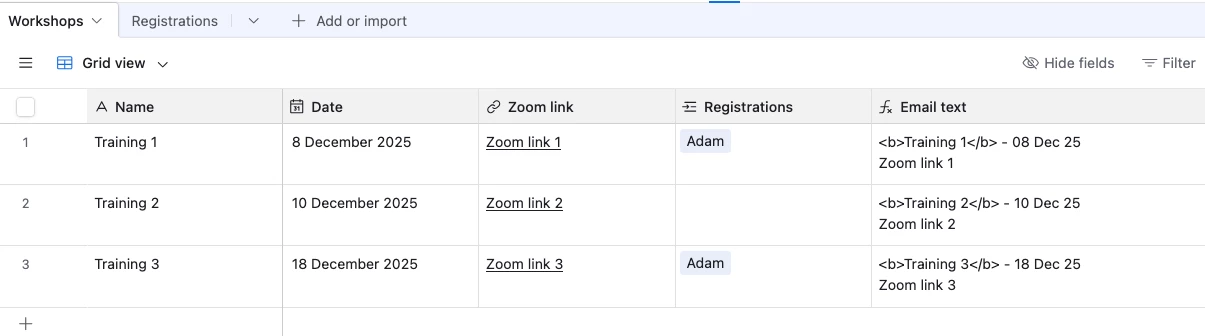
At the simplest level, I’d create two tables, one for Registrations and one for Workshops. In the Workshop table you have two views, All and Active. In Workshop you have your training details, date/time, Zoom link, etc. Your Active view is filtered to only display Workshops you want to be available for registration (not the past, or maybe a flag field). You also create a formula field in the Workshop table that concatenates all the information your registrant needs in a compressed format.

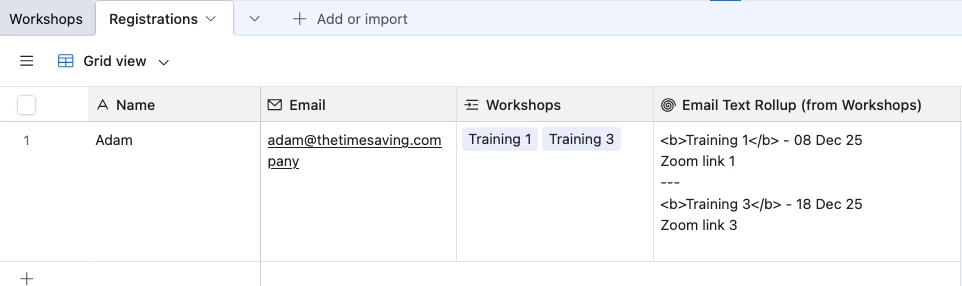
Then in the Registrant table, you make a linked record field to workshops that is limited to the Active view. Now folks can register for any of your active workshops via a form on the Registrant table. Now you add a lookup field for the concatenated formula on the workshop table.

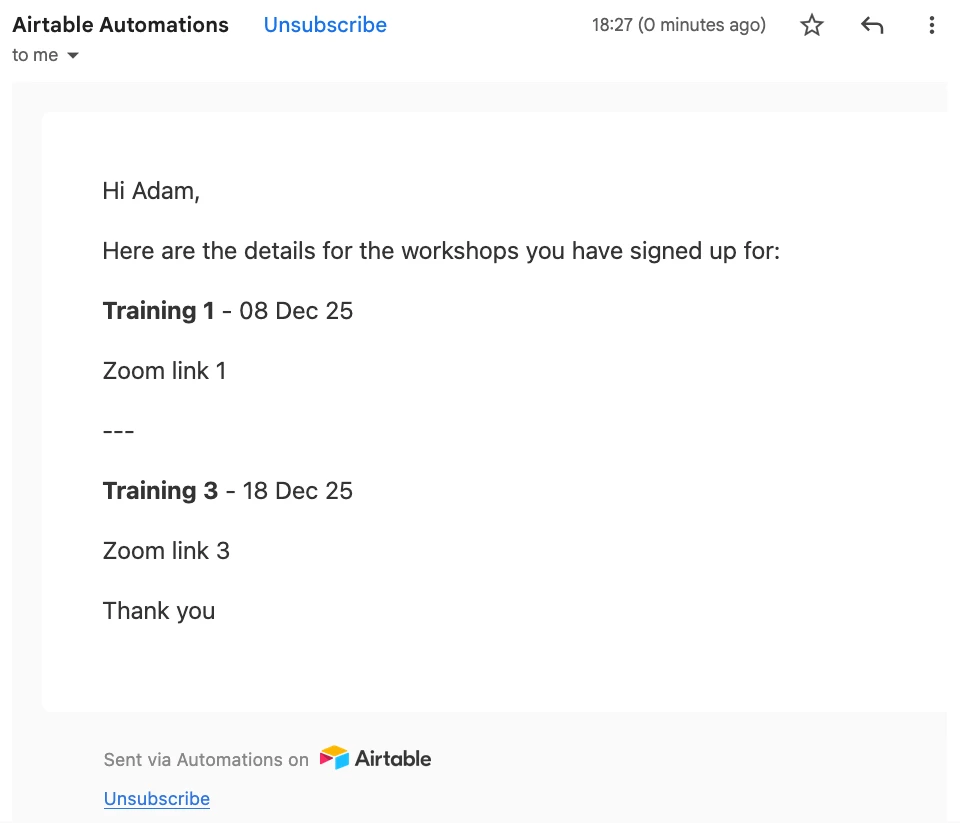
Finally in your email automation, when a form is submitted it sends an email to the respondent saying “Thanks for signing up! Below are the workshop(s) you have registered for (List of Records)”. In the List of Records, only select the lookup field. 

The other element that is probably important here is to make sure you add line breaks “\n” into your formula to separate the info. 


ScottWorld
Forum|alt.badge.img+35
  • Genius
  • December 15, 2025

Each Airtable automation can only go down one conditional path, so you would either need to:

  1. Create 6 conditional paths to account for the 6 different combinations of 3 trainings.
    or
  2. Create 3 different automations, each one triggered by the selection of one of the 3 trainings.

I feel like #2 is easier to maintain over time — especially if you continue adding new trainings — although Airtable does limit you to 50 automations, so be aware of that.

Alternatively, if you use Make’s advanced automations for Airtable, you gain a lot more flexibility, power, and control.

Make can go down MULTIPLE CONDITIONAL PATHS in a single automation, so your automations are easier to customize and maintain over time. Make also offers thousands of advanced features that Airtable’s automations don’t offer, including native integration with over 3,000 apps.

If you’ve never used Make before, I’ve assembled a bunch of Make training resources in this thread. For example, here is one of the ways that you can instantly trigger a Make automation from Airtable

Hope this helps!

If you have a budget and you’d like to hire the best Airtable consultant to help you with this or anything else that is Airtable-related, please feel free to contact me through my website: Airtable consultant — ScottWorld


VikasVimal
Forum|alt.badge.img+12
  • Inspiring
  • December 16, 2025

You should avoid conditional workflows. Instead, use Formula fields, a bunch of them.

If user selects A, output the text that comprises the relevant details, if not, leave blank. Then pull these fields in the email body.

I’d set this text in the trainings table, and rollup the relevant details when the records are selected. This gives a single text field with all necessary details for all ‘selected’ records. Just use it as a text in the email. No need to use any conditionals whatsoever.


Ping me for consults if you need help with this or other issues: https://calendly.com/d/dvq-nvm-nhg


ScottWorld
Forum|alt.badge.img+35
  • Genius
  • December 16, 2025

That’s an even better idea! Much simpler.

- ScottWorld, Expert Airtable Consultant