Solved

Create multiple records

  • January 10, 2026
  • 8 replies
  • 81 views

Forum|alt.badge.img+2
  • Participating Frequently

I have three Tables. - Commit Items, Invoice Header, and Invoice Detail. Lets assume that For Commit No ACB001 there are 4 Records in Commit Items Table with many records for other Commit Nos.. When the invoice is received for Commit No ABC001 and entered on Invoice Header table with Invoice No and Commit No ABC001, I would like automation to grab four records from Commit Items table and create those 4 records + Invoice number in Invoice Detail table. How do I achieve this? Just a reminder, I am new to AirTable.

Best answer by TheTimeSavingCo

Ahhh, yeah it’s because the ‘Commit No’ field is a linked field to another table!  I've created a new base here for you to check out
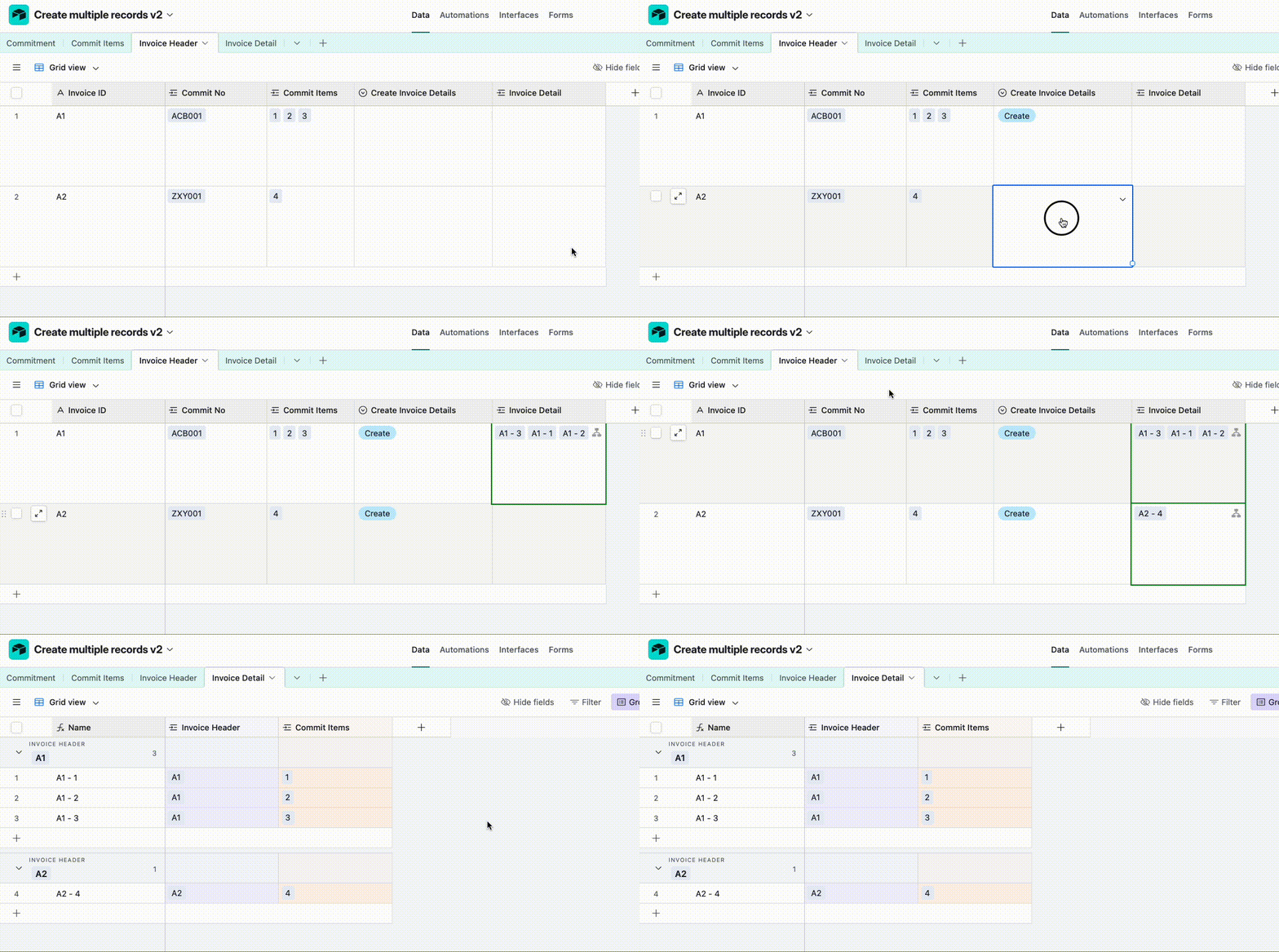
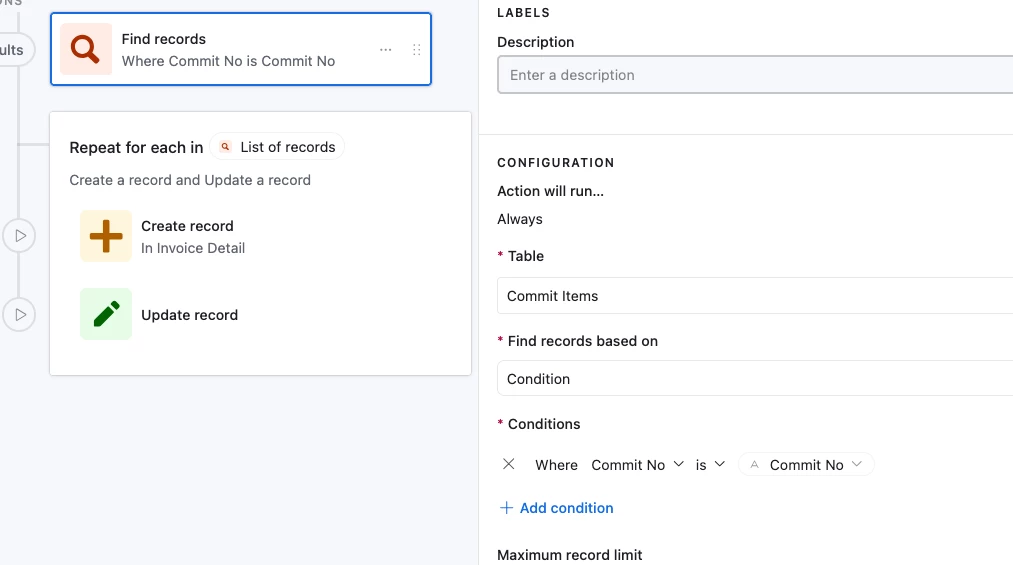
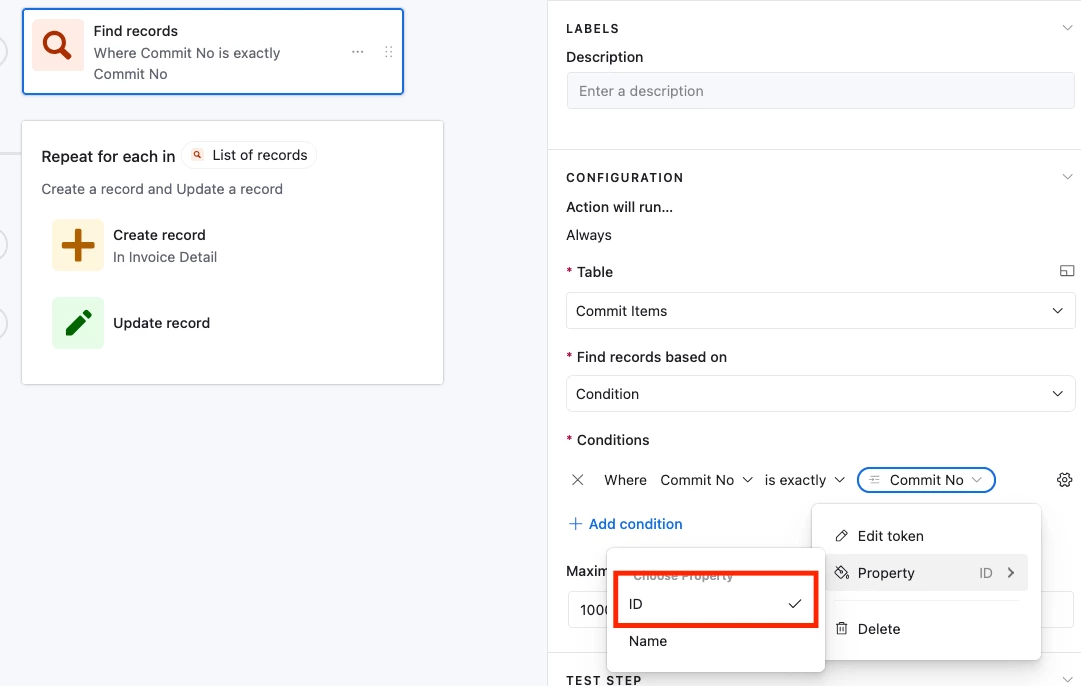
And for the automation setup, we just need to update the ‘Find Record’ step to use ‘is Exactly’ and to use the ID of the Commit No field:
 

8 replies

TheTimeSavingCo
Forum|alt.badge.img+31

This is doable but kind of tricky, and I’ve set it up here for you to check out!  You can duplicate the base into your own workspace to see the whole automation setup

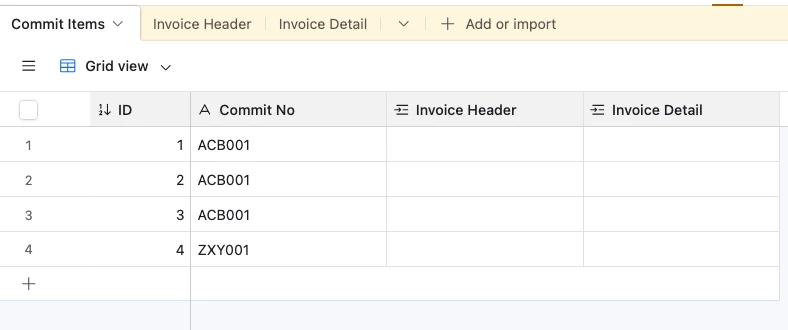
It assumes your data looks like this:


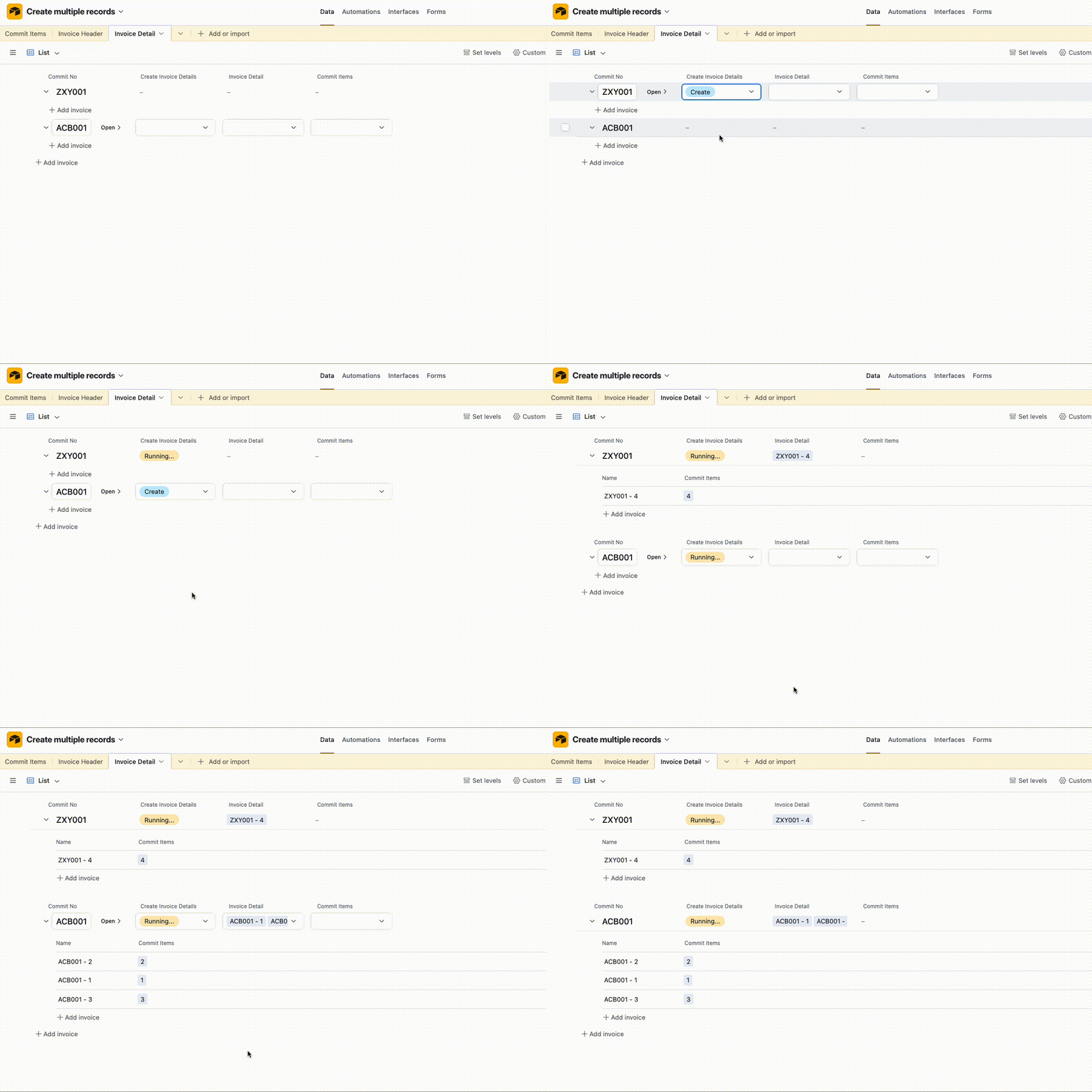
And from the Invoice Header table, you can activate the automation which will:

  1. Look for all Commit Items that have the same Commit No value
    1. For each of them, create a record in Invoice Detail and link it to the triggering Invoice Header record

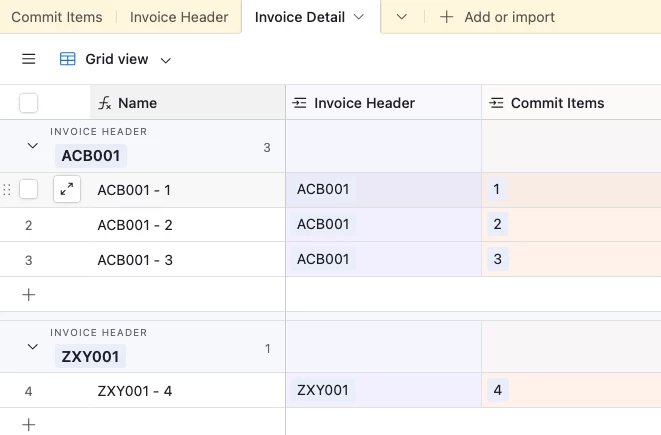
And here’s the end result in the Invoice Detail table as a Grid view:


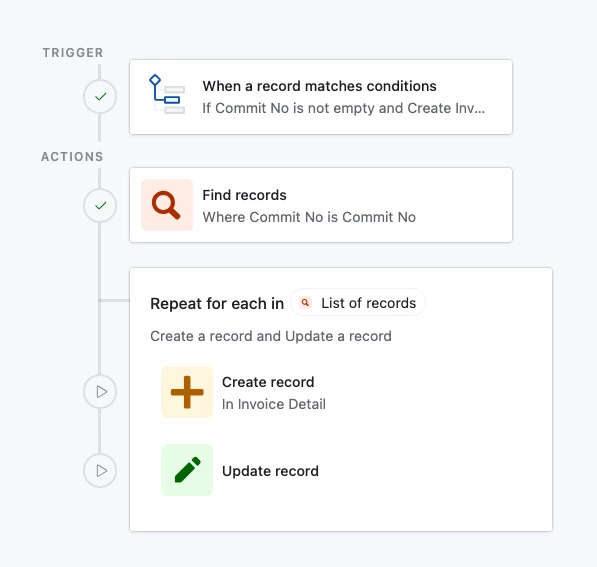
And here’s the automation setup

We have a ‘Find Record’ action that looks for all records in the Commit Items table that have the same Commit No as the triggering record:

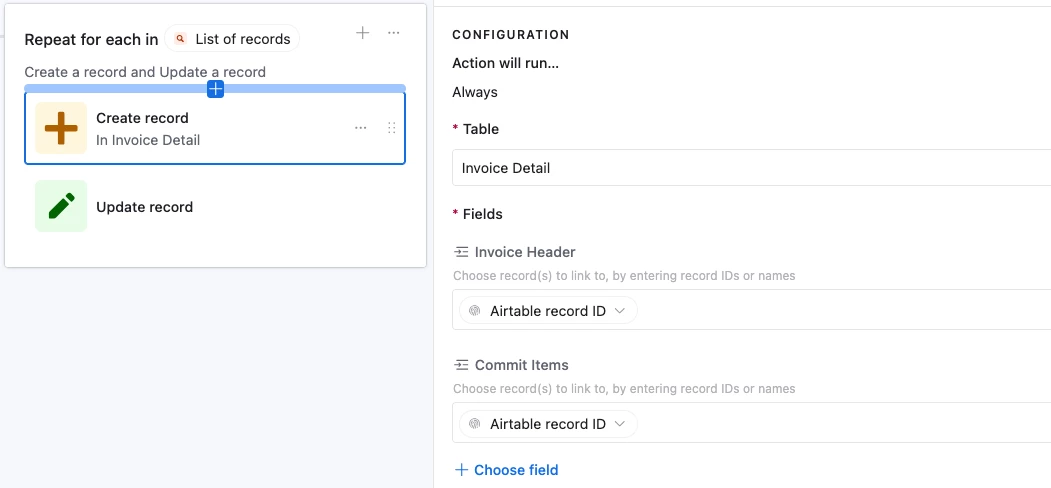
And then for each of those found records we create a record in Invoice Details and link it to the triggering record:

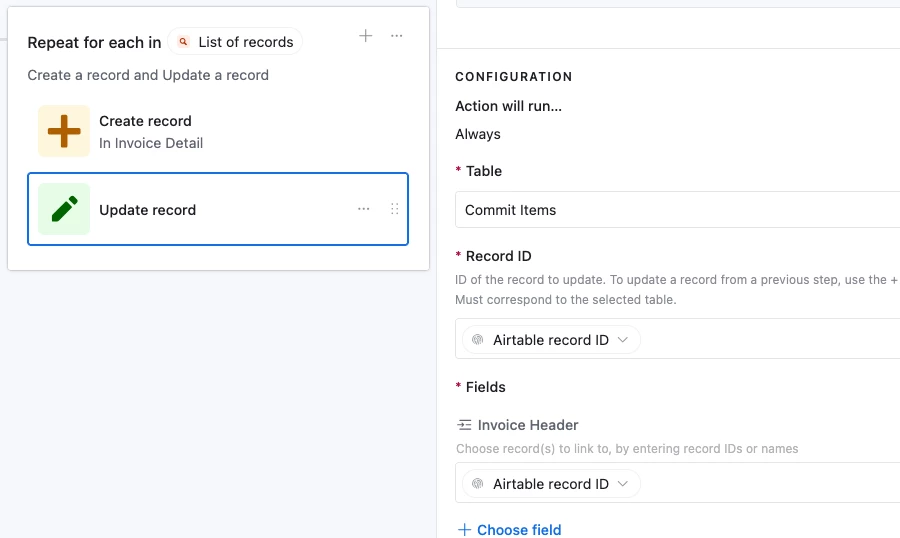
And finally we link the Commit Items to the Invoice Header as well:


Forum|alt.badge.img+2
  • Author
  • Participating Frequently
  • January 10, 2026

As you said… this is tricky so will take some time for me to absorb. But will try and get back. Many thanks. - Ketan...


Forum|alt.badge.img+2
  • Author
  • Participating Frequently
  • January 12, 2026

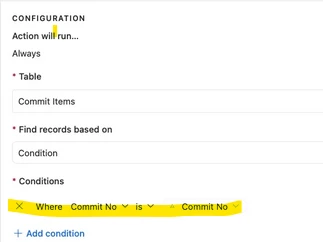
I am unable to enter this condition. It could be that I have another table called Commit Header and that record is linked to Commit Items and Invoice Header record. When I choose Commit No on automation, the ‘is’ option is not available.


TheTimeSavingCo
Forum|alt.badge.img+31

Hm, could you provide some screenshots of your tables please?


Forum|alt.badge.img+2
  • Author
  • Participating Frequently
  • January 12, 2026

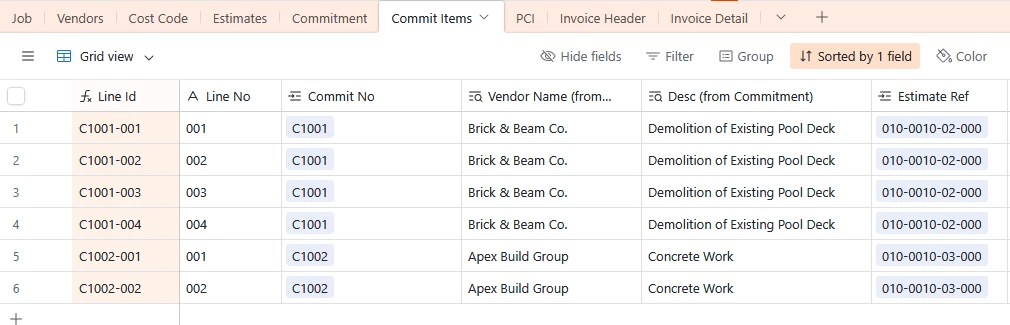
4 tables. Want to create Rows 1 to 4 in Invoice Detail table when Header for the commit no is entered.


TheTimeSavingCo
Forum|alt.badge.img+31

Ahhh, yeah it’s because the ‘Commit No’ field is a linked field to another table!  I've created a new base here for you to check out

And for the automation setup, we just need to update the ‘Find Record’ step to use ‘is Exactly’ and to use the ID of the Commit No field:


Flow Digital
Forum|alt.badge.img+2
  • Participating Frequently
  • January 13, 2026

Hey TGJM!

This is a perfect use case for an automation with a script. Here's how to set it up:

Base Structure First

Make sure your tables have these relationships:

  • Invoice Header → links to Commit Items (via Commit No)
  • Invoice Detail → links to both Invoice Header and Commit Items

Automation Setup

Trigger: When a record is created in Invoice Header

Action: Run a script

Script:

// Get input from trigger
let invoiceTable = base.getTable("Invoice Header");
let commitItemsTable = base.getTable("Commit Items");
let detailTable = base.getTable("Invoice Detail");

// Get the newly created invoice record
let invoiceRecord = await invoiceTable.selectRecordAsync(input.config().invoiceId);

// Get the Commit No from the invoice
let commitNo = invoiceRecord.getCellValue("Commit No"); // Adjust field name if different

// Query all Commit Items
let commitQuery = await commitItemsTable.selectRecordsAsync();

// Filter for matching Commit No
let matchingItems = commitQuery.records.filter(
record => record.getCellValue("Commit No") === commitNo
);

// Create Invoice Detail records
let detailRecords = matchingItems.map(item => ({
fields: {
"Invoice No": [{id: invoiceRecord.id}], // Link to Invoice Header
"Commit Item": [{id: item.id}], // Link to Commit Items
"Item Description": item.getCellValue("Item Description"), // Copy fields you need
"Quantity": item.getCellValue("Quantity"),
"Unit Price": item.getCellValue("Unit Price"),
// Add any other fields from Commit Items you want to copy
}
}));

// Create records in batches of 50
while (detailRecords.length > 0) {
await detailTable.createRecordsAsync(detailRecords.splice(0, 50));
}

output.text(`Created ${matchingItems.length} invoice detail records`);

Important: In the automation configuration, you need to:

  1. Click "Configure" on the script action
  2. Add an input variable called invoiceId
  3. Set it to the Record ID from the trigger step

Field Name Adjustments

Replace these field names in the script with your actual field names:

  • "Commit No" - your commit number field
  • "Item Description", "Quantity", "Unit Price" - whatever fields you want to copy from Commit Items to Invoice Detail

Pro tip: Test with a single invoice first. Create a test invoice with only 1-2 commit items to verify the automation works before processing larger batches.

Flow Digital - Most Rated Automation Agency in the World


Forum|alt.badge.img+2
  • Author
  • Participating Frequently
  • January 14, 2026

Thanks everyone for the creative answer for a challenging question.