

Solved

Create multiple related records from a multi-select field in one update (automation)

  • January 8, 2026
  • 2 replies
  • 36 views

Forum|alt.badge.img+1

Description

I have a Tasks table with a multi-select field (e.g. values: A, B, C).
I also have a Subtasks table linked to Tasks.

Goal:
When the multi-select field on a Task contains A and B, the automation should create two Subtask records:

  • one Subtask called  A

  • one Subtask called B
    (both linked to the same Task)

Current setup:

  • Trigger: When record is updated

  • Field watched: multi-select field on Tasks

  • Run Conditional Logic

    • If condition are met: Type = A → create record A in subtask table

    • Otherwise If condition are met: Type = B → create record B in subtask table

Problems:

  • Type in Task table = A & B, but the automation only run A

How do i fix this? Thanks in advance
 

Best answer by TheTimeSavingCo

Hm yeah that’s because automations only run the first conditional, and so what’s happening is:

  1. Record updated with A
  2. Automation triggers, meets the condition of the multi select field containing A, and so creates a record for A
  3. Record updated with B, multi select field now has A and B
  4. Automation triggers, meets the condition of the multi select field containing A, and so creates a record for A

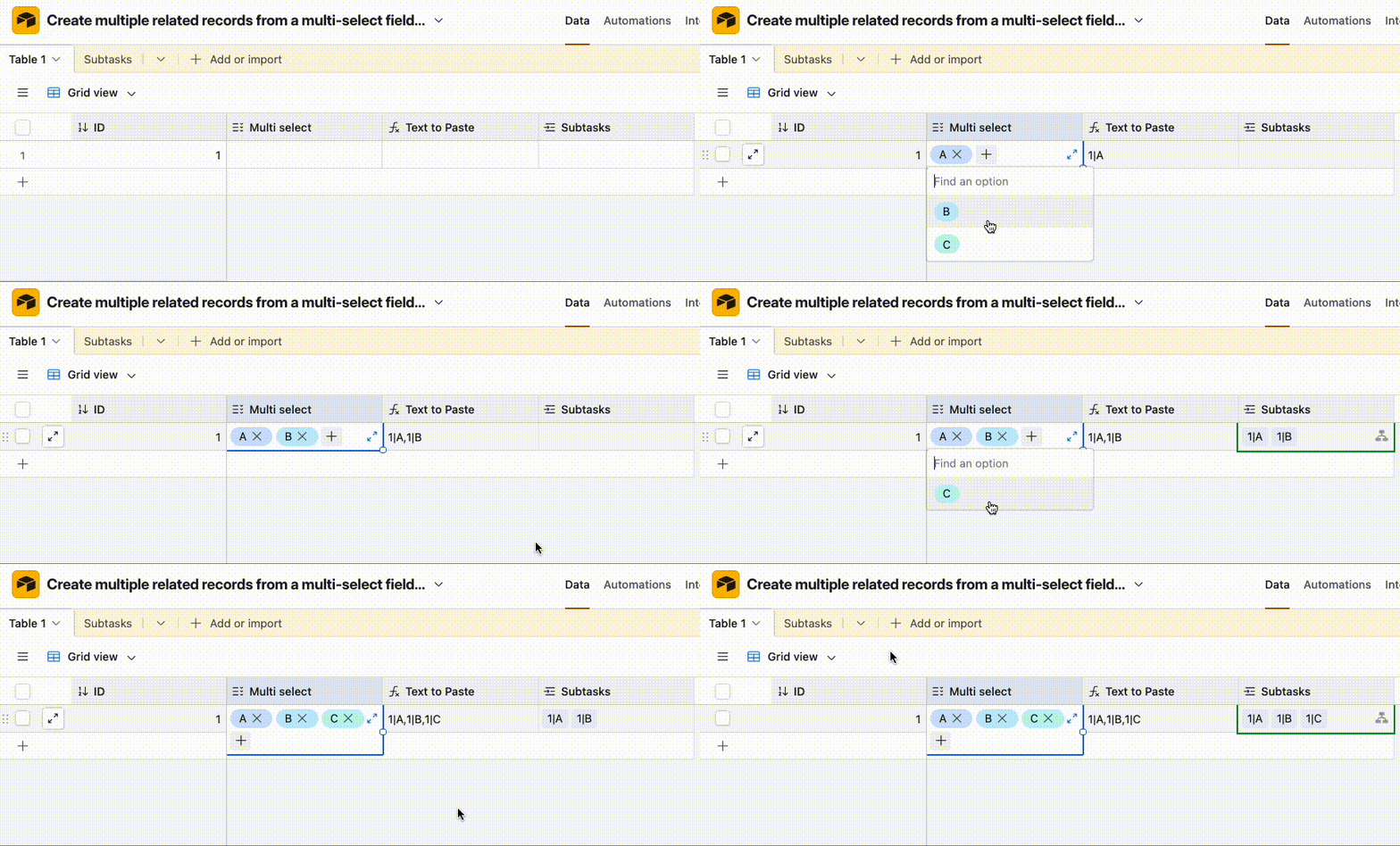
The workaround I like to use for this involves a formula field that outputs a unique ID per record I want to create, and then we get the automation to paste those unique IDs into the linked field to the other table, which forces the record creation for us

I’ve set it up here for you to check out!

IF(
AND({ID}, {Multi select}),
{ID} & "|" &
SUBSTITUTE(
{Multi select},
", ",
"," & {ID} & "|"
)
)


2 replies

TheTimeSavingCo
Forum|alt.badge.img+31

Hm yeah that’s because automations only run the first conditional, and so what’s happening is:

  1. Record updated with A
  2. Automation triggers, meets the condition of the multi select field containing A, and so creates a record for A
  3. Record updated with B, multi select field now has A and B
  4. Automation triggers, meets the condition of the multi select field containing A, and so creates a record for A

The workaround I like to use for this involves a formula field that outputs a unique ID per record I want to create, and then we get the automation to paste those unique IDs into the linked field to the other table, which forces the record creation for us

I’ve set it up here for you to check out!

IF(
AND({ID}, {Multi select}),
{ID} & "|" &
SUBSTITUTE(
{Multi select},
", ",
"," & {ID} & "|"
)
)


Forum|alt.badge.img+1
  • Author
  • New Participant
  • January 8, 2026

Thank you so much
