Question

Creating a signable form

  • December 9, 2025
  • 12 replies
  • 71 views

Barry_Seidensta
Forum|alt.badge.img+7

I want to create a signable form using some fields from my base. I want to insert an image at the top of the form, then a bunch of text from a .doc, then the signature field. How do I do that and what level of subscriptin do I need. I’m currently on free. This form will be sent to 28 unique email addresses.

12 replies

ScottWorld
Forum|alt.badge.img+35
  • Genius
  • December 9, 2025

That isn’t possible with Airtable on its own, but you can very easily do that with Fillout’s advanced forms for Airtable.

I demonstrate how to do that on this Airtable podcast episode:

Fillout also offers hundreds of other features that Airtable’s native forms don’t offer, including the ability to update Airtable records using a formaccept payments on forms, and much more.

If you need something more advanced that what Fillout offers, then you would need to integrate an external eSignature platform such as eSignatures.com and then automate the entire process by using Make’s advanced automations & integrations.

If you’ve never used Make before, I’ve assembled a bunch of Make training resources in this thread. For example, here is one of the ways that you can instantly trigger a Make automation from Airtable

Hope this helps!

If you’d like to hire the best Airtable consultant to help you with anything Airtable-related, please feel free to contact me through my website: Airtable consultant — ScottWorld


Mike_AutomaticN
Forum|alt.badge.img+28

Hey ​@Barry_Seidensta,


Airtable native forms do not have such features. You’ll be able to achieve everything mentioned using Fillout Forms which have a direct and easy integration with Airtable. You can even generate PDFs and push them to Airtable :D 


Mike, Consultant @ Automatic Nation


MatteoCrOps
Forum|alt.badge.img+3
  • Participating Frequently
  • December 9, 2025

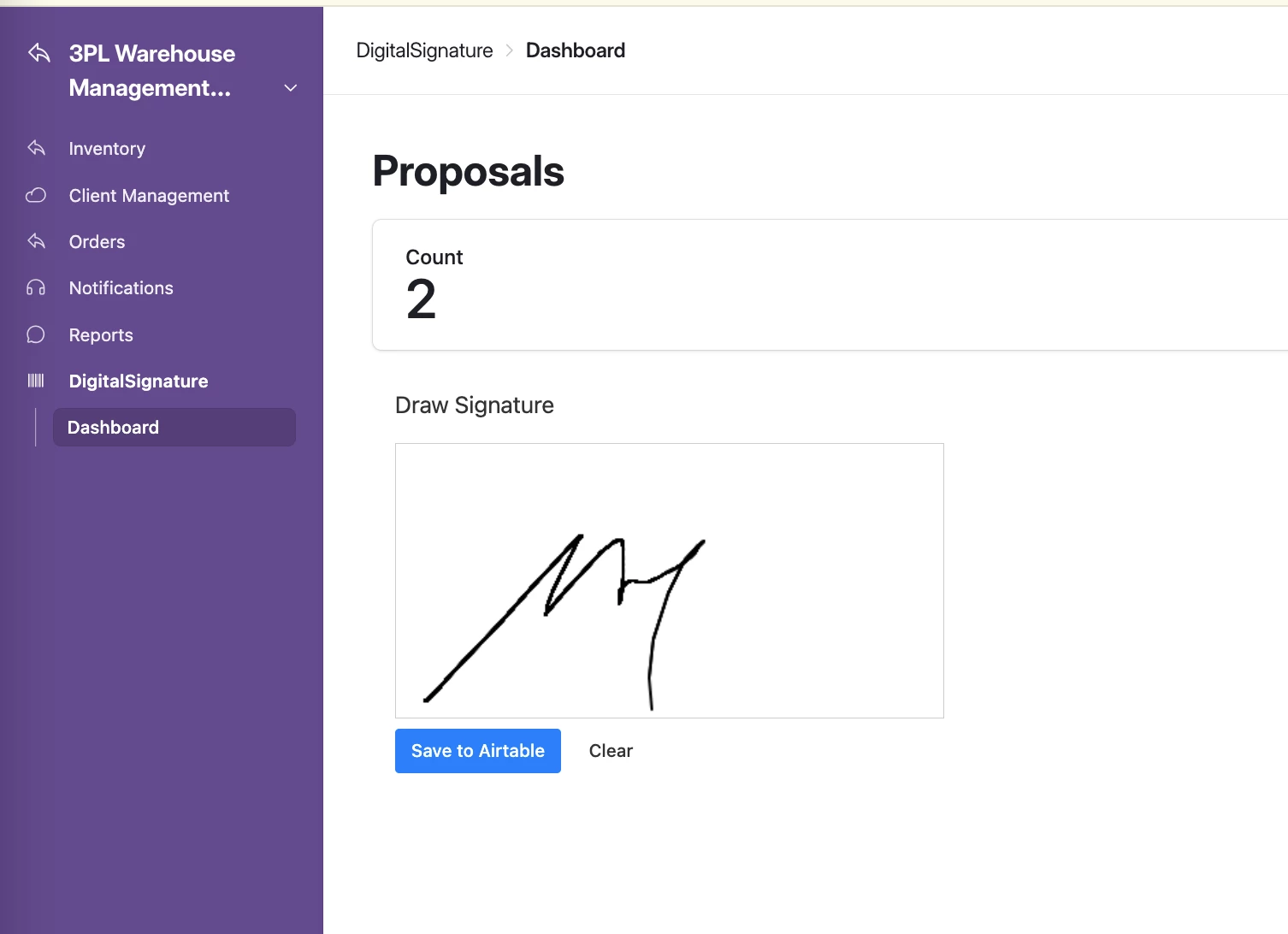
Hey ​@Barry_Seidensta. No need to go outside Airtable for this one and pay for Fillout. This is possible within Airtable Interfaces SDK

You can actually ask OMNI to code this and refine with minimal REACT familiarity.

In my use case, I expose this interface to clients via Airtable Portals where they can view, review, and sign a business proposal.

Happy to chat – Matteo

www.crops-ag.com


Barry_Seidensta
Forum|alt.badge.img+7
  • Author
  • Participating Frequently
  • December 9, 2025

Hi ​@ScottWorld  - I just watched the video. Question - I already have the base made with 28 speakers names, presentation title and type of presentation format. I want to bring this unique filed data/presenter data over into the form as I send to each of the 28 presenters. I want to only collect from each presenter their microphone type (single select in AT) and their signature. Can formfiller do that?  


Barry_Seidensta
Forum|alt.badge.img+7
  • Author
  • Participating Frequently
  • December 9, 2025

@MatteoCrOps  As I’m a pretty basic user, I have no idea what “OMNI to code this and refine with minimal REACT familiarity,” is.


MatteoCrOps
Forum|alt.badge.img+3
  • Participating Frequently
  • December 9, 2025

@Barry_Seidensta OMNI is Airtable’s AI assistant. You could ask it to do many things, including coding a custom interface.


Barry_Seidensta
Forum|alt.badge.img+7
  • Author
  • Participating Frequently
  • December 9, 2025

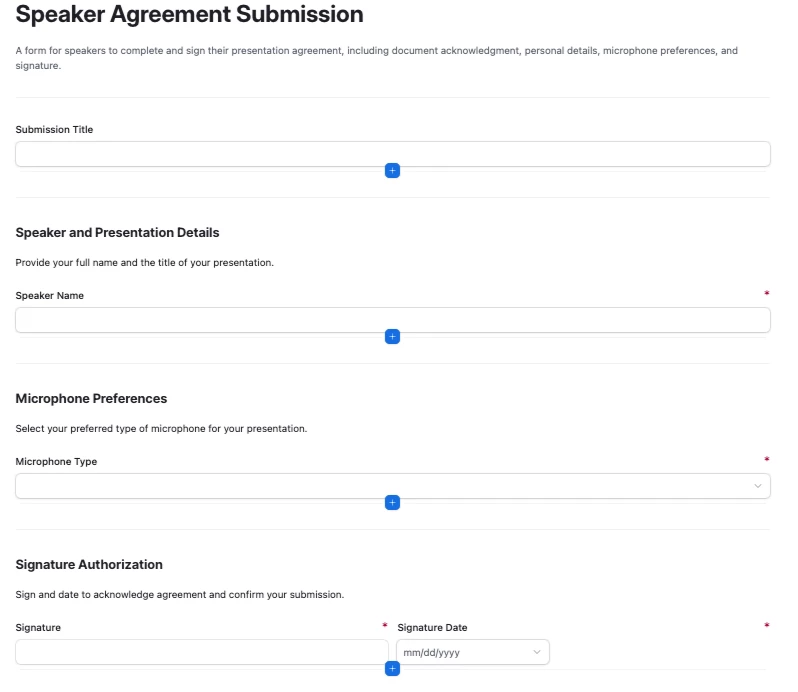
@MatteoCrOps can the interface include my .doc text. Here’s what I asked: Create an interface that is a signable document. I have 200 lines of text. The interface will include the speaker's name and their presentation title. It will ask what type of microphone they want to use. They will sign and date it.

I added this to the request: Currently in what you recommended, the speaker has to fill in their name and submission title. I already have this information in my base. When I send it to the speaker, I want those two fields to be already filled in.

I got this back: Unable to determine the intent of your request. Please try rephrasing your request.

And it doesn’t know how to include my .doc text.


MatteoCrOps
Forum|alt.badge.img+3
  • Participating Frequently
  • December 9, 2025

@Barry_Seidensta , well AI isn’t perfect otherwise we’d all be fishing 🎣

That’s actually a pretty good start. The problem is that what you’re trying to do (expose current data to  specific users) shouldn’t be accomplished via a form.

However, since you’re trying to augment information on known records (speakers), there are workarounds. You could send each user a form with the simple microphone request, and signature and require the user to be logged in (it’s a setting in the form). That means each form submission will be tied to a user and an email – provided you have the speaker email already in the base you’ll be able to create an automation to match the two records together (speaker and submission) and update the info.


HannesK-ME
Forum|alt.badge.img+13
  • Participating Frequently
  • December 9, 2025

Hey ​@Barry_Seidensta! As others have already mentioned, Airtable’s built-in form doesn’t have that functionality, but definitely have a look at the miniExtensions Form for this. It is the most advanced form for Airtable and, among countless other features, also provides signature functionality (typed, hand drawn, or uploaded from an image) where the signature is then saved as an image in an attachment field. There are lots of other features to discover as well


If you want something simpler, or if you’ve already sent out links to your Airtable form to anybody, you could also check out our automation to add a signature to an existing Airtable form! This creates a second step for your Airtable form where the signature is added to the record after the main form has been submitted.


Barry_Seidensta
Forum|alt.badge.img+7
  • Author
  • Participating Frequently
  • December 9, 2025

@ScottWorld I was able to create a form. However, I can’t seem to figure out how to make it customized for each presenter. I want to import the presenter’s name and session title from my existing base and then send each presenter a unique link to sign.

And maybe this is not the tool for that.

https://forms.fillout.com/t/94G7L3q8xjus


ScottWorld
Forum|alt.badge.img+35
  • Genius
  • December 9, 2025

@Barry_Seidensta 

There are many different ways to prefill a Fillout form, but for your needs, you will probably be best served by using URL parameters. Click on that link to be taken to the instructions for this.

If you want to add more security to your form, you could also create a login page for your form and then prefill the data based on who has logged in.

Hope this helps! If you have a budget and you’d like to hire the best Airtable consultant to help you with this or anything else that is Airtable-related, please feel free to contact me through my website: Airtable consultant — ScottWorld


MargeM
Forum|alt.badge.img+4
  • Known Participant
  • December 10, 2025

Hello ​@Barry_Seidensta,


You can do all that with Plumsail Forms

Add Image, text and Ink Sketch to collect signatures. 

I want to import the presenter’s name and session title from my existing base and then send each presenter a unique link to sign.

If you already have all the speakers in your base and want to complete their records with the microphone type, you can send them a link to edit their existing record.

You only need the URL link to that specific record. Add a formula column to build this link for you.Learn more in Edit Airtable records with Plumsail Forms

You can send the links in bulk (see this post) or send manually.

You can DM me and I can help with the form set up.